Cluster degraded after adding OSDs to increase capacity
My 3-node Ceph cluster (14.2.4) has been running fine for months. However, my data pool became close to full a couple of weeks ago, so I added 12 new OSDs, roughly doubling the capacity of the cluster. However, the pool size has not changed, and the health of the cluster has changed for the worse. The dashboard shows the following cluster status: - PG_DEGRADED_FULL: Degraded data redundancy (low space): 2 pgs backfill_toofull - POOL_NEARFULL: 6 pool(s) nearfull - OSD_NEARFULL: 1 nearfull osd(s) Output from ceph -s: cluster: id: e5a47160-a302-462a-8fa4-1e533e1edd4e health: HEALTH_ERR 1 nearfull osd(s) 6 pool(s) nearfull Degraded data redundancy (low space): 2 pgs backfill_toofull services: mon: 3 daemons, quorum ceph01,ceph02,ceph03 (age 5w) mgr: ceph01(active, since 4w), standbys: ceph03, ceph02 mds: cephfs:1 {0=ceph01=up:active} 2 up:standby osd: 33 osds: 33 up (since 43h), 33 in (since 43h); 1094 remapped pgs rgw: 3 daemons active (ceph01, ceph02, ceph03) data: pools: 6 pools, 1632 pgs objects: 134.50M objects, 7.8 TiB usage: 42 TiB used, 81 TiB / 123 TiB avail pgs: 213786007/403501920 objects misplaced (52.983%) 1088 active+remapped+backfill_wait 538 active+clean 4 active+remapped+backfilling 2 active+remapped+backfill_wait+backfill_toofull io: recovery: 477 KiB/s, 330 keys/s, 29 objects/s Can someone steer me in the right direction for how to get my cluster healthy again? Thanks in advance! -Dallas
Hi, are the new OSDs in the same root and is it the same device class? Can you share the output of ‚ceph osd df tree‘? Zitat von Dallas Jones <djones@tech4learning.com>:
My 3-node Ceph cluster (14.2.4) has been running fine for months. However, my data pool became close to full a couple of weeks ago, so I added 12 new OSDs, roughly doubling the capacity of the cluster. However, the pool size has not changed, and the health of the cluster has changed for the worse. The dashboard shows the following cluster status:
- PG_DEGRADED_FULL: Degraded data redundancy (low space): 2 pgs backfill_toofull - POOL_NEARFULL: 6 pool(s) nearfull - OSD_NEARFULL: 1 nearfull osd(s)
Output from ceph -s:
cluster: id: e5a47160-a302-462a-8fa4-1e533e1edd4e health: HEALTH_ERR 1 nearfull osd(s) 6 pool(s) nearfull Degraded data redundancy (low space): 2 pgs backfill_toofull
services: mon: 3 daemons, quorum ceph01,ceph02,ceph03 (age 5w) mgr: ceph01(active, since 4w), standbys: ceph03, ceph02 mds: cephfs:1 {0=ceph01=up:active} 2 up:standby osd: 33 osds: 33 up (since 43h), 33 in (since 43h); 1094 remapped pgs rgw: 3 daemons active (ceph01, ceph02, ceph03)
data: pools: 6 pools, 1632 pgs objects: 134.50M objects, 7.8 TiB usage: 42 TiB used, 81 TiB / 123 TiB avail pgs: 213786007/403501920 objects misplaced (52.983%) 1088 active+remapped+backfill_wait 538 active+clean 4 active+remapped+backfilling 2 active+remapped+backfill_wait+backfill_toofull
io: recovery: 477 KiB/s, 330 keys/s, 29 objects/s
Can someone steer me in the right direction for how to get my cluster healthy again?
Thanks in advance!
-Dallas _______________________________________________ ceph-users mailing list -- ceph-users@ceph.io To unsubscribe send an email to ceph-users-leave@ceph.io
The new drives are larger capacity than the first drives I added to the cluster, but they're all SAS HDDs. cephuser@ceph01:~$ ceph osd df tree ID CLASS WEIGHT REWEIGHT SIZE RAW USE DATA OMAP META AVAIL %USE VAR PGS STATUS TYPE NAME -1 122.79410 - 123 TiB 42 TiB 41 TiB 217 GiB 466 GiB 81 TiB 33.86 1.00 - root default -3 40.93137 - 41 TiB 14 TiB 14 TiB 72 GiB 154 GiB 27 TiB 33.86 1.00 - host ceph01 0 hdd 2.72849 0.95001 2.7 TiB 2.2 TiB 2.1 TiB 7.4 GiB 24 GiB 569 GiB 79.64 2.35 218 up osd.0 1 hdd 2.72849 1.00000 2.7 TiB 2.1 TiB 2.0 TiB 7.6 GiB 23 GiB 694 GiB 75.16 2.22 196 up osd.1 2 hdd 2.72849 1.00000 2.7 TiB 1.6 TiB 1.6 TiB 8.8 GiB 18 GiB 1.1 TiB 60.39 1.78 199 up osd.2 3 hdd 2.72849 0.95001 2.7 TiB 2.2 TiB 2.1 TiB 8.3 GiB 23 GiB 583 GiB 79.13 2.34 202 up osd.3 4 hdd 2.72849 1.00000 2.7 TiB 2.1 TiB 2.0 TiB 8.4 GiB 22 GiB 692 GiB 75.22 2.22 214 up osd.4 5 hdd 2.72849 1.00000 2.7 TiB 1.7 TiB 1.7 TiB 8.5 GiB 19 GiB 1.0 TiB 62.39 1.84 195 up osd.5 6 hdd 2.72849 1.00000 2.7 TiB 2.0 TiB 2.0 TiB 8.5 GiB 21 GiB 709 GiB 74.62 2.20 217 up osd.6 22 hdd 5.45799 1.00000 5.5 TiB 4.2 GiB 165 MiB 2.0 GiB 2.1 GiB 5.5 TiB 0.08 0.00 23 up osd.22 23 hdd 5.45799 1.00000 5.5 TiB 2.7 GiB 161 MiB 1.5 GiB 1.0 GiB 5.5 TiB 0.05 0.00 23 up osd.23 27 hdd 5.45799 1.00000 5.5 TiB 23 GiB 17 GiB 5.0 GiB 1.3 GiB 5.4 TiB 0.42 0.01 63 up osd.27 28 hdd 5.45799 1.00000 5.5 TiB 10 GiB 2.8 GiB 6.0 GiB 1.3 GiB 5.4 TiB 0.18 0.01 82 up osd.28 -5 40.93137 - 41 TiB 14 TiB 14 TiB 71 GiB 157 GiB 27 TiB 33.89 1.00 - host ceph02 7 hdd 2.72849 1.00000 2.7 TiB 2.1 TiB 2.1 TiB 9.6 GiB 23 GiB 652 GiB 76.66 2.26 221 up osd.7 8 hdd 2.72849 0.95001 2.7 TiB 2.4 TiB 2.4 TiB 7.6 GiB 26 GiB 308 GiB 88.98 2.63 220 up osd.8 9 hdd 2.72849 1.00000 2.7 TiB 2.1 TiB 2.0 TiB 8.5 GiB 23 GiB 679 GiB 75.71 2.24 214 up osd.9 10 hdd 2.72849 1.00000 2.7 TiB 2.0 TiB 1.9 TiB 7.5 GiB 21 GiB 777 GiB 72.18 2.13 208 up osd.10 11 hdd 2.72849 1.00000 2.7 TiB 2.0 TiB 2.0 TiB 6.1 GiB 22 GiB 752 GiB 73.10 2.16 191 up osd.11 12 hdd 2.72849 1.00000 2.7 TiB 1.5 TiB 1.5 TiB 9.1 GiB 18 GiB 1.2 TiB 56.45 1.67 188 up osd.12 13 hdd 2.72849 1.00000 2.7 TiB 1.7 TiB 1.7 TiB 7.9 GiB 19 GiB 1024 GiB 63.37 1.87 193 up osd.13 25 hdd 5.45799 1.00000 5.5 TiB 4.9 GiB 165 MiB 3.7 GiB 1.0 GiB 5.5 TiB 0.09 0.00 42 up osd.25 26 hdd 5.45799 1.00000 5.5 TiB 2.9 GiB 157 MiB 1.6 GiB 1.2 GiB 5.5 TiB 0.05 0.00 26 up osd.26 29 hdd 5.45799 1.00000 5.5 TiB 24 GiB 18 GiB 4.2 GiB 1.2 GiB 5.4 TiB 0.43 0.01 58 up osd.29 30 hdd 5.45799 1.00000 5.5 TiB 21 GiB 14 GiB 5.6 GiB 1.3 GiB 5.4 TiB 0.38 0.01 71 up osd.30 -7 40.93137 - 41 TiB 14 TiB 14 TiB 73 GiB 156 GiB 27 TiB 33.83 1.00 - host ceph03 14 hdd 2.72849 1.00000 2.7 TiB 2.1 TiB 2.1 TiB 6.9 GiB 23 GiB 627 GiB 77.56 2.29 205 up osd.14 15 hdd 2.72849 1.00000 2.7 TiB 2.0 TiB 1.9 TiB 6.8 GiB 21 GiB 793 GiB 71.62 2.12 189 up osd.15 16 hdd 2.72849 1.00000 2.7 TiB 1.9 TiB 1.9 TiB 8.7 GiB 21 GiB 813 GiB 70.89 2.09 209 up osd.16 17 hdd 2.72849 1.00000 2.7 TiB 2.1 TiB 2.1 TiB 8.6 GiB 23 GiB 609 GiB 78.19 2.31 216 up osd.17 18 hdd 2.72849 1.00000 2.7 TiB 1.7 TiB 1.7 TiB 9.1 GiB 19 GiB 1.0 TiB 62.40 1.84 209 up osd.18 19 hdd 2.72849 0.95001 2.7 TiB 2.2 TiB 2.2 TiB 9.1 GiB 24 GiB 541 GiB 80.65 2.38 210 up osd.19 20 hdd 2.72849 1.00000 2.7 TiB 1.8 TiB 1.8 TiB 8.4 GiB 19 GiB 969 GiB 65.32 1.93 200 up osd.20 21 hdd 5.45799 1.00000 5.5 TiB 3.7 GiB 161 MiB 2.2 GiB 1.3 GiB 5.5 TiB 0.07 0.00 28 up osd.21 24 hdd 5.45799 1.00000 5.5 TiB 4.9 GiB 177 MiB 3.6 GiB 1.1 GiB 5.5 TiB 0.09 0.00 37 up osd.24 31 hdd 5.45799 1.00000 5.5 TiB 8.9 GiB 2.7 GiB 5.0 GiB 1.2 GiB 5.4 TiB 0.16 0.00 59 up osd.31 32 hdd 5.45799 1.00000 5.5 TiB 6.0 GiB 182 MiB 4.7 GiB 1.1 GiB 5.5 TiB 0.11 0.00 70 up osd.32 TOTAL 123 TiB 42 TiB 41 TiB 217 GiB 466 GiB 81 TiB 33.86 MIN/MAX VAR: 0.00/2.63 STDDEV: 37.27 On Thu, Aug 27, 2020 at 8:43 AM Eugen Block <eblock@nde.ag> wrote:
Hi,
are the new OSDs in the same root and is it the same device class? Can you share the output of ‚ceph osd df tree‘?
Zitat von Dallas Jones <djones@tech4learning.com>:
My 3-node Ceph cluster (14.2.4) has been running fine for months. However, my data pool became close to full a couple of weeks ago, so I added 12 new OSDs, roughly doubling the capacity of the cluster. However, the pool size has not changed, and the health of the cluster has changed for the worse. The dashboard shows the following cluster status:
- PG_DEGRADED_FULL: Degraded data redundancy (low space): 2 pgs backfill_toofull - POOL_NEARFULL: 6 pool(s) nearfull - OSD_NEARFULL: 1 nearfull osd(s)
Output from ceph -s:
cluster: id: e5a47160-a302-462a-8fa4-1e533e1edd4e health: HEALTH_ERR 1 nearfull osd(s) 6 pool(s) nearfull Degraded data redundancy (low space): 2 pgs backfill_toofull
services: mon: 3 daemons, quorum ceph01,ceph02,ceph03 (age 5w) mgr: ceph01(active, since 4w), standbys: ceph03, ceph02 mds: cephfs:1 {0=ceph01=up:active} 2 up:standby osd: 33 osds: 33 up (since 43h), 33 in (since 43h); 1094 remapped pgs rgw: 3 daemons active (ceph01, ceph02, ceph03)
data: pools: 6 pools, 1632 pgs objects: 134.50M objects, 7.8 TiB usage: 42 TiB used, 81 TiB / 123 TiB avail pgs: 213786007/403501920 objects misplaced (52.983%) 1088 active+remapped+backfill_wait 538 active+clean 4 active+remapped+backfilling 2 active+remapped+backfill_wait+backfill_toofull
io: recovery: 477 KiB/s, 330 keys/s, 29 objects/s
Can someone steer me in the right direction for how to get my cluster healthy again?
Thanks in advance!
-Dallas _______________________________________________ ceph-users mailing list -- ceph-users@ceph.io To unsubscribe send an email to ceph-users-leave@ceph.io
Is your MUA wrapping lines, or is the list software? As predicted. Look at the VAR column and the STDDEV of 37.27
On Aug 27, 2020, at 9:02 AM, Dallas Jones <djones@tech4learning.com> wrote:
1 122.79410 - 123 TiB 42 TiB 41 TiB 217 GiB 466 GiB 81 TiB 33.86 1.00 - root default -3 40.93137 - 41 TiB 14 TiB 14 TiB 72 GiB 154 GiB 27 TiB 33.86 1.00 - host ceph01 0 hdd 2.72849 0.95001 2.7 TiB 2.2 TiB 2.1 TiB 7.4 GiB 24 GiB 569 GiB 79.64 2.35 218 up osd.0 1 hdd 2.72849 1.00000 2.7 TiB 2.1 TiB 2.0 TiB 7.6 GiB 23 GiB 694 GiB 75.16 2.22 196 up osd.1 2 hdd 2.72849 1.00000 2.7 TiB 1.6 TiB 1.6 TiB 8.8 GiB 18 GiB 1.1 TiB 60.39 1.78 199 up osd.2 3 hdd 2.72849 0.95001 2.7 TiB 2.2 TiB 2.1 TiB 8.3 GiB 23 GiB 583 GiB 79.13 2.34 202 up osd.3 4 hdd 2.72849 1.00000 2.7 TiB 2.1 TiB 2.0 TiB 8.4 GiB 22 GiB 692 GiB 75.22 2.22 214 up osd.4 5 hdd 2.72849 1.00000 2.7 TiB 1.7 TiB 1.7 TiB 8.5 GiB 19 GiB 1.0 TiB 62.39 1.84 195 up osd.5 6 hdd 2.72849 1.00000 2.7 TiB 2.0 TiB 2.0 TiB 8.5 GiB 21 GiB 709 GiB 74.62 2.20 217 up osd.6 22 hdd 5.45799 1.00000 5.5 TiB 4.2 GiB 165 MiB 2.0 GiB 2.1 GiB 5.5 TiB 0.08 0.00 23 up osd.22 23 hdd 5.45799 1.00000 5.5 TiB 2.7 GiB 161 MiB 1.5 GiB 1.0 GiB 5.5 TiB 0.05 0.00 23 up osd.23 27 hdd 5.45799 1.00000 5.5 TiB 23 GiB 17 GiB 5.0 GiB 1.3 GiB 5.4 TiB 0.42 0.01 63 up osd.27 28 hdd 5.45799 1.00000 5.5 TiB 10 GiB 2.8 GiB 6.0 GiB 1.3 GiB 5.4 TiB 0.18 0.01 82 up osd.28 -5 40.93137 - 41 TiB 14 TiB 14 TiB 71 GiB 157 GiB 27 TiB 33.89 1.00 - host ceph02 7 hdd 2.72849 1.00000 2.7 TiB 2.1 TiB 2.1 TiB 9.6 GiB 23 GiB 652 GiB 76.66 2.26 221 up osd.7 8 hdd 2.72849 0.95001 2.7 TiB 2.4 TiB 2.4 TiB 7.6 GiB 26 GiB 308 GiB 88.98 2.63 220 up osd.8 9 hdd 2.72849 1.00000 2.7 TiB 2.1 TiB 2.0 TiB 8.5 GiB 23 GiB 679 GiB 75.71 2.24 214 up osd.9 10 hdd 2.72849 1.00000 2.7 TiB 2.0 TiB 1.9 TiB 7.5 GiB 21 GiB 777 GiB 72.18 2.13 208 up osd.10 11 hdd 2.72849 1.00000 2.7 TiB 2.0 TiB 2.0 TiB 6.1 GiB 22 GiB 752 GiB 73.10 2.16 191 up osd.11 12 hdd 2.72849 1.00000 2.7 TiB 1.5 TiB 1.5 TiB 9.1 GiB 18 GiB 1.2 TiB 56.45 1.67 188 up osd.12 13 hdd 2.72849 1.00000 2.7 TiB 1.7 TiB 1.7 TiB 7.9 GiB 19 GiB 1024 GiB 63.37 1.87 193 up osd.13 25 hdd 5.45799 1.00000 5.5 TiB 4.9 GiB 165 MiB 3.7 GiB 1.0 GiB 5.5 TiB 0.09 0.00 42 up osd.25 26 hdd 5.45799 1.00000 5.5 TiB 2.9 GiB 157 MiB 1.6 GiB 1.2 GiB 5.5 TiB 0.05 0.00 26 up osd.26 29 hdd 5.45799 1.00000 5.5 TiB 24 GiB 18 GiB 4.2 GiB 1.2 GiB 5.4 TiB 0.43 0.01 58 up osd.29 30 hdd 5.45799 1.00000 5.5 TiB 21 GiB 14 GiB 5.6 GiB 1.3 GiB 5.4 TiB 0.38 0.01 71 up osd.30 -7 40.93137 - 41 TiB 14 TiB 14 TiB 73 GiB 156 GiB 27 TiB 33.83 1.00 - host ceph03 14 hdd 2.72849 1.00000 2.7 TiB 2.1 TiB 2.1 TiB 6.9 GiB 23 GiB 627 GiB 77.56 2.29 205 up osd.14 15 hdd 2.72849 1.00000 2.7 TiB 2.0 TiB 1.9 TiB 6.8 GiB 21 GiB 793 GiB 71.62 2.12 189 up osd.15 16 hdd 2.72849 1.00000 2.7 TiB 1.9 TiB 1.9 TiB 8.7 GiB 21 GiB 813 GiB 70.89 2.09 209 up osd.16 17 hdd 2.72849 1.00000 2.7 TiB 2.1 TiB 2.1 TiB 8.6 GiB 23 GiB 609 GiB 78.19 2.31 216 up osd.17 18 hdd 2.72849 1.00000 2.7 TiB 1.7 TiB 1.7 TiB 9.1 GiB 19 GiB 1.0 TiB 62.40 1.84 209 up osd.18 19 hdd 2.72849 0.95001 2.7 TiB 2.2 TiB 2.2 TiB 9.1 GiB 24 GiB 541 GiB 80.65 2.38 210 up osd.19 20 hdd 2.72849 1.00000 2.7 TiB 1.8 TiB 1.8 TiB 8.4 GiB 19 GiB 969 GiB 65.32 1.93 200 up osd.20 21 hdd 5.45799 1.00000 5.5 TiB 3.7 GiB 161 MiB 2.2 GiB 1.3 GiB 5.5 TiB 0.07 0.00 28 up osd.21 24 hdd 5.45799 1.00000 5.5 TiB 4.9 GiB 177 MiB 3.6 GiB 1.1 GiB 5.5 TiB 0.09 0.00 37 up osd.24 31 hdd 5.45799 1.00000 5.5 TiB 8.9 GiB 2.7 GiB 5.0 GiB 1.2 GiB 5.4 TiB 0.16 0.00 59 up osd.31 32 hdd 5.45799 1.00000 5.5 TiB 6.0 GiB 182 MiB 4.7 GiB 1.1 GiB 5.5 TiB 0.11 0.00 70 up osd.32 TOTAL 123 TiB 42 TiB 41 TiB 217 GiB 466 GiB 81
Dallas; It looks to me like you will need to wait until data movement naturally resolves the near-full issue. So long as you continue to have this: io: recovery: 477 KiB/s, 330 keys/s, 29 objects/s the cluster is working. That said, there are some things you can do. 1) The near-full ratio is configurable. I don't have those commands immediately to hand, but Googling, or searching archives of this list should show you have to change this value from its default of 80%. Make sure you set it back when the data movement is complete, or almost complete. You need to be careful with this, as ceph will happily run up to the new near-full ratio, and error again. You also need to keep track of the other full ratios (I believe there are 2 others). 2) Adjust performance settings to allow the data movement to go faster. Again, I don't have those setting immediately to hand, but Googling something like 'ceph recovery tuning,' or searching this list, should point you in the right direction. Notice that you only have 6 PGs trying to move at a time, with 2 blocked on your near-full OSDs (8 & 19). I believe; by default, each OSD daemon is only involved in 1 data movement at a time. The tradeoff here is user activity suffers if you adjust to favor recovery, however, with the cluster in ERROR status, I suspect user activity is already suffering. Thank you, Dominic L. Hilsbos, MBA Director – Information Technology Perform Air International Inc. DHilsbos@PerformAir.com www.PerformAir.com -----Original Message----- From: Dallas Jones [mailto:djones@tech4learning.com] Sent: Thursday, August 27, 2020 9:02 AM To: ceph-users@ceph.io Subject: [ceph-users] Re: Cluster degraded after adding OSDs to increase capacity The new drives are larger capacity than the first drives I added to the cluster, but they're all SAS HDDs. cephuser@ceph01:~$ ceph osd df tree ID CLASS WEIGHT REWEIGHT SIZE RAW USE DATA OMAP META AVAIL %USE VAR PGS STATUS TYPE NAME -1 122.79410 - 123 TiB 42 TiB 41 TiB 217 GiB 466 GiB 81 TiB 33.86 1.00 - root default -3 40.93137 - 41 TiB 14 TiB 14 TiB 72 GiB 154 GiB 27 TiB 33.86 1.00 - host ceph01 0 hdd 2.72849 0.95001 2.7 TiB 2.2 TiB 2.1 TiB 7.4 GiB 24 GiB 569 GiB 79.64 2.35 218 up osd.0 1 hdd 2.72849 1.00000 2.7 TiB 2.1 TiB 2.0 TiB 7.6 GiB 23 GiB 694 GiB 75.16 2.22 196 up osd.1 2 hdd 2.72849 1.00000 2.7 TiB 1.6 TiB 1.6 TiB 8.8 GiB 18 GiB 1.1 TiB 60.39 1.78 199 up osd.2 3 hdd 2.72849 0.95001 2.7 TiB 2.2 TiB 2.1 TiB 8.3 GiB 23 GiB 583 GiB 79.13 2.34 202 up osd.3 4 hdd 2.72849 1.00000 2.7 TiB 2.1 TiB 2.0 TiB 8.4 GiB 22 GiB 692 GiB 75.22 2.22 214 up osd.4 5 hdd 2.72849 1.00000 2.7 TiB 1.7 TiB 1.7 TiB 8.5 GiB 19 GiB 1.0 TiB 62.39 1.84 195 up osd.5 6 hdd 2.72849 1.00000 2.7 TiB 2.0 TiB 2.0 TiB 8.5 GiB 21 GiB 709 GiB 74.62 2.20 217 up osd.6 22 hdd 5.45799 1.00000 5.5 TiB 4.2 GiB 165 MiB 2.0 GiB 2.1 GiB 5.5 TiB 0.08 0.00 23 up osd.22 23 hdd 5.45799 1.00000 5.5 TiB 2.7 GiB 161 MiB 1.5 GiB 1.0 GiB 5.5 TiB 0.05 0.00 23 up osd.23 27 hdd 5.45799 1.00000 5.5 TiB 23 GiB 17 GiB 5.0 GiB 1.3 GiB 5.4 TiB 0.42 0.01 63 up osd.27 28 hdd 5.45799 1.00000 5.5 TiB 10 GiB 2.8 GiB 6.0 GiB 1.3 GiB 5.4 TiB 0.18 0.01 82 up osd.28 -5 40.93137 - 41 TiB 14 TiB 14 TiB 71 GiB 157 GiB 27 TiB 33.89 1.00 - host ceph02 7 hdd 2.72849 1.00000 2.7 TiB 2.1 TiB 2.1 TiB 9.6 GiB 23 GiB 652 GiB 76.66 2.26 221 up osd.7 8 hdd 2.72849 0.95001 2.7 TiB 2.4 TiB 2.4 TiB 7.6 GiB 26 GiB 308 GiB 88.98 2.63 220 up osd.8 9 hdd 2.72849 1.00000 2.7 TiB 2.1 TiB 2.0 TiB 8.5 GiB 23 GiB 679 GiB 75.71 2.24 214 up osd.9 10 hdd 2.72849 1.00000 2.7 TiB 2.0 TiB 1.9 TiB 7.5 GiB 21 GiB 777 GiB 72.18 2.13 208 up osd.10 11 hdd 2.72849 1.00000 2.7 TiB 2.0 TiB 2.0 TiB 6.1 GiB 22 GiB 752 GiB 73.10 2.16 191 up osd.11 12 hdd 2.72849 1.00000 2.7 TiB 1.5 TiB 1.5 TiB 9.1 GiB 18 GiB 1.2 TiB 56.45 1.67 188 up osd.12 13 hdd 2.72849 1.00000 2.7 TiB 1.7 TiB 1.7 TiB 7.9 GiB 19 GiB 1024 GiB 63.37 1.87 193 up osd.13 25 hdd 5.45799 1.00000 5.5 TiB 4.9 GiB 165 MiB 3.7 GiB 1.0 GiB 5.5 TiB 0.09 0.00 42 up osd.25 26 hdd 5.45799 1.00000 5.5 TiB 2.9 GiB 157 MiB 1.6 GiB 1.2 GiB 5.5 TiB 0.05 0.00 26 up osd.26 29 hdd 5.45799 1.00000 5.5 TiB 24 GiB 18 GiB 4.2 GiB 1.2 GiB 5.4 TiB 0.43 0.01 58 up osd.29 30 hdd 5.45799 1.00000 5.5 TiB 21 GiB 14 GiB 5.6 GiB 1.3 GiB 5.4 TiB 0.38 0.01 71 up osd.30 -7 40.93137 - 41 TiB 14 TiB 14 TiB 73 GiB 156 GiB 27 TiB 33.83 1.00 - host ceph03 14 hdd 2.72849 1.00000 2.7 TiB 2.1 TiB 2.1 TiB 6.9 GiB 23 GiB 627 GiB 77.56 2.29 205 up osd.14 15 hdd 2.72849 1.00000 2.7 TiB 2.0 TiB 1.9 TiB 6.8 GiB 21 GiB 793 GiB 71.62 2.12 189 up osd.15 16 hdd 2.72849 1.00000 2.7 TiB 1.9 TiB 1.9 TiB 8.7 GiB 21 GiB 813 GiB 70.89 2.09 209 up osd.16 17 hdd 2.72849 1.00000 2.7 TiB 2.1 TiB 2.1 TiB 8.6 GiB 23 GiB 609 GiB 78.19 2.31 216 up osd.17 18 hdd 2.72849 1.00000 2.7 TiB 1.7 TiB 1.7 TiB 9.1 GiB 19 GiB 1.0 TiB 62.40 1.84 209 up osd.18 19 hdd 2.72849 0.95001 2.7 TiB 2.2 TiB 2.2 TiB 9.1 GiB 24 GiB 541 GiB 80.65 2.38 210 up osd.19 20 hdd 2.72849 1.00000 2.7 TiB 1.8 TiB 1.8 TiB 8.4 GiB 19 GiB 969 GiB 65.32 1.93 200 up osd.20 21 hdd 5.45799 1.00000 5.5 TiB 3.7 GiB 161 MiB 2.2 GiB 1.3 GiB 5.5 TiB 0.07 0.00 28 up osd.21 24 hdd 5.45799 1.00000 5.5 TiB 4.9 GiB 177 MiB 3.6 GiB 1.1 GiB 5.5 TiB 0.09 0.00 37 up osd.24 31 hdd 5.45799 1.00000 5.5 TiB 8.9 GiB 2.7 GiB 5.0 GiB 1.2 GiB 5.4 TiB 0.16 0.00 59 up osd.31 32 hdd 5.45799 1.00000 5.5 TiB 6.0 GiB 182 MiB 4.7 GiB 1.1 GiB 5.5 TiB 0.11 0.00 70 up osd.32 TOTAL 123 TiB 42 TiB 41 TiB 217 GiB 466 GiB 81 TiB 33.86 MIN/MAX VAR: 0.00/2.63 STDDEV: 37.27 On Thu, Aug 27, 2020 at 8:43 AM Eugen Block <eblock@nde.ag> wrote:
Hi,
are the new OSDs in the same root and is it the same device class? Can you share the output of ‚ceph osd df tree‘?
Zitat von Dallas Jones <djones@tech4learning.com>:
My 3-node Ceph cluster (14.2.4) has been running fine for months. However, my data pool became close to full a couple of weeks ago, so I added 12 new OSDs, roughly doubling the capacity of the cluster. However, the pool size has not changed, and the health of the cluster has changed for the worse. The dashboard shows the following cluster status:
- PG_DEGRADED_FULL: Degraded data redundancy (low space): 2 pgs backfill_toofull - POOL_NEARFULL: 6 pool(s) nearfull - OSD_NEARFULL: 1 nearfull osd(s)
Output from ceph -s:
cluster: id: e5a47160-a302-462a-8fa4-1e533e1edd4e health: HEALTH_ERR 1 nearfull osd(s) 6 pool(s) nearfull Degraded data redundancy (low space): 2 pgs backfill_toofull
services: mon: 3 daemons, quorum ceph01,ceph02,ceph03 (age 5w) mgr: ceph01(active, since 4w), standbys: ceph03, ceph02 mds: cephfs:1 {0=ceph01=up:active} 2 up:standby osd: 33 osds: 33 up (since 43h), 33 in (since 43h); 1094 remapped pgs rgw: 3 daemons active (ceph01, ceph02, ceph03)
data: pools: 6 pools, 1632 pgs objects: 134.50M objects, 7.8 TiB usage: 42 TiB used, 81 TiB / 123 TiB avail pgs: 213786007/403501920 objects misplaced (52.983%) 1088 active+remapped+backfill_wait 538 active+clean 4 active+remapped+backfilling 2 active+remapped+backfill_wait+backfill_toofull
io: recovery: 477 KiB/s, 330 keys/s, 29 objects/s
Can someone steer me in the right direction for how to get my cluster healthy again?
Thanks in advance!
-Dallas _______________________________________________ ceph-users mailing list -- ceph-users@ceph.io To unsubscribe send an email to ceph-users-leave@ceph.io
_______________________________________________ ceph-users mailing list -- ceph-users@ceph.io To unsubscribe send an email to ceph-users-leave@ceph.io
On Thu, Aug 27, 2020 at 05:56:22PM +0000, DHilsbos@performair.com wrote:
2) Adjust performance settings to allow the data movement to go faster. Again, I don't have those setting immediately to hand, but Googling something like 'ceph recovery tuning,' or searching this list, should point you in the right direction. Notice that you only have 6 PGs trying to move at a time, with 2 blocked on your near-full OSDs (8 & 19). I believe; by default, each OSD daemon is only involved in 1 data movement at a time. The tradeoff here is user activity suffers if you adjust to favor recovery, however, with the cluster in ERROR status, I suspect user activity is already suffering.
We've set osd_max_backfills to 16 in the config and when necessary we manually change the runtime value of osd_recovery_sleep_hdd. It defaults to 0.1 seconds of wait time between objects (I think?). If you really want fast recovery try this additional change: ceph tell osd.\* config set osd_recovery_sleep_hdd 0 Be warned though, this will seriously affect client performance. Then again it can bump your recovery speed by multiple orders of magnitude. If you want to go back to how things were, set it back to 0.1 instead of 0. It may take a couple of seconds (maybe a minute) until performance for clients starts to improve. I guess the OSDs are too busy with recovery to instantly accept the changed value. Florian
Thanks for the reply. I dialed up the value for max backfills yesterday, which increased my recovery throughput from about 1mbps to 5ish. After tweaking osd_recovery_sleep_hdd, I'm seeing 50-60MBPS - which is fairly epic. No clients are currently using this cluster, so I'm not worried about tanking client performance. One remaining question: Will the pool sizes begin to adjust once the recovery process is complete? Per the following screenshot, my data pool is ~94% full... [image: image.png] On Fri, Aug 28, 2020 at 4:31 AM Florian Pritz <florian.pritz@rise-world.com> wrote:
2) Adjust performance settings to allow the data movement to go faster. Again, I don't have those setting immediately to hand, but Googling something like 'ceph recovery tuning,' or searching this list, should point you in the right direction. Notice that you only have 6 PGs
On Thu, Aug 27, 2020 at 05:56:22PM +0000, DHilsbos@performair.com wrote: trying to move at a time, with 2 blocked on your near-full OSDs (8 & 19). I believe; by default, each OSD daemon is only involved in 1 data movement at a time. The tradeoff here is user activity suffers if you adjust to favor recovery, however, with the cluster in ERROR status, I suspect user activity is already suffering.
We've set osd_max_backfills to 16 in the config and when necessary we manually change the runtime value of osd_recovery_sleep_hdd. It defaults to 0.1 seconds of wait time between objects (I think?). If you really want fast recovery try this additional change:
ceph tell osd.\* config set osd_recovery_sleep_hdd 0
Be warned though, this will seriously affect client performance. Then again it can bump your recovery speed by multiple orders of magnitude. If you want to go back to how things were, set it back to 0.1 instead of 0. It may take a couple of seconds (maybe a minute) until performance for clients starts to improve. I guess the OSDs are too busy with recovery to instantly accept the changed value.
Florian
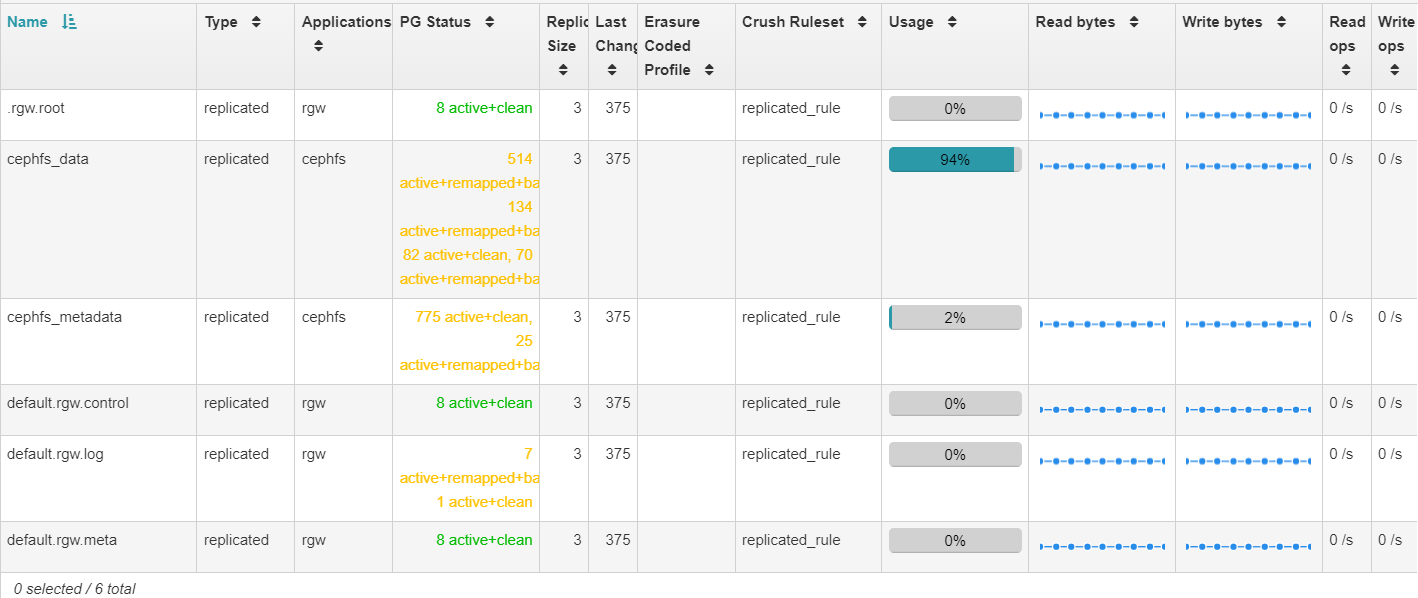
Dallas; I would expect so, yes. I wouldn't be surprised to see the used percentage slowly drop as the recovery / rebalance progresses. I believe that the pool free space number is based on the free space of the most filled OSD under any of the PGs, so I expect the free space will go up as your near-full OSDs drain. I've added OSDs to one of our clusters, once, and the recovery / rebalance completed fairly quickly. I don't remember how the pool sizes progressed. I'm going to need to expand our other cluster in the next couple of months, so follow up on how this proceeds would be appreciated. Thank you, Dominic L. Hilsbos, MBA Director – Information Technology Perform Air International, Inc. DHilsbos@PerformAir.com www.PerformAir.com From: Dallas Jones [mailto:djones@tech4learning.com] Sent: Friday, August 28, 2020 7:58 AM To: Florian Pritz Cc: ceph-users@ceph.io; Dominic Hilsbos Subject: Re: [ceph-users] Re: Cluster degraded after adding OSDs to increase capacity Thanks for the reply. I dialed up the value for max backfills yesterday, which increased my recovery throughput from about 1mbps to 5ish. After tweaking osd_recovery_sleep_hdd, I'm seeing 50-60MBPS - which is fairly epic. No clients are currently using this cluster, so I'm not worried about tanking client performance. One remaining question: Will the pool sizes begin to adjust once the recovery process is complete? Per the following screenshot, my data pool is ~94% full... On Fri, Aug 28, 2020 at 4:31 AM Florian Pritz <florian.pritz@rise-world.com> wrote: On Thu, Aug 27, 2020 at 05:56:22PM +0000, DHilsbos@performair.com wrote:
2) Adjust performance settings to allow the data movement to go faster. Again, I don't have those setting immediately to hand, but Googling something like 'ceph recovery tuning,' or searching this list, should point you in the right direction. Notice that you only have 6 PGs trying to move at a time, with 2 blocked on your near-full OSDs (8 & 19). I believe; by default, each OSD daemon is only involved in 1 data movement at a time. The tradeoff here is user activity suffers if you adjust to favor recovery, however, with the cluster in ERROR status, I suspect user activity is already suffering.
We've set osd_max_backfills to 16 in the config and when necessary we manually change the runtime value of osd_recovery_sleep_hdd. It defaults to 0.1 seconds of wait time between objects (I think?). If you really want fast recovery try this additional change: ceph tell osd.\* config set osd_recovery_sleep_hdd 0 Be warned though, this will seriously affect client performance. Then again it can bump your recovery speed by multiple orders of magnitude. If you want to go back to how things were, set it back to 0.1 instead of 0. It may take a couple of seconds (maybe a minute) until performance for clients starts to improve. I guess the OSDs are too busy with recovery to instantly accept the changed value. Florian
Thanks to everyone who replied. After setting osd_recovery_sleep_hdd to 0 and changing osd-max-backfills to 16, my recovery throughput increased from < 1MBPS to 40-60MPBS and finished up late last night. The cluster is mopping up a bunch of queued deep scrubs, but is otherwise now healthy. I do have one remaining question - the cluster now shows 81TB of free space, but the data pool only shows 22.8TB of free space. I was expecting/hoping to see the free space value for the pool grow more after doubling the capacity of the cluster (it previously had 21 OSDs w/ 2.7TB SAS drives; I just added 12 more OSDs w/ 5.5TB drives). Are my expectations flawed, or is there something I can do to prod Ceph into growing the data pool free space? [image: image.png] [image: image.png] On Fri, Aug 28, 2020 at 9:37 AM <DHilsbos@performair.com> wrote:
Dallas;
I would expect so, yes.
I wouldn't be surprised to see the used percentage slowly drop as the recovery / rebalance progresses. I believe that the pool free space number is based on the free space of the most filled OSD under any of the PGs, so I expect the free space will go up as your near-full OSDs drain.
I've added OSDs to one of our clusters, once, and the recovery / rebalance completed fairly quickly. I don't remember how the pool sizes progressed. I'm going to need to expand our other cluster in the next couple of months, so follow up on how this proceeds would be appreciated.
Thank you,
Dominic L. Hilsbos, MBA Director – Information Technology Perform Air International, Inc. DHilsbos@PerformAir.com www.PerformAir.com
From: Dallas Jones [mailto:djones@tech4learning.com] Sent: Friday, August 28, 2020 7:58 AM To: Florian Pritz Cc: ceph-users@ceph.io; Dominic Hilsbos Subject: Re: [ceph-users] Re: Cluster degraded after adding OSDs to increase capacity
Thanks for the reply. I dialed up the value for max backfills yesterday, which increased my recovery throughput from about 1mbps to 5ish. After tweaking osd_recovery_sleep_hdd, I'm seeing 50-60MBPS - which is fairly epic. No clients are currently using this cluster, so I'm not worried about tanking client performance.
One remaining question: Will the pool sizes begin to adjust once the recovery process is complete? Per the following screenshot, my data pool is ~94% full...
2) Adjust performance settings to allow the data movement to go faster. Again, I don't have those setting immediately to hand, but Googling something like 'ceph recovery tuning,' or searching this list, should point you in the right direction. Notice that you only have 6 PGs
On Fri, Aug 28, 2020 at 4:31 AM Florian Pritz < florian.pritz@rise-world.com> wrote: On Thu, Aug 27, 2020 at 05:56:22PM +0000, DHilsbos@performair.com wrote: trying to move at a time, with 2 blocked on your near-full OSDs (8 & 19). I believe; by default, each OSD daemon is only involved in 1 data movement at a time. The tradeoff here is user activity suffers if you adjust to favor recovery, however, with the cluster in ERROR status, I suspect user activity is already suffering.
We've set osd_max_backfills to 16 in the config and when necessary we manually change the runtime value of osd_recovery_sleep_hdd. It defaults to 0.1 seconds of wait time between objects (I think?). If you really want fast recovery try this additional change:
ceph tell osd.\* config set osd_recovery_sleep_hdd 0
Be warned though, this will seriously affect client performance. Then again it can bump your recovery speed by multiple orders of magnitude. If you want to go back to how things were, set it back to 0.1 instead of 0. It may take a couple of seconds (maybe a minute) until performance for clients starts to improve. I guess the OSDs are too busy with recovery to instantly accept the changed value.
Florian
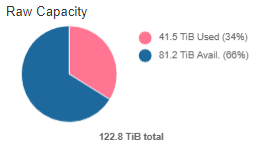
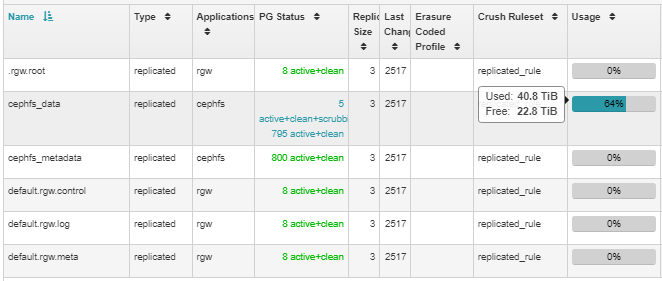
Dallas; First, I should point out that you have an issue with your units. Your cluster is reporting 81TiB (1024^4) of available space, not 81TB (1000^4). Similarly; it's reporting 22.8 TiB free space in the pool, not 22.8TB. For comparison; your 5.5 TB drives (this is the correct unit here) is only 5.02 TiB. Hard drive manufacturers market in one set of units, while software systems report in another. Thus, while you added 66 TB to your cluster, that is only 60 TiB. For background information, these pages are interesting: https://en.wikipedia.org/wiki/Tebibyte https://en.wikipedia.org/wiki/Binary_prefix#Consumer_confusion It looks like you're using a replicated rule for your cephfs_data pool. With 81.2 TiB available in the cluster, the maximum free space you can expect is 27.06 TiB (81.2 / 3 = 27.06). As we've seen you can't actually fill a cluster to 100%. It might be worth noting that the discrepancy is roughly 10% of your entire cluster (122.8 / (81.2 - (22.8 * 3))). From your previously provided OSD map, I'm seeing some reweights that aren't 1. It's possible that has some impact. It's also possible that your cluster is "reserving" space on your HDDs for DB and WAL operations. It would take someone that is more familiar with the CephFS and Dashboard code than I am, to answer your question definitively. Thank you, Dominic L. Hilsbos, MBA Director – Information Technology Perform Air International, Inc. DHilsbos@PerformAir.com www.PerformAir.com From: Dallas Jones [mailto:djones@tech4learning.com] Sent: Monday, August 31, 2020 2:59 PM To: Dominic Hilsbos Cc: ceph-users@ceph.io Subject: [ceph-users] Re: Cluster degraded after adding OSDs to increase capacity Thanks to everyone who replied. After setting osd_recovery_sleep_hdd to 0 and changing osd-max-backfills to 16, my recovery throughput increased from < 1MBPS to 40-60MPBS and finished up late last night. The cluster is mopping up a bunch of queued deep scrubs, but is otherwise now healthy. I do have one remaining question - the cluster now shows 81TB of free space, but the data pool only shows 22.8TB of free space. I was expecting/hoping to see the free space value for the pool grow more after doubling the capacity of the cluster (it previously had 21 OSDs w/ 2.7TB SAS drives; I just added 12 more OSDs w/ 5.5TB drives). Are my expectations flawed, or is there something I can do to prod Ceph into growing the data pool free space? On Fri, Aug 28, 2020 at 9:37 AM <DHilsbos@performair.com> wrote: Dallas; I would expect so, yes. I wouldn't be surprised to see the used percentage slowly drop as the recovery / rebalance progresses. I believe that the pool free space number is based on the free space of the most filled OSD under any of the PGs, so I expect the free space will go up as your near-full OSDs drain. I've added OSDs to one of our clusters, once, and the recovery / rebalance completed fairly quickly. I don't remember how the pool sizes progressed. I'm going to need to expand our other cluster in the next couple of months, so follow up on how this proceeds would be appreciated. Thank you, Dominic L. Hilsbos, MBA Director – Information Technology Perform Air International, Inc. DHilsbos@PerformAir.com www.PerformAir.com From: Dallas Jones [mailto:djones@tech4learning.com] Sent: Friday, August 28, 2020 7:58 AM To: Florian Pritz Cc: ceph-users@ceph.io; Dominic Hilsbos Subject: Re: [ceph-users] Re: Cluster degraded after adding OSDs to increase capacity Thanks for the reply. I dialed up the value for max backfills yesterday, which increased my recovery throughput from about 1mbps to 5ish. After tweaking osd_recovery_sleep_hdd, I'm seeing 50-60MBPS - which is fairly epic. No clients are currently using this cluster, so I'm not worried about tanking client performance. One remaining question: Will the pool sizes begin to adjust once the recovery process is complete? Per the following screenshot, my data pool is ~94% full... On Fri, Aug 28, 2020 at 4:31 AM Florian Pritz <florian.pritz@rise-world.com> wrote: On Thu, Aug 27, 2020 at 05:56:22PM +0000, DHilsbos@performair.com wrote:
2) Adjust performance settings to allow the data movement to go faster. Again, I don't have those setting immediately to hand, but Googling something like 'ceph recovery tuning,' or searching this list, should point you in the right direction. Notice that you only have 6 PGs trying to move at a time, with 2 blocked on your near-full OSDs (8 & 19). I believe; by default, each OSD daemon is only involved in 1 data movement at a time. The tradeoff here is user activity suffers if you adjust to favor recovery, however, with the cluster in ERROR status, I suspect user activity is already suffering.
We've set osd_max_backfills to 16 in the config and when necessary we manually change the runtime value of osd_recovery_sleep_hdd. It defaults to 0.1 seconds of wait time between objects (I think?). If you really want fast recovery try this additional change: ceph tell osd.\* config set osd_recovery_sleep_hdd 0 Be warned though, this will seriously affect client performance. Then again it can bump your recovery speed by multiple orders of magnitude. If you want to go back to how things were, set it back to 0.1 instead of 0. It may take a couple of seconds (maybe a minute) until performance for clients starts to improve. I guess the OSDs are too busy with recovery to instantly accept the changed value. Florian
Doubling the capacity in one shot was a big topology change, hence the 53% misplaced. OSD fullness will naturally reflect a bell curve; there will be a tail of under-full and over-full OSDs. If you’d not said that your cluster was very full before expansion I would have predicted it from the full / nearfull OSDs. Think of CRUSH has a hash function that can experience collisions. When you change the topology, some collisions are removed, and sometimes PGs newly land on OSDs that they were previously redirected from, which can result in additional fillage. This can also occur as just a natural result of move data moving onto a given OSD before it’s moved off, especially as Ceph makes copies before deleting the old during a move, to maintain full redundancy along the way. `ceph osd df | sort -nk8` Couple of ways to recover, depending on the unspecified release that you’re running. You need to squeeze the most-full outliers down on a continual basis going forward. * Balance OSDs with either the ceph-mgr pg-upmap balancer (if all clients are Luminous or better) * Balance OSDs with reweight-by-utilization * Balance OSDs with override weights `ceph osd reweight osd.666 0.xx` * Raise the osd full ratio and backfill full ratio a few percentage points to let the 3 affected OSDs drain. You may need to restart them serially for the new setting to take effect.
On Aug 27, 2020, at 8:28 AM, Dallas Jones <djones@tech4learning.com> wrote:
My 3-node Ceph cluster (14.2.4) has been running fine for months. However, my data pool became close to full a couple of weeks ago, so I added 12 new OSDs, roughly doubling the capacity of the cluster. However, the pool size has not changed, and the health of the cluster has changed for the worse. The dashboard shows the following cluster status:
- PG_DEGRADED_FULL: Degraded data redundancy (low space): 2 pgs backfill_toofull - POOL_NEARFULL: 6 pool(s) nearfull - OSD_NEARFULL: 1 nearfull osd(s)
Output from ceph -s:
cluster: id: e5a47160-a302-462a-8fa4-1e533e1edd4e health: HEALTH_ERR 1 nearfull osd(s) 6 pool(s) nearfull Degraded data redundancy (low space): 2 pgs backfill_toofull
services: mon: 3 daemons, quorum ceph01,ceph02,ceph03 (age 5w) mgr: ceph01(active, since 4w), standbys: ceph03, ceph02 mds: cephfs:1 {0=ceph01=up:active} 2 up:standby osd: 33 osds: 33 up (since 43h), 33 in (since 43h); 1094 remapped pgs rgw: 3 daemons active (ceph01, ceph02, ceph03)
data: pools: 6 pools, 1632 pgs objects: 134.50M objects, 7.8 TiB usage: 42 TiB used, 81 TiB / 123 TiB avail pgs: 213786007/403501920 objects misplaced (52.983%) 1088 active+remapped+backfill_wait 538 active+clean 4 active+remapped+backfilling 2 active+remapped+backfill_wait+backfill_toofull
io: recovery: 477 KiB/s, 330 keys/s, 29 objects/s
Can someone steer me in the right direction for how to get my cluster healthy again?
Thanks in advance!
-Dallas _______________________________________________ ceph-users mailing list -- ceph-users@ceph.io To unsubscribe send an email to ceph-users-leave@ceph.io
participants (5)
-
Anthony D'Atri
-
Dallas Jones
-
DHilsbos@performair.com
-
Eugen Block
-
Florian Pritz