Migrate old EC pool to new EC pool (mimic)
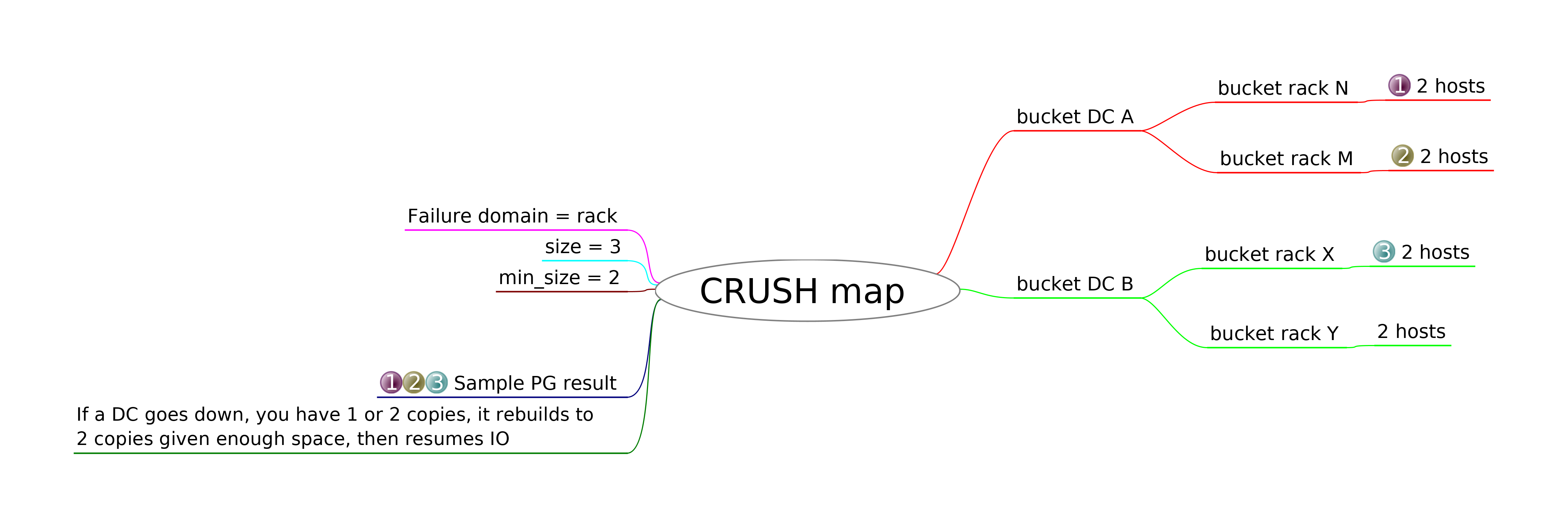
Hello There, Recently, I've been reading about how to migrate an existing EC pool which has the following profile: crush-device-class= crush-failure-domain=host crush-root=default jerasure-per-chunk-alignment=false k=2 m=2 plugin=jerasure technique=reed_sol_van w=8 To a new EC pool with the following profile: crush-device-class= crush-failure-domain=rack crush-root=default jerasure-per-chunk-alignment=false k=2 m=2 plugin=jerasure technique=reed_sol_van w=8 So, I've been reading the following blog but not sure if this will work with an EC pool. The header which says "The simple way" shows the steps how it's done but there is a small comment beneath it which says and I quote: || "But it does not work in all cases. For example with EC pools : “error copying pool testpool => newpool: (95) Operation not supported”." My setup is as follows: DC1 = 4 servers each with 1 OSD running DC2 = 4 servers each with 1 OSD running Since my current EC profile crush-failure-domain is set to 'host' (which seems to be the default) I wanted to change that to 'rack' so I can ensures that no two /chunks/ are stored in the same rack. The idea here is to place 4 OSD's on DC1 in rack1 and 4 OSD's on DC2 in rack2. I am aware I'd need to modify the crush ruleset to achieve, however, from this starting point, what's best practice to achieve this? Please see a diagram (Thanks to lordcirth_ on IRC oftc #ceph) attached to this email.// Please let me know if you need additional information from my side. -- Met vriendelijke groeten / Kind regards, Valentin Bajrami Target Holding
Apologies for not including the blog post explaining pool migration but here it is: https://ceph.com/geen-categorie/ceph-pool-migration/ On 7/27/19 11:51 PM, Valentin Bajrami wrote:
Hello There,
Recently, I've been reading about how to migrate an existing EC pool which has the following profile:
crush-device-class= crush-failure-domain=host crush-root=default jerasure-per-chunk-alignment=false k=2 m=2 plugin=jerasure technique=reed_sol_van w=8
To a new EC pool with the following profile:
crush-device-class= crush-failure-domain=rack crush-root=default jerasure-per-chunk-alignment=false k=2 m=2 plugin=jerasure technique=reed_sol_van w=8
So, I've been reading the following blog but not sure if this will work with an EC pool. The header which says "The simple way" shows the steps how it's done but there is a small comment beneath it which says and I quote:
||
"But it does not work in all cases. For example with EC pools : “error copying pool testpool => newpool: (95) Operation not supported”."
My setup is as follows:
DC1 = 4 servers each with 1 OSD running
DC2 = 4 servers each with 1 OSD running
Since my current EC profile crush-failure-domain is set to 'host' (which seems to be the default) I wanted to change that to 'rack' so I can ensures that no two /chunks/ are stored in the same rack.
The idea here is to place 4 OSD's on DC1 in rack1 and 4 OSD's on DC2 in rack2. I am aware I'd need to modify the crush ruleset to achieve, however, from this starting point, what's best practice to achieve this?
Please see a diagram (Thanks to lordcirth_ on IRC oftc #ceph) attached to this email.
Please let me know if you need additional information from my side.
-- Met vriendelijke groeten / Kind regards,
Valentin Bajrami Target Holding
_______________________________________________ Dev mailing list -- dev@ceph.io To unsubscribe send an email to dev-leave@ceph.io
-- Met vriendelijke groeten, Valentin Bajrami Target Holding
On Sat, Jul 27, 2019 at 11:54:40PM +0200, Valentin Bajrami wrote:
here it is: https://ceph.com/geen-categorie/ceph-pool-migration/
So, I've been reading the following blog but not sure if this will work with an EC pool. The header which says "The simple way" shows the steps how it's done but there is a small comment beneath it which says and I quote:
||
"But it does not work in all cases. For example with EC pools : “error copying pool testpool => newpool: (95) Operation not supported”."
I suppose it is for the case when migrating from a replicated pool to EC pool. EC pools does not support omap, so you can not copy objects with omap values (like rbd image metadata) to EC pool. I think it should work when copying data from EC pool to EC pool, but I would consider some other way, as `rados cppool` is usually not recommended. Depending on what application the pool is used for (rbd, rgw, cephfs) you may use the native aplication tools for migration. E.g. for rbd I would recommend `rbd migration` if you are on Nautilus. For mimic there is `rbd deep copy`. For earlier versions you could use `rbd copy` or the combination of `rbd clone` + `rbd flatten`, but you can not copy snapshots this way. "Using Cache Tier" way will not work for your case as EC pool can not be usead as cache tier. It can be used only when migrating from a replicated pool (to another replicated pool or EC pool). -- Mykola Golub
Hi Mykola, Thanks for the explanation. I am exclusively running cephfs and all my clients use the cephfs kernel driver. So I was reading this: https://ceph.com/community/new-mimic-simplified-rbd-image-cloning/ but I don't think this is something I could use. I'm not really interested in snapshots. I think I could create a new EC pool, then use a client to copy the data from the old EC pool to the new one and then remove the old EC. Subsequently, clients could connect to this new EC pool. This is a long shot but is this feasible? Thanks in advance! On 7/29/19 6:52 PM, Mykola Golub wrote:
On Sat, Jul 27, 2019 at 11:54:40PM +0200, Valentin Bajrami wrote:
here it is: https://ceph.com/geen-categorie/ceph-pool-migration/
So, I've been reading the following blog but not sure if this will work with an EC pool. The header which says "The simple way" shows the steps how it's done but there is a small comment beneath it which says and I quote:
||
"But it does not work in all cases. For example with EC pools : “error copying pool testpool => newpool: (95) Operation not supported”." I suppose it is for the case when migrating from a replicated pool to EC pool. EC pools does not support omap, so you can not copy objects with omap values (like rbd image metadata) to EC pool.
I think it should work when copying data from EC pool to EC pool, but I would consider some other way, as `rados cppool` is usually not recommended. Depending on what application the pool is used for (rbd, rgw, cephfs) you may use the native aplication tools for migration.
E.g. for rbd I would recommend `rbd migration` if you are on Nautilus. For mimic there is `rbd deep copy`. For earlier versions you could use `rbd copy` or the combination of `rbd clone` + `rbd flatten`, but you can not copy snapshots this way.
"Using Cache Tier" way will not work for your case as EC pool can not be usead as cache tier. It can be used only when migrating from a replicated pool (to another replicated pool or EC pool).
-- Met vriendelijke groeten, Valentin Bajrami Target Holding
On Tue, Jul 30, 2019 at 09:53:30AM +0200, Valentin Bajrami wrote:
Hi Mykola,
Thanks for the explanation. I am exclusively running cephfs and all my clients use the cephfs kernel driver. So I was reading this: https://ceph.com/community/new-mimic-simplified-rbd-image-cloning/ but I don't think this is something I could use. I'm not really interested in snapshots.
I think I could create a new EC pool, then use a client to copy the data from the old EC pool to the new one and then remove the old EC. Subsequently, clients could connect to this new EC pool. This is a long shot but is this feasible?
I am not very familiar with cephfs and would like someone else recommend you how to migrate cephfs data from one pool to another. But if I had to do this I think I would try this way: add the new pool to the existing cephfs, create a new dir on this fs, using file layout [1] set the new pool for this dir and move the files here. [1] https://docs.ceph.com/docs/luminous/cephfs/file-layouts/ -- Mykola Golub
On Sat, Jul 27, 2019 at 11:51 PM Valentin Bajrami <valentin.bajrami@target-holding.nl> wrote:
Hello There,
Recently, I've been reading about how to migrate an existing EC pool which has the following profile:
crush-device-class= crush-failure-domain=host crush-root=default jerasure-per-chunk-alignment=false k=2 m=2 plugin=jerasure technique=reed_sol_van w=8
To a new EC pool with the following profile:
crush-device-class= crush-failure-domain=rack crush-root=default jerasure-per-chunk-alignment=false k=2 m=2 plugin=jerasure technique=reed_sol_van w=8
These ec profiles are effectively identical. You can just change the CRUSH rule of the pool. -- Paul Emmerich Looking for help with your Ceph cluster? Contact us at https://croit.io croit GmbH Freseniusstr. 31h 81247 München www.croit.io Tel: +49 89 1896585 90
So, I've been reading the following blog but not sure if this will work with an EC pool. The header which says "The simple way" shows the steps how it's done but there is a small comment beneath it which says and I quote:
"But it does not work in all cases. For example with EC pools : “error copying pool testpool => newpool: (95) Operation not supported”."
My setup is as follows:
DC1 = 4 servers each with 1 OSD running
DC2 = 4 servers each with 1 OSD running
Since my current EC profile crush-failure-domain is set to 'host' (which seems to be the default) I wanted to change that to 'rack' so I can ensures that no two chunks are stored in the same rack.
The idea here is to place 4 OSD's on DC1 in rack1 and 4 OSD's on DC2 in rack2. I am aware I'd need to modify the crush ruleset to achieve, however, from this starting point, what's best practice to achieve this?
Please see a diagram (Thanks to lordcirth_ on IRC oftc #ceph) attached to this email.
Please let me know if you need additional information from my side.
-- Met vriendelijke groeten / Kind regards,
Valentin Bajrami Target Holding
_______________________________________________ Dev mailing list -- dev@ceph.io To unsubscribe send an email to dev-leave@ceph.io
Hi Paul Thanks for your reply! They indeed are except the crush-failure-domain=host vs crush-failure-domain=rack. The latter has the preference since I've spread my OSD's on 2 seperate DC's. As far as I know, modifying the crush rule on an existing / running pool isn't possible (at least not on mimic not sure about nautilus). I quote from the following Red Hat documentation found here: https://access.redhat.com/documentation/en-us/red_hat_ceph_storage/1.2.3/htm... and it goes: "Choosing the right profile is important because you cannot change the profile after you create the pool. To modify a profile, you must create a new pool with a different profile and migrate the objects from the old pool to the new pool." Also, let's assume it was possible, how would I modify my crush rules so I could afford losing one DC without data loss? On 7/30/19 11:24 PM, Paul Emmerich wrote:
On Sat, Jul 27, 2019 at 11:51 PM Valentin Bajrami <valentin.bajrami@target-holding.nl> wrote:
Hello There,
Recently, I've been reading about how to migrate an existing EC pool which has the following profile:
crush-device-class= crush-failure-domain=host crush-root=default jerasure-per-chunk-alignment=false k=2 m=2 plugin=jerasure technique=reed_sol_van w=8
To a new EC pool with the following profile:
crush-device-class= crush-failure-domain=rack crush-root=default jerasure-per-chunk-alignment=false k=2 m=2 plugin=jerasure technique=reed_sol_van w=8
These ec profiles are effectively identical. You can just change the CRUSH rule of the pool.
-- Met vriendelijke groeten, Valentin Bajrami Target Holding
participants (3)
-
Mykola Golub
-
Paul Emmerich
-
Valentin Bajrami