[ceph 17.2.6] unable to create rbd snapshots for images with erasure code data-pool
Dear Ceph Users, After upgrading from version 17.2.5 to 17.2.6 I no longer seem to be able to create snapshots of images that have an erasure coded datapool. root@zephir:~# rbd snap create ceph-dev@backup_20230417 Creating snap: 10% complete...failed. rbd: failed to create snapshot: (95) Operation not supported root@zephir:~# rbd info ceph-dev rbd image 'ceph-dev': size 10 GiB in 2560 objects order 22 (4 MiB objects) snapshot_count: 11 id: d2f3d287f13c7b data_pool: ecpool_hdd block_name_prefix: rbd_data.7.d2f3d287f13c7b format: 2 features: layering, exclusive-lock, object-map, fast-diff, deep-flatten, data-pool op_features: flags: create_timestamp: Wed Nov 23 17:01:03 2022 access_timestamp: Sun Apr 16 17:20:58 2023 modify_timestamp: Wed Nov 23 17:01:03 2022 root@zephir:~# Before the upgrade I was able to create snapshots of this pool: SNAPID NAME SIZE PROTECTED TIMESTAMP 1538 ceph-dev_2023-03-05T02:00:09.030+01:00 10 GiB Sun Mar 5 02:00:14 2023 1545 ceph-dev_2023-03-06T02:00:03.832+01:00 10 GiB Mon Mar 6 02:00:05 2023 1903 ceph-dev_2023-04-05T03:22:01.315+02:00 10 GiB Wed Apr 5 03:22:02 2023 1909 ceph-dev_2023-04-05T03:35:56.748+02:00 10 GiB Wed Apr 5 03:35:57 2023 1915 ceph-dev_2023-04-05T03:37:23.778+02:00 10 GiB Wed Apr 5 03:37:24 2023 1930 ceph-dev_2023-04-06T02:00:06.159+02:00 10 GiB Thu Apr 6 02:00:07 2023 1940 ceph-dev_2023-04-07T02:00:05.913+02:00 10 GiB Fri Apr 7 02:00:06 2023 1952 ceph-dev_2023-04-08T02:00:06.534+02:00 10 GiB Sat Apr 8 02:00:07 2023 1964 ceph-dev_2023-04-09T02:00:06.430+02:00 10 GiB Sun Apr 9 02:00:07 2023 2003 ceph-dev_2023-04-11T02:00:09.750+02:00 10 GiB Tue Apr 11 02:00:10 2023 2014 ceph-dev_2023-04-12T02:00:09.528+02:00 10 GiB Wed Apr 12 02:00:10 2023 root@zephir:~# I have looked through the release notes of 17.2.6 but couldn't find anything obvious regarding rbd and ec pools. Does anyone else have this problem? Do I need to change some config setting, or was this feature disabled or is it a bug? Ceph version info: root@zephir:~# ceph orch upgrade check --ceph_version 17.2.6 { "needs_update": {}, "non_ceph_image_daemons": [ "promtail.debian", "node-exporter.debian", "promtail.zephir", "grafana.zephir", "node-exporter.zephir", "prometheus.zephir", "loki.zephir", "alertmanager.zephir" ], "target_digest": " quay.io/ceph/ceph@sha256:1161e35e4e02cf377c93b913ce78773f8413f5a8d7c5eaee4b4773a4f9dd6635", "target_id": "9cea3956c04b2d889b91b58f957577fcb4eacd3852df073e3e2567f159fcdbf8", "target_name": "quay.io/ceph/ceph:v17.2.6", "target_version": "ceph version 17.2.6 (d7ff0d10654d2280e08f1ab989c7cdf3064446a5) quincy (stable)", "up_to_date": [ "iscsi.rbd.debian.ijztzu", "mds.jellyfin.debian.dcsocv", "mon.debian", "osd.13", "osd.6", "mds.backups.debian.runngh", "mds.rgysi.debian.uhgqen", "crash.debian", "mgr.debian.sookxi", "iscsi.rbd.zephir.viqahd", "osd.1", "mds.jellyfin.zephir.iqywsn", "osd.12", "osd.7", "osd.2", "crash.zephir", "rgw.default.zephir.jqmick", "mds.backups.zephir.ygigch", "osd.0", "osd.4", "mon.zephir", "mgr.zephir.enywvy", "mds.rgysi.zephir.diylss", "osd.3", "osd.10", "osd.5", "osd.8", "osd.11" ] } root@zephir:~# root@zephir:~# rbd --version ceph version 17.2.6 (d7ff0d10654d2280e08f1ab989c7cdf3064446a5) quincy (stable) root@zephir:~# Cheers Reto Gysi
I've just tried this on 17.2.6 and it worked fine.... On 17/04/2023 12:57, Reto Gysi wrote:
Dear Ceph Users,
After upgrading from version 17.2.5 to 17.2.6 I no longer seem to be able to create snapshots of images that have an erasure coded datapool.
root@zephir:~# rbd snap create ceph-dev@backup_20230417 Creating snap: 10% complete...failed. rbd: failed to create snapshot: (95) Operation not supported
root@zephir:~# rbd info ceph-dev rbd image 'ceph-dev': size 10 GiB in 2560 objects order 22 (4 MiB objects) snapshot_count: 11 id: d2f3d287f13c7b data_pool: ecpool_hdd block_name_prefix: rbd_data.7.d2f3d287f13c7b format: 2 features: layering, exclusive-lock, object-map, fast-diff, deep-flatten, data-pool op_features: flags: create_timestamp: Wed Nov 23 17:01:03 2022 access_timestamp: Sun Apr 16 17:20:58 2023 modify_timestamp: Wed Nov 23 17:01:03 2022 root@zephir:~#
Before the upgrade I was able to create snapshots of this pool:
SNAPID NAME SIZE PROTECTED TIMESTAMP 1538 ceph-dev_2023-03-05T02:00:09.030+01:00 10 GiB Sun Mar 5 02:00:14 2023 1545 ceph-dev_2023-03-06T02:00:03.832+01:00 10 GiB Mon Mar 6 02:00:05 2023 1903 ceph-dev_2023-04-05T03:22:01.315+02:00 10 GiB Wed Apr 5 03:22:02 2023 1909 ceph-dev_2023-04-05T03:35:56.748+02:00 10 GiB Wed Apr 5 03:35:57 2023 1915 ceph-dev_2023-04-05T03:37:23.778+02:00 10 GiB Wed Apr 5 03:37:24 2023 1930 ceph-dev_2023-04-06T02:00:06.159+02:00 10 GiB Thu Apr 6 02:00:07 2023 1940 ceph-dev_2023-04-07T02:00:05.913+02:00 10 GiB Fri Apr 7 02:00:06 2023 1952 ceph-dev_2023-04-08T02:00:06.534+02:00 10 GiB Sat Apr 8 02:00:07 2023 1964 ceph-dev_2023-04-09T02:00:06.430+02:00 10 GiB Sun Apr 9 02:00:07 2023 2003 ceph-dev_2023-04-11T02:00:09.750+02:00 10 GiB Tue Apr 11 02:00:10 2023 2014 ceph-dev_2023-04-12T02:00:09.528+02:00 10 GiB Wed Apr 12 02:00:10 2023 root@zephir:~#
I have looked through the release notes of 17.2.6 but couldn't find anything obvious regarding rbd and ec pools.
Does anyone else have this problem?
Do I need to change some config setting, or was this feature disabled or is it a bug?
Ceph version info: root@zephir:~# ceph orch upgrade check --ceph_version 17.2.6 { "needs_update": {}, "non_ceph_image_daemons": [ "promtail.debian", "node-exporter.debian", "promtail.zephir", "grafana.zephir", "node-exporter.zephir", "prometheus.zephir", "loki.zephir", "alertmanager.zephir" ], "target_digest": " quay.io/ceph/ceph@sha256:1161e35e4e02cf377c93b913ce78773f8413f5a8d7c5eaee4b4773a4f9dd6635",
"target_id": "9cea3956c04b2d889b91b58f957577fcb4eacd3852df073e3e2567f159fcdbf8", "target_name": "quay.io/ceph/ceph:v17.2.6", "target_version": "ceph version 17.2.6 (d7ff0d10654d2280e08f1ab989c7cdf3064446a5) quincy (stable)", "up_to_date": [ "iscsi.rbd.debian.ijztzu", "mds.jellyfin.debian.dcsocv", "mon.debian", "osd.13", "osd.6", "mds.backups.debian.runngh", "mds.rgysi.debian.uhgqen", "crash.debian", "mgr.debian.sookxi", "iscsi.rbd.zephir.viqahd", "osd.1", "mds.jellyfin.zephir.iqywsn", "osd.12", "osd.7", "osd.2", "crash.zephir", "rgw.default.zephir.jqmick", "mds.backups.zephir.ygigch", "osd.0", "osd.4", "mon.zephir", "mgr.zephir.enywvy", "mds.rgysi.zephir.diylss", "osd.3", "osd.10", "osd.5", "osd.8", "osd.11" ] } root@zephir:~# root@zephir:~# rbd --version ceph version 17.2.6 (d7ff0d10654d2280e08f1ab989c7cdf3064446a5) quincy (stable) root@zephir:~#
Cheers
Reto Gysi _______________________________________________ ceph-users mailing list -- ceph-users@ceph.io To unsubscribe send an email to ceph-users-leave@ceph.io
On Mon, Apr 17, 2023 at 2:01 PM Reto Gysi <rlgysi@gmail.com> wrote:
Dear Ceph Users,
After upgrading from version 17.2.5 to 17.2.6 I no longer seem to be able to create snapshots of images that have an erasure coded datapool.
root@zephir:~# rbd snap create ceph-dev@backup_20230417 Creating snap: 10% complete...failed. rbd: failed to create snapshot: (95) Operation not supported
root@zephir:~# rbd info ceph-dev rbd image 'ceph-dev': size 10 GiB in 2560 objects order 22 (4 MiB objects) snapshot_count: 11 id: d2f3d287f13c7b data_pool: ecpool_hdd block_name_prefix: rbd_data.7.d2f3d287f13c7b format: 2 features: layering, exclusive-lock, object-map, fast-diff, deep-flatten, data-pool op_features: flags: create_timestamp: Wed Nov 23 17:01:03 2022 access_timestamp: Sun Apr 16 17:20:58 2023 modify_timestamp: Wed Nov 23 17:01:03 2022 root@zephir:~#
Before the upgrade I was able to create snapshots of this pool:
SNAPID NAME SIZE PROTECTED TIMESTAMP 1538 ceph-dev_2023-03-05T02:00:09.030+01:00 10 GiB Sun Mar 5 02:00:14 2023 1545 ceph-dev_2023-03-06T02:00:03.832+01:00 10 GiB Mon Mar 6 02:00:05 2023 1903 ceph-dev_2023-04-05T03:22:01.315+02:00 10 GiB Wed Apr 5 03:22:02 2023 1909 ceph-dev_2023-04-05T03:35:56.748+02:00 10 GiB Wed Apr 5 03:35:57 2023 1915 ceph-dev_2023-04-05T03:37:23.778+02:00 10 GiB Wed Apr 5 03:37:24 2023 1930 ceph-dev_2023-04-06T02:00:06.159+02:00 10 GiB Thu Apr 6 02:00:07 2023 1940 ceph-dev_2023-04-07T02:00:05.913+02:00 10 GiB Fri Apr 7 02:00:06 2023 1952 ceph-dev_2023-04-08T02:00:06.534+02:00 10 GiB Sat Apr 8 02:00:07 2023 1964 ceph-dev_2023-04-09T02:00:06.430+02:00 10 GiB Sun Apr 9 02:00:07 2023 2003 ceph-dev_2023-04-11T02:00:09.750+02:00 10 GiB Tue Apr 11 02:00:10 2023 2014 ceph-dev_2023-04-12T02:00:09.528+02:00 10 GiB Wed Apr 12 02:00:10 2023 root@zephir:~#
I have looked through the release notes of 17.2.6 but couldn't find anything obvious regarding rbd and ec pools.
Does anyone else have this problem?
Do I need to change some config setting, or was this feature disabled or is it a bug?
Hi Reto, Nothing was disabled and no config changes are expected. This should just work. What is the output of "rbd status" for that image? Can you reproduce with "--debug-ms 1 --debug-rbd 20" appended to "rbd snap create" command and attach a file with the output? Thanks, Ilya
Hi Ilya, Thanks for the reply. Here's is the output: root@zephir:~# rbd status ceph-dev Watchers: watcher=192.168.1.1:0/338620854 client.19264246 cookie=18446462598732840969 root@zephir:~# rbd snap create ceph-dev@backup --debug-ms 1 --debug-rbd 20 2023-04-17T18:23:16.211+0200 7f5e05dca4c0 1 Processor -- start 2023-04-17T18:23:16.211+0200 7f5e05dca4c0 1 -- start start 2023-04-17T18:23:16.211+0200 7f5e05dca4c0 1 --2- >> [v2: 192.168.1.1:3300/0,v1:192.168.1.1:6789/0] conn(0x5558b4e3c260 0x5558b4e3c630 unknown :-1 s=NONE pgs=0 cs=0 l=0 rev1=0 crypto rx=0 tx=0 comp rx=0 tx=0).connect 2023-04-17T18:23:16.211+0200 7f5e05dca4c0 1 --2- >> [v2: 192.168.1.10:3300/0,v1:192.168.1.10:6789/0] conn(0x5558b4e3cc00 0x5558b4e452d0 unknown :-1 s=NONE pgs=0 cs=0 l=0 rev1=0 crypto rx=0 tx=0 comp rx=0 tx=0).connect 2023-04-17T18:23:16.211+0200 7f5e05dca4c0 1 --2- >> [v2: 192.168.43.208:3300/0,v1:192.168.43.208:6789/0] conn(0x5558b4e45810 0x5558b4e47bf0 unknown :-1 s=NONE pgs=0 cs=0 l=0 rev1=0 crypto rx=0 tx=0 comp rx=0 tx=0).connect 2023-04-17T18:23:16.211+0200 7f5e05dca4c0 1 -- --> [v2: 192.168.1.1:3300/0,v1:192.168.1.1:6789/0] -- mon_getmap magic: 0 v1 -- 0x5558b4d29b70 con 0x5558b4e3c260 2023-04-17T18:23:16.211+0200 7f5e05dca4c0 1 -- --> [v2: 192.168.1.10:3300/0,v1:192.168.1.10:6789/0] -- mon_getmap magic: 0 v1 -- 0x5558b4d231b0 con 0x5558b4e3cc00 2023-04-17T18:23:16.211+0200 7f5e05dca4c0 1 -- --> [v2: 192.168.43.208:3300/0,v1:192.168.43.208:6789/0] -- mon_getmap magic: 0 v1 -- 0x5558b4cbf680 con 0x5558b4e45810 2023-04-17T18:23:16.211+0200 7f5e04103700 1 --2- >> [v2: 192.168.1.1:3300/0,v1:192.168.1.1:6789/0] conn(0x5558b4e3c260 0x5558b4e3c630 unknown :-1 s=BANNER_CONNECTING pgs=0 cs=0 l=0 rev1=0 crypto rx=0 tx=0 comp rx=0 tx=0)._handle_peer_banner_payload supporte d=3 required=0 2023-04-17T18:23:16.211+0200 7f5e04103700 1 --2- >> [v2: 192.168.1.1:3300/0,v1:192.168.1.1:6789/0] conn(0x5558b4e3c260 0x5558b4e3c630 unknown :-1 s=HELLO_CONNECTING pgs=0 cs=0 l=0 rev1=1 crypto rx=0 tx=0 comp rx=0 tx=0).handle_hello peer v2:192.168.1.1:3300 /0 says I am v2:192.168.1.1:42714/0 (socket says 192.168.1.1:42714) 2023-04-17T18:23:16.211+0200 7f5e04103700 1 -- 192.168.1.1:0/1614127865 learned_addr learned my addr 192.168.1.1:0/1614127865 (peer_addr_for_me v2: 192.168.1.1:0/0) 2023-04-17T18:23:16.211+0200 7f5e03902700 1 --2- 192.168.1.1:0/1614127865
[v2:192.168.1.10:3300/0,v1:192.168.1.10:6789/0] conn(0x5558b4e3cc00 0x5558b4e452d0 unknown :-1 s=BANNER_CONNECTING pgs=0 cs=0 l=0 rev1=0 crypto rx=0 tx=0 comp rx=0 tx=0)._handle_pe er_banner_payload supported=3 required=0 2023-04-17T18:23:16.211+0200 7f5e04103700 1 -- 192.168.1.1:0/1614127865 >> [v2:192.168.43.208:3300/0,v1:192.168.43.208:6789/0] conn(0x5558b4e45810 msgr2=0x5558b4e47bf0 unknown :-1 s=STATE_CONNECTING_RE l=0).mark_down 2023-04-17T18:23:16.211+0200 7f5e04103700 1 --2- 192.168.1.1:0/1614127865 [v2:192.168.43.208:3300/0,v1:192.168.43.208:6789/0] conn(0x5558b4e45810 0x5558b4e47bf0 unknown :-1 s=START_CONNECT pgs=0 cs=0 l=0 rev1=0 crypto rx=0 tx=0 comp rx=0 tx=0).stop 2023-04-17T18:23:16.211+0200 7f5e04103700 1 -- 192.168.1.1:0/1614127865 >> [v2:192.168.1.10:3300/0,v1:192.168.1.10:6789/0] conn(0x5558b4e3cc00 msgr2=0x5558b4e452d0 unknown :-1 s=STATE_CONNECTION_ESTABLISHED l=0).mark_down 2023-04-17T18:23:16.211+0200 7f5e04103700 1 --2- 192.168.1.1:0/1614127865 [v2:192.168.1.10:3300/0,v1:192.168.1.10:6789/0] conn(0x5558b4e3cc00 0x5558b4e452d0 unknown :-1 s=AUTH_CONNECTING pgs=0 cs=0 l=0 rev1=1 crypto rx=0 tx=0 comp rx=0 tx=0).stop 2023-04-17T18:23:16.211+0200 7f5e04103700 1 -- 192.168.1.1:0/1614127865 --> [v2:192.168.1.1:3300/0,v1:192.168.1.1:6789/0] -- mon_subscribe({config=0+,monmap=0+}) v3 -- 0x5558b4cd6d60 con 0x5558b4e3c260 2023-04-17T18:23:16.211+0200 7f5e04103700 1 --2- 192.168.1.1:0/1614127865 [v2:192.168.1.1:3300/0,v1:192.168.1.1:6789/0] conn(0x5558b4e3c260 0x5558b4e3c630 secure :-1 s=READY pgs=355 cs=0 l=1 rev1=1 crypto rx=0x7f5df400a700 tx=0x7f5df4005b10 comp rx=0 tx= 0).ready entity=mon.0 client_cookie=2d9464291c26a0e7 server_cookie=0 in_seq=0 out_seq=0 2023-04-17T18:23:16.211+0200 7f5e03101700 1 -- 192.168.1.1:0/1614127865 <== mon.0 v2:192.168.1.1:3300/0 1 ==== mon_map magic: 0 v1 ==== 467+0+0 (secure 0 0 0) 0x7f5df40089b0 con 0x5558b4e3c260 2023-04-17T18:23:16.211+0200 7f5e03101700 1 -- 192.168.1.1:0/1614127865 <== mon.0 v2:192.168.1.1:3300/0 2 ==== config(39 keys) v1 ==== 1461+0+0 (secure 0 0 0) 0x7f5df4008b10 con 0x5558b4e3c260 2023-04-17T18:23:16.211+0200 7f5e03101700 1 -- 192.168.1.1:0/1614127865 <== mon.0 v2:192.168.1.1:3300/0 3 ==== mon_map magic: 0 v1 ==== 467+0+0 (secure 0 0 0) 0x7f5df4011e60 con 0x5558b4e3c260 Creating snap: 10% complete...failed. rbd: failed to create snapshot: (95) Operation not supported root@zephir:~#
root@zephir:~# rbd config image list ceph-dev There are 78 values: Name Value Source rbd_atime_update_interval 60 config rbd_balance_parent_reads false config rbd_balance_snap_reads false config rbd_blkin_trace_all false config rbd_blocklist_expire_seconds 0 config rbd_blocklist_on_break_lock true config rbd_cache true config rbd_cache_block_writes_upfront false config rbd_cache_max_dirty 25165824 config rbd_cache_max_dirty_age 1.000000 config rbd_cache_max_dirty_object 0 config rbd_cache_policy writearound config rbd_cache_size 33554432 config rbd_cache_target_dirty 16777216 config rbd_cache_writethrough_until_flush false config rbd_clone_copy_on_read false config rbd_compression_hint none config rbd_concurrent_management_ops 10 config rbd_default_map_options config rbd_default_snapshot_quiesce_mode required config rbd_disable_zero_copy_writes true config rbd_discard_granularity_bytes 65536 config rbd_enable_alloc_hint true config rbd_invalidate_object_map_on_timeout true config rbd_io_scheduler simple config rbd_io_scheduler_simple_max_delay 0 config rbd_journal_commit_age 5.000000 config rbd_journal_max_concurrent_object_sets 0 config rbd_journal_max_payload_bytes 16384 config rbd_journal_object_flush_age 0.000000 config rbd_journal_object_flush_bytes 1048576 config rbd_journal_object_flush_interval 0 config rbd_journal_object_max_in_flight_appends 0 config rbd_journal_object_writethrough_until_flush true config rbd_localize_parent_reads false config rbd_localize_snap_reads false config rbd_mirroring_delete_delay 0 config rbd_mirroring_max_mirroring_snapshots 5 config rbd_mirroring_replay_delay 0 config rbd_mirroring_resync_after_disconnect false config rbd_move_parent_to_trash_on_remove false config rbd_move_to_trash_on_remove true config rbd_move_to_trash_on_remove_expire_seconds 0 config rbd_mtime_update_interval 60 config rbd_non_blocking_aio true config rbd_parent_cache_enabled false config rbd_persistent_cache_mode disabled config rbd_persistent_cache_path /tmp config rbd_persistent_cache_size 1073741824 config rbd_plugins config rbd_qos_bps_burst 0 config rbd_qos_bps_burst_seconds 1 config rbd_qos_bps_limit 0 config rbd_qos_exclude_ops 0 config rbd_qos_iops_burst 0 config rbd_qos_iops_burst_seconds 1 config rbd_qos_iops_limit 0 config rbd_qos_read_bps_burst 0 config rbd_qos_read_bps_burst_seconds 1 config rbd_qos_read_bps_limit 0 config rbd_qos_read_iops_burst 0 config rbd_qos_read_iops_burst_seconds 1 config rbd_qos_read_iops_limit 0 config rbd_qos_schedule_tick_min 50 config rbd_qos_write_bps_burst 0 config rbd_qos_write_bps_burst_seconds 1 config rbd_qos_write_bps_limit 0 config rbd_qos_write_iops_burst 0 config rbd_qos_write_iops_burst_seconds 1 config rbd_qos_write_iops_limit 0 config rbd_quiesce_notification_attempts 10 config rbd_read_from_replica_policy default config rbd_readahead_disable_after_bytes 52428800 config rbd_readahead_max_bytes 524288 config rbd_readahead_trigger_requests 10 config rbd_request_timed_out_seconds 30 config rbd_skip_partial_discard true config rbd_sparse_read_threshold_bytes 65536 config Cheers Reto Gysi Am Mo., 17. Apr. 2023 um 17:31 Uhr schrieb Ilya Dryomov <idryomov@gmail.com
:
On Mon, Apr 17, 2023 at 2:01 PM Reto Gysi <rlgysi@gmail.com> wrote:
Dear Ceph Users,
After upgrading from version 17.2.5 to 17.2.6 I no longer seem to be able to create snapshots of images that have an erasure coded datapool.
root@zephir:~# rbd snap create ceph-dev@backup_20230417 Creating snap: 10% complete...failed. rbd: failed to create snapshot: (95) Operation not supported
root@zephir:~# rbd info ceph-dev rbd image 'ceph-dev': size 10 GiB in 2560 objects order 22 (4 MiB objects) snapshot_count: 11 id: d2f3d287f13c7b data_pool: ecpool_hdd block_name_prefix: rbd_data.7.d2f3d287f13c7b format: 2 features: layering, exclusive-lock, object-map, fast-diff, deep-flatten, data-pool op_features: flags: create_timestamp: Wed Nov 23 17:01:03 2022 access_timestamp: Sun Apr 16 17:20:58 2023 modify_timestamp: Wed Nov 23 17:01:03 2022 root@zephir:~#
Before the upgrade I was able to create snapshots of this pool:
SNAPID NAME SIZE PROTECTED TIMESTAMP 1538 ceph-dev_2023-03-05T02:00:09.030+01:00 10 GiB Sun Mar 5 02:00:14 2023 1545 ceph-dev_2023-03-06T02:00:03.832+01:00 10 GiB Mon Mar 6 02:00:05 2023 1903 ceph-dev_2023-04-05T03:22:01.315+02:00 10 GiB Wed Apr 5 03:22:02 2023 1909 ceph-dev_2023-04-05T03:35:56.748+02:00 10 GiB Wed Apr 5 03:35:57 2023 1915 ceph-dev_2023-04-05T03:37:23.778+02:00 10 GiB Wed Apr 5 03:37:24 2023 1930 ceph-dev_2023-04-06T02:00:06.159+02:00 10 GiB Thu Apr 6 02:00:07 2023 1940 ceph-dev_2023-04-07T02:00:05.913+02:00 10 GiB Fri Apr 7 02:00:06 2023 1952 ceph-dev_2023-04-08T02:00:06.534+02:00 10 GiB Sat Apr 8 02:00:07 2023 1964 ceph-dev_2023-04-09T02:00:06.430+02:00 10 GiB Sun Apr 9 02:00:07 2023 2003 ceph-dev_2023-04-11T02:00:09.750+02:00 10 GiB Tue Apr 11 02:00:10 2023 2014 ceph-dev_2023-04-12T02:00:09.528+02:00 10 GiB Wed Apr 12 02:00:10 2023 root@zephir:~#
I have looked through the release notes of 17.2.6 but couldn't find anything obvious regarding rbd and ec pools.
Does anyone else have this problem?
Do I need to change some config setting, or was this feature disabled or
is
it a bug?
Hi Reto,
Nothing was disabled and no config changes are expected. This should just work.
What is the output of "rbd status" for that image?
Can you reproduce with "--debug-ms 1 --debug-rbd 20" appended to "rbd snap create" command and attach a file with the output?
Thanks,
Ilya
On Mon, Apr 17, 2023 at 6:37 PM Reto Gysi <rlgysi@gmail.com> wrote:
Hi Ilya,
Thanks for the reply. Here's is the output:
root@zephir:~# rbd status ceph-dev Watchers: watcher=192.168.1.1:0/338620854 client.19264246 cookie=18446462598732840969
root@zephir:~# rbd snap create ceph-dev@backup --debug-ms 1 --debug-rbd 20 2023-04-17T18:23:16.211+0200 7f5e05dca4c0 1 Processor -- start 2023-04-17T18:23:16.211+0200 7f5e05dca4c0 1 -- start start 2023-04-17T18:23:16.211+0200 7f5e05dca4c0 1 --2- >> [v2:192.168.1.1:3300/0,v1:192.168.1.1:6789/0] conn(0x5558b4e3c260 0x5558b4e3c630 unknown :-1 s=NONE pgs=0 cs=0 l=0 rev1=0 crypto rx=0 tx=0 comp rx=0 tx=0).connect 2023-04-17T18:23:16.211+0200 7f5e05dca4c0 1 --2- >> [v2:192.168.1.10:3300/0,v1:192.168.1.10:6789/0] conn(0x5558b4e3cc00 0x5558b4e452d0 unknown :-1 s=NONE pgs=0 cs=0 l=0 rev1=0 crypto rx=0 tx=0 comp rx=0 tx=0).connect 2023-04-17T18:23:16.211+0200 7f5e05dca4c0 1 --2- >> [v2:192.168.43.208:3300/0,v1:192.168.43.208:6789/0] conn(0x5558b4e45810 0x5558b4e47bf0 unknown :-1 s=NONE pgs=0 cs=0 l=0 rev1=0 crypto rx=0 tx=0 comp rx=0 tx=0).connect 2023-04-17T18:23:16.211+0200 7f5e05dca4c0 1 -- --> [v2:192.168.1.1:3300/0,v1:192.168.1.1:6789/0] -- mon_getmap magic: 0 v1 -- 0x5558b4d29b70 con 0x5558b4e3c260 2023-04-17T18:23:16.211+0200 7f5e05dca4c0 1 -- --> [v2:192.168.1.10:3300/0,v1:192.168.1.10:6789/0] -- mon_getmap magic: 0 v1 -- 0x5558b4d231b0 con 0x5558b4e3cc00 2023-04-17T18:23:16.211+0200 7f5e05dca4c0 1 -- --> [v2:192.168.43.208:3300/0,v1:192.168.43.208:6789/0] -- mon_getmap magic: 0 v1 -- 0x5558b4cbf680 con 0x5558b4e45810 2023-04-17T18:23:16.211+0200 7f5e04103700 1 --2- >> [v2:192.168.1.1:3300/0,v1:192.168.1.1:6789/0] conn(0x5558b4e3c260 0x5558b4e3c630 unknown :-1 s=BANNER_CONNECTING pgs=0 cs=0 l=0 rev1=0 crypto rx=0 tx=0 comp rx=0 tx=0)._handle_peer_banner_payload supporte d=3 required=0 2023-04-17T18:23:16.211+0200 7f5e04103700 1 --2- >> [v2:192.168.1.1:3300/0,v1:192.168.1.1:6789/0] conn(0x5558b4e3c260 0x5558b4e3c630 unknown :-1 s=HELLO_CONNECTING pgs=0 cs=0 l=0 rev1=1 crypto rx=0 tx=0 comp rx=0 tx=0).handle_hello peer v2:192.168.1.1:3300 /0 says I am v2:192.168.1.1:42714/0 (socket says 192.168.1.1:42714) 2023-04-17T18:23:16.211+0200 7f5e04103700 1 -- 192.168.1.1:0/1614127865 learned_addr learned my addr 192.168.1.1:0/1614127865 (peer_addr_for_me v2:192.168.1.1:0/0) 2023-04-17T18:23:16.211+0200 7f5e03902700 1 --2- 192.168.1.1:0/1614127865 >> [v2:192.168.1.10:3300/0,v1:192.168.1.10:6789/0] conn(0x5558b4e3cc00 0x5558b4e452d0 unknown :-1 s=BANNER_CONNECTING pgs=0 cs=0 l=0 rev1=0 crypto rx=0 tx=0 comp rx=0 tx=0)._handle_pe er_banner_payload supported=3 required=0 2023-04-17T18:23:16.211+0200 7f5e04103700 1 -- 192.168.1.1:0/1614127865 >> [v2:192.168.43.208:3300/0,v1:192.168.43.208:6789/0] conn(0x5558b4e45810 msgr2=0x5558b4e47bf0 unknown :-1 s=STATE_CONNECTING_RE l=0).mark_down 2023-04-17T18:23:16.211+0200 7f5e04103700 1 --2- 192.168.1.1:0/1614127865 >> [v2:192.168.43.208:3300/0,v1:192.168.43.208:6789/0] conn(0x5558b4e45810 0x5558b4e47bf0 unknown :-1 s=START_CONNECT pgs=0 cs=0 l=0 rev1=0 crypto rx=0 tx=0 comp rx=0 tx=0).stop 2023-04-17T18:23:16.211+0200 7f5e04103700 1 -- 192.168.1.1:0/1614127865 >> [v2:192.168.1.10:3300/0,v1:192.168.1.10:6789/0] conn(0x5558b4e3cc00 msgr2=0x5558b4e452d0 unknown :-1 s=STATE_CONNECTION_ESTABLISHED l=0).mark_down 2023-04-17T18:23:16.211+0200 7f5e04103700 1 --2- 192.168.1.1:0/1614127865 >> [v2:192.168.1.10:3300/0,v1:192.168.1.10:6789/0] conn(0x5558b4e3cc00 0x5558b4e452d0 unknown :-1 s=AUTH_CONNECTING pgs=0 cs=0 l=0 rev1=1 crypto rx=0 tx=0 comp rx=0 tx=0).stop 2023-04-17T18:23:16.211+0200 7f5e04103700 1 -- 192.168.1.1:0/1614127865 --> [v2:192.168.1.1:3300/0,v1:192.168.1.1:6789/0] -- mon_subscribe({config=0+,monmap=0+}) v3 -- 0x5558b4cd6d60 con 0x5558b4e3c260 2023-04-17T18:23:16.211+0200 7f5e04103700 1 --2- 192.168.1.1:0/1614127865 >> [v2:192.168.1.1:3300/0,v1:192.168.1.1:6789/0] conn(0x5558b4e3c260 0x5558b4e3c630 secure :-1 s=READY pgs=355 cs=0 l=1 rev1=1 crypto rx=0x7f5df400a700 tx=0x7f5df4005b10 comp rx=0 tx= 0).ready entity=mon.0 client_cookie=2d9464291c26a0e7 server_cookie=0 in_seq=0 out_seq=0 2023-04-17T18:23:16.211+0200 7f5e03101700 1 -- 192.168.1.1:0/1614127865 <== mon.0 v2:192.168.1.1:3300/0 1 ==== mon_map magic: 0 v1 ==== 467+0+0 (secure 0 0 0) 0x7f5df40089b0 con 0x5558b4e3c260 2023-04-17T18:23:16.211+0200 7f5e03101700 1 -- 192.168.1.1:0/1614127865 <== mon.0 v2:192.168.1.1:3300/0 2 ==== config(39 keys) v1 ==== 1461+0+0 (secure 0 0 0) 0x7f5df4008b10 con 0x5558b4e3c260 2023-04-17T18:23:16.211+0200 7f5e03101700 1 -- 192.168.1.1:0/1614127865 <== mon.0 v2:192.168.1.1:3300/0 3 ==== mon_map magic: 0 v1 ==== 467+0+0 (secure 0 0 0) 0x7f5df4011e60 con 0x5558b4e3c260 Creating snap: 10% complete...failed. rbd: failed to create snapshot: (95) Operation not supported
Can you double check if this output is complete? It looks truncated to me -- the debug log part (lines beginning with a timestamp) should be many times longer. Try collecting it as follows and attach log.txt file: $ rbd snap create ceph-dev@backup --debug-ms 1 --debug-rbd 20 >log.txt 2>&1 Thanks, Ilya
That was all that it logged. In the meantime I did some further test. I've created a new erasure coded datapool 'ecpool_test' and if I create a new rbd image with this data pool I can create snapshots, but I can't create snapshots on both new and existing images with existing data pool 'ecpool_hdd' #create new image on existing erasure code data-pool ecpool_hdd root@zephir:~# rbd create -p rbd --data-pool ecpool_hdd test_ecpool_hdd --size 10G #create new image on new erasure code data-pool ecpool_test root@zephir:~# rbd create -p rbd --data-pool ecpool_test test_ecpool_test --size 10G # trying to create snap-shot of image with data pool ecpool_hdd -> fails root@zephir:~# rbd snap create test_ecpool_hdd@backup --debug-ms 1 --debug-rbd 20 2023-04-17T21:52:43.623+0200 7f3f787174c0 1 Processor -- start 2023-04-17T21:52:43.623+0200 7f3f787174c0 1 -- start start 2023-04-17T21:52:43.623+0200 7f3f787174c0 1 --2- >> [v2: 192.168.1.1:3300/0,v1:192.168.1.1:6789/0] conn(0x562a3dd350c0 0x562a3dd35490 unknown :-1 s=NONE pgs=0 cs=0 l=0 rev1=0 crypto rx=0 tx=0 comp rx=0 tx=0).connect 2023-04-17T21:52:43.623+0200 7f3f787174c0 1 --2- >> [v2: 192.168.1.10:3300/0,v1:192.168.1.10:6789/0] conn(0x562a3dd359d0 0x562a3dd42730 unknown :-1 s=NONE pgs=0 cs=0 l=0 rev1=0 crypto rx=0 tx=0 comp rx=0 tx=0).connect 2023-04-17T21:52:43.623+0200 7f3f787174c0 1 --2- >> [v2: 192.168.43.208:3300/0,v1:192.168.43.208:6789/0] conn(0x562a3dd42c70 0x562a3dd45050 unknown :-1 s=NONE pgs=0 cs=0 l=0 rev1=0 crypto rx=0 tx=0 comp rx=0 tx=0).connect 2023-04-17T21:52:43.623+0200 7f3f787174c0 1 -- --> [v2: 192.168.1.1:3300/0,v1:192.168.1.1:6789/0] -- mon_getmap magic: 0 v1 -- 0x562a3dc24b70 con 0x562a3dd350c0 2023-04-17T21:52:43.623+0200 7f3f787174c0 1 -- --> [v2: 192.168.1.10:3300/0,v1:192.168.1.10:6789/0] -- mon_getmap magic: 0 v1 -- 0x562a3dc1e1b0 con 0x562a3dd359d0 2023-04-17T21:52:43.623+0200 7f3f787174c0 1 -- --> [v2: 192.168.43.208:3300/0,v1:192.168.43.208:6789/0] -- mon_getmap magic: 0 v1 -- 0x562a3dbba680 con 0x562a3dd42c70 2023-04-17T21:52:43.623+0200 7f3f7668d700 1 --2- >> [v2: 192.168.1.1:3300/0,v1:192.168.1.1:6789/0] conn(0x562a3dd350c0 0x562a3dd35490 unknown :-1 s=BANNER_CONNECTING pgs=0 cs=0 l=0 rev1=0 crypto rx=0 tx=0 comp rx=0 tx=0)._handle_peer_banner_payload supporte d=3 required=0 2023-04-17T21:52:43.623+0200 7f3f7668d700 1 --2- >> [v2: 192.168.1.1:3300/0,v1:192.168.1.1:6789/0] conn(0x562a3dd350c0 0x562a3dd35490 unknown :-1 s=HELLO_CONNECTING pgs=0 cs=0 l=0 rev1=1 crypto rx=0 tx=0 comp rx=0 tx=0).handle_hello peer v2:192.168.1.1:3300 /0 says I am v2:192.168.1.1:43298/0 (socket says 192.168.1.1:43298) 2023-04-17T21:52:43.623+0200 7f3f7668d700 1 -- 192.168.1.1:0/3758799544 learned_addr learned my addr 192.168.1.1:0/3758799544 (peer_addr_for_me v2: 192.168.1.1:0/0) 2023-04-17T21:52:43.623+0200 7f3f75e8c700 1 --2- 192.168.1.1:0/3758799544
[v2:192.168.1.10:3300/0,v1:192.168.1.10:6789/0] conn(0x562a3dd359d0 0x562a3dd42730 unknown :-1 s=BANNER_CONNECTING pgs=0 cs=0 l=0 rev1=0 crypto rx=0 tx=0 comp rx=0 tx=0)._handle_pe er_banner_payload supported=3 required=0 2023-04-17T21:52:43.623+0200 7f3f7668d700 1 -- 192.168.1.1:0/3758799544 >> [v2:192.168.43.208:3300/0,v1:192.168.43.208:6789/0] conn(0x562a3dd42c70 msgr2=0x562a3dd45050 unknown :-1 s=STATE_CONNECTING_RE l=0).mark_down 2023-04-17T21:52:43.623+0200 7f3f7668d700 1 --2- 192.168.1.1:0/3758799544 [v2:192.168.43.208:3300/0,v1:192.168.43.208:6789/0] conn(0x562a3dd42c70 0x562a3dd45050 unknown :-1 s=START_CONNECT pgs=0 cs=0 l=0 rev1=0 crypto rx=0 tx=0 comp rx=0 tx=0).stop 2023-04-17T21:52:43.623+0200 7f3f7668d700 1 -- 192.168.1.1:0/3758799544 >> [v2:192.168.1.10:3300/0,v1:192.168.1.10:6789/0] conn(0x562a3dd359d0 msgr2=0x562a3dd42730 unknown :-1 s=STATE_CONNECTION_ESTABLISHED l=0).mark_down 2023-04-17T21:52:43.623+0200 7f3f7668d700 1 --2- 192.168.1.1:0/3758799544 [v2:192.168.1.10:3300/0,v1:192.168.1.10:6789/0] conn(0x562a3dd359d0 0x562a3dd42730 unknown :-1 s=AUTH_CONNECTING pgs=0 cs=0 l=0 rev1=1 crypto rx=0 tx=0 comp rx=0 tx=0).stop 2023-04-17T21:52:43.623+0200 7f3f7668d700 1 -- 192.168.1.1:0/3758799544 --> [v2:192.168.1.1:3300/0,v1:192.168.1.1:6789/0] -- mon_subscribe({config=0+,monmap=0+}) v3 -- 0x562a3dbd1d60 con 0x562a3dd350c0 2023-04-17T21:52:43.623+0200 7f3f7668d700 1 --2- 192.168.1.1:0/3758799544 [v2:192.168.1.1:3300/0,v1:192.168.1.1:6789/0] conn(0x562a3dd350c0 0x562a3dd35490 secure :-1 s=READY pgs=511 cs=0 l=1 rev1=1 crypto rx=0x7f3f6800a700 tx=0x7f3f68005b10 comp rx=0 tx= 0).ready entity=mon.0 client_cookie=b20073a6af526567 server_cookie=0 in_seq=0 out_seq=0 2023-04-17T21:52:43.623+0200 7f3f7568b700 1 -- 192.168.1.1:0/3758799544 <== mon.0 v2:192.168.1.1:3300/0 1 ==== mon_map magic: 0 v1 ==== 467+0+0 (secure 0 0 0) 0x7f3f680089b0 con 0x562a3dd350c0 2023-04-17T21:52:43.623+0200 7f3f7568b700 1 -- 192.168.1.1:0/3758799544 <== mon.0 v2:192.168.1.1:3300/0 2 ==== config(39 keys) v1 ==== 1461+0+0 (secure 0 0 0) 0x7f3f68008b10 con 0x562a3dd350c0 2023-04-17T21:52:43.623+0200 7f3f7568b700 1 -- 192.168.1.1:0/3758799544 <== mon.0 v2:192.168.1.1:3300/0 3 ==== mon_map magic: 0 v1 ==== 467+0+0 (secure 0 0 0) 0x7f3f68011e60 con 0x562a3dd350c0 Creating snap: 10% complete...failed. rbd: failed to create snapshot: (95) Operation not supported root@zephir:~#
# trying to create snapshot of image with new data pool ecpool_test -> success root@zephir:~# rbd snap create test_ecpool_test@backup --debug-ms 1 --debug-rbd 20 2023-04-17T21:52:52.883+0200 7f3d15ceb4c0 1 Processor -- start 2023-04-17T21:52:52.883+0200 7f3d15ceb4c0 1 -- start start 2023-04-17T21:52:52.883+0200 7f3d15ceb4c0 1 --2- >> [v2: 192.168.43.208:3300/0,v1:192.168.43.208:6789/0] conn(0x5603e9c7e530 0x5603e9c7e900 unknown :-1 s=NONE pgs=0 cs=0 l=0 rev1=0 crypto rx=0 tx=0 comp rx=0 tx=0).connect 2023-04-17T21:52:52.883+0200 7f3d15ceb4c0 1 --2- >> [v2: 192.168.1.1:3300/0,v1:192.168.1.1:6789/0] conn(0x5603e9c785c0 0x5603e9c789f0 unknown :-1 s=NONE pgs=0 cs=0 l=0 rev1=0 crypto rx=0 tx=0 comp rx=0 tx=0).connect 2023-04-17T21:52:52.883+0200 7f3d15ceb4c0 1 --2- >> [v2: 192.168.1.10:3300/0,v1:192.168.1.10:6789/0] conn(0x5603e9c78f30 0x5603e9c852f0 unknown :-1 s=NONE pgs=0 cs=0 l=0 rev1=0 crypto rx=0 tx=0 comp rx=0 tx=0).connect 2023-04-17T21:52:52.883+0200 7f3d15ceb4c0 1 -- --> [v2: 192.168.1.1:3300/0,v1:192.168.1.1:6789/0] -- mon_getmap magic: 0 v1 -- 0x5603e9b64b70 con 0x5603e9c785c0 2023-04-17T21:52:52.883+0200 7f3d15ceb4c0 1 -- --> [v2: 192.168.1.10:3300/0,v1:192.168.1.10:6789/0] -- mon_getmap magic: 0 v1 -- 0x5603e9b5e1b0 con 0x5603e9c78f30 2023-04-17T21:52:52.883+0200 7f3d15ceb4c0 1 -- --> [v2: 192.168.43.208:3300/0,v1:192.168.43.208:6789/0] -- mon_getmap magic: 0 v1 -- 0x5603e9afa680 con 0x5603e9c7e530 2023-04-17T21:52:52.883+0200 7f3d0bfff700 1 --2- >> [v2: 192.168.1.1:3300/0,v1:192.168.1.1:6789/0] conn(0x5603e9c785c0 0x5603e9c789f0 unknown :-1 s=BANNER_CONNECTING pgs=0 cs=0 l=0 rev1=0 crypto rx=0 tx=0 comp rx=0 tx=0)._handle_peer_banner_payload supporte d=3 required=0 2023-04-17T21:52:52.883+0200 7f3d0bfff700 1 --2- >> [v2: 192.168.1.1:3300/0,v1:192.168.1.1:6789/0] conn(0x5603e9c785c0 0x5603e9c789f0 unknown :-1 s=HELLO_CONNECTING pgs=0 cs=0 l=0 rev1=1 crypto rx=0 tx=0 comp rx=0 tx=0).handle_hello peer v2:192.168.1.1:3300 /0 says I am v2:192.168.1.1:41638/0 (socket says 192.168.1.1:41638) 2023-04-17T21:52:52.883+0200 7f3d0bfff700 1 -- 192.168.1.1:0/2685923383 learned_addr learned my addr 192.168.1.1:0/2685923383 (peer_addr_for_me v2: 192.168.1.1:0/0) 2023-04-17T21:52:52.883+0200 7f3d14825700 1 --2- 192.168.1.1:0/2685923383
[v2:192.168.1.10:3300/0,v1:192.168.1.10:6789/0] conn(0x5603e9c78f30 0x5603e9c852f0 unknown :-1 s=BANNER_CONNECTING pgs=0 cs=0 l=0 rev1=0 crypto rx=0 tx=0 comp rx=0 tx=0)._handle_pe er_banner_payload supported=3 required=0 2023-04-17T21:52:52.883+0200 7f3d0bfff700 1 -- 192.168.1.1:0/2685923383 >> [v2:192.168.43.208:3300/0,v1:192.168.43.208:6789/0] conn(0x5603e9c7e530 msgr2=0x5603e9c7e900 unknown :-1 s=STATE_CONNECTING_RE l=0).mark_down 2023-04-17T21:52:52.883+0200 7f3d0bfff700 1 --2- 192.168.1.1:0/2685923383 [v2:192.168.43.208:3300/0,v1:192.168.43.208:6789/0] conn(0x5603e9c7e530 0x5603e9c7e900 unknown :-1 s=START_CONNECT pgs=0 cs=0 l=0 rev1=0 crypto rx=0 tx=0 comp rx=0 tx=0).stop 2023-04-17T21:52:52.883+0200 7f3d0bfff700 1 -- 192.168.1.1:0/2685923383 >> [v2:192.168.1.10:3300/0,v1:192.168.1.10:6789/0] conn(0x5603e9c78f30 msgr2=0x5603e9c852f0 unknown :-1 s=STATE_CONNECTION_ESTABLISHED l=0).mark_down 2023-04-17T21:52:52.883+0200 7f3d0bfff700 1 --2- 192.168.1.1:0/2685923383 [v2:192.168.1.10:3300/0,v1:192.168.1.10:6789/0] conn(0x5603e9c78f30 0x5603e9c852f0 unknown :-1 s=AUTH_CONNECTING pgs=0 cs=0 l=0 rev1=1 crypto rx=0 tx=0 comp rx=0 tx=0).stop 2023-04-17T21:52:52.883+0200 7f3d0bfff700 1 -- 192.168.1.1:0/2685923383 --> [v2:192.168.1.1:3300/0,v1:192.168.1.1:6789/0] -- mon_subscribe({config=0+,monmap=0+}) v3 -- 0x5603e9b11d60 con 0x5603e9c785c0 2023-04-17T21:52:52.883+0200 7f3d0bfff700 1 --2- 192.168.1.1:0/2685923383 [v2:192.168.1.1:3300/0,v1:192.168.1.1:6789/0] conn(0x5603e9c785c0 0x5603e9c789f0 secure :-1 s=READY pgs=513 cs=0 l=1 rev1=1 crypto rx=0x7f3cfc00a700 tx=0x7f3cfc005b10 comp rx=0 tx= 0).ready entity=mon.0 client_cookie=d9d113e873a32a9f server_cookie=0 in_seq=0 out_seq=0 2023-04-17T21:52:52.883+0200 7f3d13823700 1 -- 192.168.1.1:0/2685923383 <== mon.0 v2:192.168.1.1:3300/0 1 ==== mon_map magic: 0 v1 ==== 467+0+0 (secure 0 0 0) 0x7f3cfc008a30 con 0x5603e9c785c0 2023-04-17T21:52:52.883+0200 7f3d13823700 1 -- 192.168.1.1:0/2685923383 <== mon.0 v2:192.168.1.1:3300/0 2 ==== config(39 keys) v1 ==== 1461+0+0 (secure 0 0 0) 0x7f3cfc008b90 con 0x5603e9c785c0 2023-04-17T21:52:52.883+0200 7f3d13823700 1 -- 192.168.1.1:0/2685923383 <== mon.0 v2:192.168.1.1:3300/0 3 ==== mon_map magic: 0 v1 ==== 467+0+0 (secure 0 0 0) 0x7f3cfc0063a0 con 0x5603e9c785c0 Creating snap: 100% complete...done. root@zephir:~#
root@zephir:~# ceph osd pool ls detail | egrep "ecpool_hdd|ecpool_test" pool 37 'ecpool_hdd' erasure profile 3-2-jerasure size 5 min_size 4 crush_rule 5 object_hash rjenkins pg_num 128 pgp_num 128 autoscale_mode on last_change 72385 lfor 0/0/65311 flags hashpspool,ec_overwrites,selfmanaged_snaps stripe_width 12288 compression_algorithm lz4 compression_mode aggressive compression_required_ratio 0.875 application cephfs,rbd pool 87 'ecpool_test' erasure profile 3-2-jerasure size 5 min_size 4 crush_rule 9 object_hash rjenkins pg_num 1 pgp_num 1 autoscale_mode on last_change 72720 flags hashpspool,ec_overwrites,selfmanaged_snaps stripe_width 12288 compression_algorithm lz4 compression_mode aggressive compression_required_ratio 0.825 application cephfs,rbd root@zephir:~# root@zephir:~# rbd config pool list ecpool_hdd > ecpool_hdd.txt root@zephir:~# rbd config pool list ecpool_test > ecpool_test.txt root@zephir:~# diff ecpool_hdd.txt ecpool_test.txt root@zephir:~# I'm currently running ceph osd pool repair ecpool_hdd and will check later if that fixes the problem Cheers Reto Am Mo., 17. Apr. 2023 um 21:18 Uhr schrieb Ilya Dryomov <idryomov@gmail.com
:
On Mon, Apr 17, 2023 at 6:37 PM Reto Gysi <rlgysi@gmail.com> wrote:
Hi Ilya,
Thanks for the reply. Here's is the output:
root@zephir:~# rbd status ceph-dev Watchers: watcher=192.168.1.1:0/338620854 client.19264246
cookie=18446462598732840969
root@zephir:~# rbd snap create ceph-dev@backup --debug-ms 1 --debug-rbd
20
2023-04-17T18:23:16.211+0200 7f5e05dca4c0 1 Processor -- start 2023-04-17T18:23:16.211+0200 7f5e05dca4c0 1 -- start start 2023-04-17T18:23:16.211+0200 7f5e05dca4c0 1 --2- >> [v2: 192.168.1.1:3300/0,v1:192.168.1.1:6789/0] conn(0x5558b4e3c260 0x5558b4e3c630 unknown :-1 s=NONE pgs=0 cs=0 l=0 rev1=0 crypto rx=0 tx=0 comp rx=0 tx=0).connect 2023-04-17T18:23:16.211+0200 7f5e05dca4c0 1 --2- >> [v2: 192.168.1.10:3300/0,v1:192.168.1.10:6789/0] conn(0x5558b4e3cc00 0x5558b4e452d0 unknown :-1 s=NONE pgs=0 cs=0 l=0 rev1=0 crypto rx=0 tx=0 comp rx=0 tx=0).connect 2023-04-17T18:23:16.211+0200 7f5e05dca4c0 1 --2- >> [v2: 192.168.43.208:3300/0,v1:192.168.43.208:6789/0] conn(0x5558b4e45810 0x5558b4e47bf0 unknown :-1 s=NONE pgs=0 cs=0 l=0 rev1=0 crypto rx=0 tx=0 comp rx=0 tx=0).connect 2023-04-17T18:23:16.211+0200 7f5e05dca4c0 1 -- --> [v2: 192.168.1.1:3300/0,v1:192.168.1.1:6789/0] -- mon_getmap magic: 0 v1 -- 0x5558b4d29b70 con 0x5558b4e3c260 2023-04-17T18:23:16.211+0200 7f5e05dca4c0 1 -- --> [v2: 192.168.1.10:3300/0,v1:192.168.1.10:6789/0] -- mon_getmap magic: 0 v1 -- 0x5558b4d231b0 con 0x5558b4e3cc00 2023-04-17T18:23:16.211+0200 7f5e05dca4c0 1 -- --> [v2: 192.168.43.208:3300/0,v1:192.168.43.208:6789/0] -- mon_getmap magic: 0 v1 -- 0x5558b4cbf680 con 0x5558b4e45810 2023-04-17T18:23:16.211+0200 7f5e04103700 1 --2- >> [v2: 192.168.1.1:3300/0,v1:192.168.1.1:6789/0] conn(0x5558b4e3c260 0x5558b4e3c630 unknown :-1 s=BANNER_CONNECTING pgs=0 cs=0 l=0 rev1=0 crypto rx=0 tx=0 comp rx=0 tx=0)._handle_peer_banner_payload supporte d=3 required=0 2023-04-17T18:23:16.211+0200 7f5e04103700 1 --2- >> [v2: 192.168.1.1:3300/0,v1:192.168.1.1:6789/0] conn(0x5558b4e3c260 0x5558b4e3c630 unknown :-1 s=HELLO_CONNECTING pgs=0 cs=0 l=0 rev1=1 crypto rx=0 tx=0 comp rx=0 tx=0).handle_hello peer v2:192.168.1.1:3300 /0 says I am v2:192.168.1.1:42714/0 (socket says 192.168.1.1:42714) 2023-04-17T18:23:16.211+0200 7f5e04103700 1 -- 192.168.1.1:0/1614127865 learned_addr learned my addr 192.168.1.1:0/1614127865 (peer_addr_for_me v2:192.168.1.1:0/0) 2023-04-17T18:23:16.211+0200 7f5e03902700 1 --2- 192.168.1.1:0/1614127865 >> [v2:192.168.1.10:3300/0,v1:192.168.1.10:6789/0] conn(0x5558b4e3cc00 0x5558b4e452d0 unknown :-1 s=BANNER_CONNECTING pgs=0 cs=0 l=0 rev1=0 crypto rx=0 tx=0 comp rx=0 tx=0)._handle_pe er_banner_payload supported=3 required=0 2023-04-17T18:23:16.211+0200 7f5e04103700 1 -- 192.168.1.1:0/1614127865
[v2:192.168.43.208:3300/0,v1:192.168.43.208:6789/0] conn(0x5558b4e45810 msgr2=0x5558b4e47bf0 unknown :-1 s=STATE_CONNECTING_RE l=0).mark_down 2023-04-17T18:23:16.211+0200 7f5e04103700 1 --2- 192.168.1.1:0/1614127865 >> [v2: 192.168.43.208:3300/0,v1:192.168.43.208:6789/0] conn(0x5558b4e45810 0x5558b4e47bf0 unknown :-1 s=START_CONNECT pgs=0 cs=0 l=0 rev1=0 crypto rx=0 tx=0 comp rx=0 tx=0).stop 2023-04-17T18:23:16.211+0200 7f5e04103700 1 -- 192.168.1.1:0/1614127865 [v2:192.168.1.10:3300/0,v1:192.168.1.10:6789/0] conn(0x5558b4e3cc00 msgr2=0x5558b4e452d0 unknown :-1 s=STATE_CONNECTION_ESTABLISHED l=0).mark_down 2023-04-17T18:23:16.211+0200 7f5e04103700 1 --2- 192.168.1.1:0/1614127865 >> [v2:192.168.1.10:3300/0,v1:192.168.1.10:6789/0] conn(0x5558b4e3cc00 0x5558b4e452d0 unknown :-1 s=AUTH_CONNECTING pgs=0 cs=0 l=0 rev1=1 crypto rx=0 tx=0 comp rx=0 tx=0).stop 2023-04-17T18:23:16.211+0200 7f5e04103700 1 -- 192.168.1.1:0/1614127865 --> [v2:192.168.1.1:3300/0,v1:192.168.1.1:6789/0] -- mon_subscribe({config=0+,monmap=0+}) v3 -- 0x5558b4cd6d60 con 0x5558b4e3c260 2023-04-17T18:23:16.211+0200 7f5e04103700 1 --2- 192.168.1.1:0/1614127865 >> [v2:192.168.1.1:3300/0,v1:192.168.1.1:6789/0] conn(0x5558b4e3c260 0x5558b4e3c630 secure :-1 s=READY pgs=355 cs=0 l=1 rev1=1 crypto rx=0x7f5df400a700 tx=0x7f5df4005b10 comp rx=0 tx= 0).ready entity=mon.0 client_cookie=2d9464291c26a0e7 server_cookie=0 in_seq=0 out_seq=0 2023-04-17T18:23:16.211+0200 7f5e03101700 1 -- 192.168.1.1:0/1614127865 <== mon.0 v2:192.168.1.1:3300/0 1 ==== mon_map magic: 0 v1 ==== 467+0+0 (secure 0 0 0) 0x7f5df40089b0 con 0x5558b4e3c260 2023-04-17T18:23:16.211+0200 7f5e03101700 1 -- 192.168.1.1:0/1614127865 <== mon.0 v2:192.168.1.1:3300/0 2 ==== config(39 keys) v1 ==== 1461+0+0 (secure 0 0 0) 0x7f5df4008b10 con 0x5558b4e3c260 2023-04-17T18:23:16.211+0200 7f5e03101700 1 -- 192.168.1.1:0/1614127865 <== mon.0 v2:192.168.1.1:3300/0 3 ==== mon_map magic: 0 v1 ==== 467+0+0 (secure 0 0 0) 0x7f5df4011e60 con 0x5558b4e3c260 Creating snap: 10% complete...failed. rbd: failed to create snapshot: (95) Operation not supported
Can you double check if this output is complete? It looks truncated to me -- the debug log part (lines beginning with a timestamp) should be many times longer.
Try collecting it as follows and attach log.txt file:
$ rbd snap create ceph-dev@backup --debug-ms 1 --debug-rbd 20 >log.txt 2>&1
Thanks,
Ilya
Hi,
In the meantime I did some further test. I've created a new erasure coded datapool 'ecpool_test' and if I create a new rbd image with this data pool I can create snapshots, but I can't create snapshots on both new and existing images with existing data pool 'ecpool_hdd'
just one thought, could this be a caps mismatch? Is it the same user in those two pools who creates snaps (or tries to)? If those are different users could you share the auth caps? Zitat von Reto Gysi <rlgysi@gmail.com>:
That was all that it logged. In the meantime I did some further test. I've created a new erasure coded datapool 'ecpool_test' and if I create a new rbd image with this data pool I can create snapshots, but I can't create snapshots on both new and existing images with existing data pool 'ecpool_hdd'
#create new image on existing erasure code data-pool ecpool_hdd root@zephir:~# rbd create -p rbd --data-pool ecpool_hdd test_ecpool_hdd --size 10G
#create new image on new erasure code data-pool ecpool_test root@zephir:~# rbd create -p rbd --data-pool ecpool_test test_ecpool_test --size 10G
# trying to create snap-shot of image with data pool ecpool_hdd -> fails root@zephir:~# rbd snap create test_ecpool_hdd@backup --debug-ms 1 --debug-rbd 20 2023-04-17T21:52:43.623+0200 7f3f787174c0 1 Processor -- start 2023-04-17T21:52:43.623+0200 7f3f787174c0 1 -- start start 2023-04-17T21:52:43.623+0200 7f3f787174c0 1 --2- >> [v2: 192.168.1.1:3300/0,v1:192.168.1.1:6789/0] conn(0x562a3dd350c0 0x562a3dd35490 unknown :-1 s=NONE pgs=0 cs=0 l=0 rev1=0 crypto rx=0 tx=0 comp rx=0 tx=0).connect 2023-04-17T21:52:43.623+0200 7f3f787174c0 1 --2- >> [v2: 192.168.1.10:3300/0,v1:192.168.1.10:6789/0] conn(0x562a3dd359d0 0x562a3dd42730 unknown :-1 s=NONE pgs=0 cs=0 l=0 rev1=0 crypto rx=0 tx=0 comp rx=0 tx=0).connect 2023-04-17T21:52:43.623+0200 7f3f787174c0 1 --2- >> [v2: 192.168.43.208:3300/0,v1:192.168.43.208:6789/0] conn(0x562a3dd42c70 0x562a3dd45050 unknown :-1 s=NONE pgs=0 cs=0 l=0 rev1=0 crypto rx=0 tx=0 comp rx=0 tx=0).connect 2023-04-17T21:52:43.623+0200 7f3f787174c0 1 -- --> [v2: 192.168.1.1:3300/0,v1:192.168.1.1:6789/0] -- mon_getmap magic: 0 v1 -- 0x562a3dc24b70 con 0x562a3dd350c0 2023-04-17T21:52:43.623+0200 7f3f787174c0 1 -- --> [v2: 192.168.1.10:3300/0,v1:192.168.1.10:6789/0] -- mon_getmap magic: 0 v1 -- 0x562a3dc1e1b0 con 0x562a3dd359d0 2023-04-17T21:52:43.623+0200 7f3f787174c0 1 -- --> [v2: 192.168.43.208:3300/0,v1:192.168.43.208:6789/0] -- mon_getmap magic: 0 v1 -- 0x562a3dbba680 con 0x562a3dd42c70 2023-04-17T21:52:43.623+0200 7f3f7668d700 1 --2- >> [v2: 192.168.1.1:3300/0,v1:192.168.1.1:6789/0] conn(0x562a3dd350c0 0x562a3dd35490 unknown :-1 s=BANNER_CONNECTING pgs=0 cs=0 l=0 rev1=0 crypto rx=0 tx=0 comp rx=0 tx=0)._handle_peer_banner_payload supporte d=3 required=0 2023-04-17T21:52:43.623+0200 7f3f7668d700 1 --2- >> [v2: 192.168.1.1:3300/0,v1:192.168.1.1:6789/0] conn(0x562a3dd350c0 0x562a3dd35490 unknown :-1 s=HELLO_CONNECTING pgs=0 cs=0 l=0 rev1=1 crypto rx=0 tx=0 comp rx=0 tx=0).handle_hello peer v2:192.168.1.1:3300 /0 says I am v2:192.168.1.1:43298/0 (socket says 192.168.1.1:43298) 2023-04-17T21:52:43.623+0200 7f3f7668d700 1 -- 192.168.1.1:0/3758799544 learned_addr learned my addr 192.168.1.1:0/3758799544 (peer_addr_for_me v2: 192.168.1.1:0/0) 2023-04-17T21:52:43.623+0200 7f3f75e8c700 1 --2- 192.168.1.1:0/3758799544
[v2:192.168.1.10:3300/0,v1:192.168.1.10:6789/0] conn(0x562a3dd359d0 0x562a3dd42730 unknown :-1 s=BANNER_CONNECTING pgs=0 cs=0 l=0 rev1=0 crypto rx=0 tx=0 comp rx=0 tx=0)._handle_pe er_banner_payload supported=3 required=0 2023-04-17T21:52:43.623+0200 7f3f7668d700 1 -- 192.168.1.1:0/3758799544 >> [v2:192.168.43.208:3300/0,v1:192.168.43.208:6789/0] conn(0x562a3dd42c70 msgr2=0x562a3dd45050 unknown :-1 s=STATE_CONNECTING_RE l=0).mark_down 2023-04-17T21:52:43.623+0200 7f3f7668d700 1 --2- 192.168.1.1:0/3758799544 [v2:192.168.43.208:3300/0,v1:192.168.43.208:6789/0] conn(0x562a3dd42c70 0x562a3dd45050 unknown :-1 s=START_CONNECT pgs=0 cs=0 l=0 rev1=0 crypto rx=0 tx=0 comp rx=0 tx=0).stop 2023-04-17T21:52:43.623+0200 7f3f7668d700 1 -- 192.168.1.1:0/3758799544 >> [v2:192.168.1.10:3300/0,v1:192.168.1.10:6789/0] conn(0x562a3dd359d0 msgr2=0x562a3dd42730 unknown :-1 s=STATE_CONNECTION_ESTABLISHED l=0).mark_down 2023-04-17T21:52:43.623+0200 7f3f7668d700 1 --2- 192.168.1.1:0/3758799544 [v2:192.168.1.10:3300/0,v1:192.168.1.10:6789/0] conn(0x562a3dd359d0 0x562a3dd42730 unknown :-1 s=AUTH_CONNECTING pgs=0 cs=0 l=0 rev1=1 crypto rx=0 tx=0 comp rx=0 tx=0).stop 2023-04-17T21:52:43.623+0200 7f3f7668d700 1 -- 192.168.1.1:0/3758799544 --> [v2:192.168.1.1:3300/0,v1:192.168.1.1:6789/0] -- mon_subscribe({config=0+,monmap=0+}) v3 -- 0x562a3dbd1d60 con 0x562a3dd350c0 2023-04-17T21:52:43.623+0200 7f3f7668d700 1 --2- 192.168.1.1:0/3758799544 [v2:192.168.1.1:3300/0,v1:192.168.1.1:6789/0] conn(0x562a3dd350c0 0x562a3dd35490 secure :-1 s=READY pgs=511 cs=0 l=1 rev1=1 crypto rx=0x7f3f6800a700 tx=0x7f3f68005b10 comp rx=0 tx= 0).ready entity=mon.0 client_cookie=b20073a6af526567 server_cookie=0 in_seq=0 out_seq=0 2023-04-17T21:52:43.623+0200 7f3f7568b700 1 -- 192.168.1.1:0/3758799544 <== mon.0 v2:192.168.1.1:3300/0 1 ==== mon_map magic: 0 v1 ==== 467+0+0 (secure 0 0 0) 0x7f3f680089b0 con 0x562a3dd350c0 2023-04-17T21:52:43.623+0200 7f3f7568b700 1 -- 192.168.1.1:0/3758799544 <== mon.0 v2:192.168.1.1:3300/0 2 ==== config(39 keys) v1 ==== 1461+0+0 (secure 0 0 0) 0x7f3f68008b10 con 0x562a3dd350c0 2023-04-17T21:52:43.623+0200 7f3f7568b700 1 -- 192.168.1.1:0/3758799544 <== mon.0 v2:192.168.1.1:3300/0 3 ==== mon_map magic: 0 v1 ==== 467+0+0 (secure 0 0 0) 0x7f3f68011e60 con 0x562a3dd350c0 Creating snap: 10% complete...failed. rbd: failed to create snapshot: (95) Operation not supported root@zephir:~#
# trying to create snapshot of image with new data pool ecpool_test -> success root@zephir:~# rbd snap create test_ecpool_test@backup --debug-ms 1 --debug-rbd 20 2023-04-17T21:52:52.883+0200 7f3d15ceb4c0 1 Processor -- start 2023-04-17T21:52:52.883+0200 7f3d15ceb4c0 1 -- start start 2023-04-17T21:52:52.883+0200 7f3d15ceb4c0 1 --2- >> [v2: 192.168.43.208:3300/0,v1:192.168.43.208:6789/0] conn(0x5603e9c7e530 0x5603e9c7e900 unknown :-1 s=NONE pgs=0 cs=0 l=0 rev1=0 crypto rx=0 tx=0 comp rx=0 tx=0).connect 2023-04-17T21:52:52.883+0200 7f3d15ceb4c0 1 --2- >> [v2: 192.168.1.1:3300/0,v1:192.168.1.1:6789/0] conn(0x5603e9c785c0 0x5603e9c789f0 unknown :-1 s=NONE pgs=0 cs=0 l=0 rev1=0 crypto rx=0 tx=0 comp rx=0 tx=0).connect 2023-04-17T21:52:52.883+0200 7f3d15ceb4c0 1 --2- >> [v2: 192.168.1.10:3300/0,v1:192.168.1.10:6789/0] conn(0x5603e9c78f30 0x5603e9c852f0 unknown :-1 s=NONE pgs=0 cs=0 l=0 rev1=0 crypto rx=0 tx=0 comp rx=0 tx=0).connect 2023-04-17T21:52:52.883+0200 7f3d15ceb4c0 1 -- --> [v2: 192.168.1.1:3300/0,v1:192.168.1.1:6789/0] -- mon_getmap magic: 0 v1 -- 0x5603e9b64b70 con 0x5603e9c785c0 2023-04-17T21:52:52.883+0200 7f3d15ceb4c0 1 -- --> [v2: 192.168.1.10:3300/0,v1:192.168.1.10:6789/0] -- mon_getmap magic: 0 v1 -- 0x5603e9b5e1b0 con 0x5603e9c78f30 2023-04-17T21:52:52.883+0200 7f3d15ceb4c0 1 -- --> [v2: 192.168.43.208:3300/0,v1:192.168.43.208:6789/0] -- mon_getmap magic: 0 v1 -- 0x5603e9afa680 con 0x5603e9c7e530 2023-04-17T21:52:52.883+0200 7f3d0bfff700 1 --2- >> [v2: 192.168.1.1:3300/0,v1:192.168.1.1:6789/0] conn(0x5603e9c785c0 0x5603e9c789f0 unknown :-1 s=BANNER_CONNECTING pgs=0 cs=0 l=0 rev1=0 crypto rx=0 tx=0 comp rx=0 tx=0)._handle_peer_banner_payload supporte d=3 required=0 2023-04-17T21:52:52.883+0200 7f3d0bfff700 1 --2- >> [v2: 192.168.1.1:3300/0,v1:192.168.1.1:6789/0] conn(0x5603e9c785c0 0x5603e9c789f0 unknown :-1 s=HELLO_CONNECTING pgs=0 cs=0 l=0 rev1=1 crypto rx=0 tx=0 comp rx=0 tx=0).handle_hello peer v2:192.168.1.1:3300 /0 says I am v2:192.168.1.1:41638/0 (socket says 192.168.1.1:41638) 2023-04-17T21:52:52.883+0200 7f3d0bfff700 1 -- 192.168.1.1:0/2685923383 learned_addr learned my addr 192.168.1.1:0/2685923383 (peer_addr_for_me v2: 192.168.1.1:0/0) 2023-04-17T21:52:52.883+0200 7f3d14825700 1 --2- 192.168.1.1:0/2685923383
[v2:192.168.1.10:3300/0,v1:192.168.1.10:6789/0] conn(0x5603e9c78f30 0x5603e9c852f0 unknown :-1 s=BANNER_CONNECTING pgs=0 cs=0 l=0 rev1=0 crypto rx=0 tx=0 comp rx=0 tx=0)._handle_pe er_banner_payload supported=3 required=0 2023-04-17T21:52:52.883+0200 7f3d0bfff700 1 -- 192.168.1.1:0/2685923383 >> [v2:192.168.43.208:3300/0,v1:192.168.43.208:6789/0] conn(0x5603e9c7e530 msgr2=0x5603e9c7e900 unknown :-1 s=STATE_CONNECTING_RE l=0).mark_down 2023-04-17T21:52:52.883+0200 7f3d0bfff700 1 --2- 192.168.1.1:0/2685923383 [v2:192.168.43.208:3300/0,v1:192.168.43.208:6789/0] conn(0x5603e9c7e530 0x5603e9c7e900 unknown :-1 s=START_CONNECT pgs=0 cs=0 l=0 rev1=0 crypto rx=0 tx=0 comp rx=0 tx=0).stop 2023-04-17T21:52:52.883+0200 7f3d0bfff700 1 -- 192.168.1.1:0/2685923383 >> [v2:192.168.1.10:3300/0,v1:192.168.1.10:6789/0] conn(0x5603e9c78f30 msgr2=0x5603e9c852f0 unknown :-1 s=STATE_CONNECTION_ESTABLISHED l=0).mark_down 2023-04-17T21:52:52.883+0200 7f3d0bfff700 1 --2- 192.168.1.1:0/2685923383 [v2:192.168.1.10:3300/0,v1:192.168.1.10:6789/0] conn(0x5603e9c78f30 0x5603e9c852f0 unknown :-1 s=AUTH_CONNECTING pgs=0 cs=0 l=0 rev1=1 crypto rx=0 tx=0 comp rx=0 tx=0).stop 2023-04-17T21:52:52.883+0200 7f3d0bfff700 1 -- 192.168.1.1:0/2685923383 --> [v2:192.168.1.1:3300/0,v1:192.168.1.1:6789/0] -- mon_subscribe({config=0+,monmap=0+}) v3 -- 0x5603e9b11d60 con 0x5603e9c785c0 2023-04-17T21:52:52.883+0200 7f3d0bfff700 1 --2- 192.168.1.1:0/2685923383 [v2:192.168.1.1:3300/0,v1:192.168.1.1:6789/0] conn(0x5603e9c785c0 0x5603e9c789f0 secure :-1 s=READY pgs=513 cs=0 l=1 rev1=1 crypto rx=0x7f3cfc00a700 tx=0x7f3cfc005b10 comp rx=0 tx= 0).ready entity=mon.0 client_cookie=d9d113e873a32a9f server_cookie=0 in_seq=0 out_seq=0 2023-04-17T21:52:52.883+0200 7f3d13823700 1 -- 192.168.1.1:0/2685923383 <== mon.0 v2:192.168.1.1:3300/0 1 ==== mon_map magic: 0 v1 ==== 467+0+0 (secure 0 0 0) 0x7f3cfc008a30 con 0x5603e9c785c0 2023-04-17T21:52:52.883+0200 7f3d13823700 1 -- 192.168.1.1:0/2685923383 <== mon.0 v2:192.168.1.1:3300/0 2 ==== config(39 keys) v1 ==== 1461+0+0 (secure 0 0 0) 0x7f3cfc008b90 con 0x5603e9c785c0 2023-04-17T21:52:52.883+0200 7f3d13823700 1 -- 192.168.1.1:0/2685923383 <== mon.0 v2:192.168.1.1:3300/0 3 ==== mon_map magic: 0 v1 ==== 467+0+0 (secure 0 0 0) 0x7f3cfc0063a0 con 0x5603e9c785c0 Creating snap: 100% complete...done. root@zephir:~#
root@zephir:~# ceph osd pool ls detail | egrep "ecpool_hdd|ecpool_test"
pool 37 'ecpool_hdd' erasure profile 3-2-jerasure size 5 min_size 4 crush_rule 5 object_hash rjenkins pg_num 128 pgp_num 128 autoscale_mode on last_change 72385 lfor 0/0/65311 flags hashpspool,ec_overwrites,selfmanaged_snaps stripe_width 12288 compression_algorithm lz4 compression_mode aggressive compression_required_ratio 0.875 application cephfs,rbd pool 87 'ecpool_test' erasure profile 3-2-jerasure size 5 min_size 4 crush_rule 9 object_hash rjenkins pg_num 1 pgp_num 1 autoscale_mode on last_change 72720 flags hashpspool,ec_overwrites,selfmanaged_snaps stripe_width 12288 compression_algorithm lz4 compression_mode aggressive compression_required_ratio 0.825 application cephfs,rbd root@zephir:~#
root@zephir:~# rbd config pool list ecpool_hdd > ecpool_hdd.txt root@zephir:~# rbd config pool list ecpool_test > ecpool_test.txt root@zephir:~# diff ecpool_hdd.txt ecpool_test.txt root@zephir:~#
I'm currently running ceph osd pool repair ecpool_hdd and will check later if that fixes the problem
Cheers
Reto
Am Mo., 17. Apr. 2023 um 21:18 Uhr schrieb Ilya Dryomov <idryomov@gmail.com
:
On Mon, Apr 17, 2023 at 6:37 PM Reto Gysi <rlgysi@gmail.com> wrote:
Hi Ilya,
Thanks for the reply. Here's is the output:
root@zephir:~# rbd status ceph-dev Watchers: watcher=192.168.1.1:0/338620854 client.19264246
cookie=18446462598732840969
root@zephir:~# rbd snap create ceph-dev@backup --debug-ms 1 --debug-rbd
20
2023-04-17T18:23:16.211+0200 7f5e05dca4c0 1 Processor -- start 2023-04-17T18:23:16.211+0200 7f5e05dca4c0 1 -- start start 2023-04-17T18:23:16.211+0200 7f5e05dca4c0 1 --2- >> [v2: 192.168.1.1:3300/0,v1:192.168.1.1:6789/0] conn(0x5558b4e3c260 0x5558b4e3c630 unknown :-1 s=NONE pgs=0 cs=0 l=0 rev1=0 crypto rx=0 tx=0 comp rx=0 tx=0).connect 2023-04-17T18:23:16.211+0200 7f5e05dca4c0 1 --2- >> [v2: 192.168.1.10:3300/0,v1:192.168.1.10:6789/0] conn(0x5558b4e3cc00 0x5558b4e452d0 unknown :-1 s=NONE pgs=0 cs=0 l=0 rev1=0 crypto rx=0 tx=0 comp rx=0 tx=0).connect 2023-04-17T18:23:16.211+0200 7f5e05dca4c0 1 --2- >> [v2: 192.168.43.208:3300/0,v1:192.168.43.208:6789/0] conn(0x5558b4e45810 0x5558b4e47bf0 unknown :-1 s=NONE pgs=0 cs=0 l=0 rev1=0 crypto rx=0 tx=0 comp rx=0 tx=0).connect 2023-04-17T18:23:16.211+0200 7f5e05dca4c0 1 -- --> [v2: 192.168.1.1:3300/0,v1:192.168.1.1:6789/0] -- mon_getmap magic: 0 v1 -- 0x5558b4d29b70 con 0x5558b4e3c260 2023-04-17T18:23:16.211+0200 7f5e05dca4c0 1 -- --> [v2: 192.168.1.10:3300/0,v1:192.168.1.10:6789/0] -- mon_getmap magic: 0 v1 -- 0x5558b4d231b0 con 0x5558b4e3cc00 2023-04-17T18:23:16.211+0200 7f5e05dca4c0 1 -- --> [v2: 192.168.43.208:3300/0,v1:192.168.43.208:6789/0] -- mon_getmap magic: 0 v1 -- 0x5558b4cbf680 con 0x5558b4e45810 2023-04-17T18:23:16.211+0200 7f5e04103700 1 --2- >> [v2: 192.168.1.1:3300/0,v1:192.168.1.1:6789/0] conn(0x5558b4e3c260 0x5558b4e3c630 unknown :-1 s=BANNER_CONNECTING pgs=0 cs=0 l=0 rev1=0 crypto rx=0 tx=0 comp rx=0 tx=0)._handle_peer_banner_payload supporte d=3 required=0 2023-04-17T18:23:16.211+0200 7f5e04103700 1 --2- >> [v2: 192.168.1.1:3300/0,v1:192.168.1.1:6789/0] conn(0x5558b4e3c260 0x5558b4e3c630 unknown :-1 s=HELLO_CONNECTING pgs=0 cs=0 l=0 rev1=1 crypto rx=0 tx=0 comp rx=0 tx=0).handle_hello peer v2:192.168.1.1:3300 /0 says I am v2:192.168.1.1:42714/0 (socket says 192.168.1.1:42714) 2023-04-17T18:23:16.211+0200 7f5e04103700 1 -- 192.168.1.1:0/1614127865 learned_addr learned my addr 192.168.1.1:0/1614127865 (peer_addr_for_me v2:192.168.1.1:0/0) 2023-04-17T18:23:16.211+0200 7f5e03902700 1 --2- 192.168.1.1:0/1614127865 >> [v2:192.168.1.10:3300/0,v1:192.168.1.10:6789/0] conn(0x5558b4e3cc00 0x5558b4e452d0 unknown :-1 s=BANNER_CONNECTING pgs=0 cs=0 l=0 rev1=0 crypto rx=0 tx=0 comp rx=0 tx=0)._handle_pe er_banner_payload supported=3 required=0 2023-04-17T18:23:16.211+0200 7f5e04103700 1 -- 192.168.1.1:0/1614127865
[v2:192.168.43.208:3300/0,v1:192.168.43.208:6789/0] conn(0x5558b4e45810 msgr2=0x5558b4e47bf0 unknown :-1 s=STATE_CONNECTING_RE l=0).mark_down 2023-04-17T18:23:16.211+0200 7f5e04103700 1 --2- 192.168.1.1:0/1614127865 >> [v2: 192.168.43.208:3300/0,v1:192.168.43.208:6789/0] conn(0x5558b4e45810 0x5558b4e47bf0 unknown :-1 s=START_CONNECT pgs=0 cs=0 l=0 rev1=0 crypto rx=0 tx=0 comp rx=0 tx=0).stop 2023-04-17T18:23:16.211+0200 7f5e04103700 1 -- 192.168.1.1:0/1614127865 [v2:192.168.1.10:3300/0,v1:192.168.1.10:6789/0] conn(0x5558b4e3cc00 msgr2=0x5558b4e452d0 unknown :-1 s=STATE_CONNECTION_ESTABLISHED l=0).mark_down 2023-04-17T18:23:16.211+0200 7f5e04103700 1 --2- 192.168.1.1:0/1614127865 >> [v2:192.168.1.10:3300/0,v1:192.168.1.10:6789/0] conn(0x5558b4e3cc00 0x5558b4e452d0 unknown :-1 s=AUTH_CONNECTING pgs=0 cs=0 l=0 rev1=1 crypto rx=0 tx=0 comp rx=0 tx=0).stop 2023-04-17T18:23:16.211+0200 7f5e04103700 1 -- 192.168.1.1:0/1614127865 --> [v2:192.168.1.1:3300/0,v1:192.168.1.1:6789/0] -- mon_subscribe({config=0+,monmap=0+}) v3 -- 0x5558b4cd6d60 con 0x5558b4e3c260 2023-04-17T18:23:16.211+0200 7f5e04103700 1 --2- 192.168.1.1:0/1614127865 >> [v2:192.168.1.1:3300/0,v1:192.168.1.1:6789/0] conn(0x5558b4e3c260 0x5558b4e3c630 secure :-1 s=READY pgs=355 cs=0 l=1 rev1=1 crypto rx=0x7f5df400a700 tx=0x7f5df4005b10 comp rx=0 tx= 0).ready entity=mon.0 client_cookie=2d9464291c26a0e7 server_cookie=0 in_seq=0 out_seq=0 2023-04-17T18:23:16.211+0200 7f5e03101700 1 -- 192.168.1.1:0/1614127865 <== mon.0 v2:192.168.1.1:3300/0 1 ==== mon_map magic: 0 v1 ==== 467+0+0 (secure 0 0 0) 0x7f5df40089b0 con 0x5558b4e3c260 2023-04-17T18:23:16.211+0200 7f5e03101700 1 -- 192.168.1.1:0/1614127865 <== mon.0 v2:192.168.1.1:3300/0 2 ==== config(39 keys) v1 ==== 1461+0+0 (secure 0 0 0) 0x7f5df4008b10 con 0x5558b4e3c260 2023-04-17T18:23:16.211+0200 7f5e03101700 1 -- 192.168.1.1:0/1614127865 <== mon.0 v2:192.168.1.1:3300/0 3 ==== mon_map magic: 0 v1 ==== 467+0+0 (secure 0 0 0) 0x7f5df4011e60 con 0x5558b4e3c260 Creating snap: 10% complete...failed. rbd: failed to create snapshot: (95) Operation not supported
Can you double check if this output is complete? It looks truncated to me -- the debug log part (lines beginning with a timestamp) should be many times longer.
Try collecting it as follows and attach log.txt file:
$ rbd snap create ceph-dev@backup --debug-ms 1 --debug-rbd 20 >log.txt 2>&1
Thanks,
Ilya
_______________________________________________ ceph-users mailing list -- ceph-users@ceph.io To unsubscribe send an email to ceph-users-leave@ceph.io
Hi, Yes both snap create commands were executed as user admin: client.admin caps: [mds] allow * caps: [mgr] allow * caps: [mon] allow * caps: [osd] allow * deep scrubbing+repair of ecpool_hdd is still ongoing, but so far the problem still exists Am Di., 18. Apr. 2023 um 13:43 Uhr schrieb Eugen Block <eblock@nde.ag>:
Hi,
In the meantime I did some further test. I've created a new erasure coded datapool 'ecpool_test' and if I create a new rbd image with this data pool I can create snapshots, but I can't create snapshots on both new and existing images with existing data pool 'ecpool_hdd'
just one thought, could this be a caps mismatch? Is it the same user in those two pools who creates snaps (or tries to)? If those are different users could you share the auth caps?
Zitat von Reto Gysi <rlgysi@gmail.com>:
That was all that it logged. In the meantime I did some further test. I've created a new erasure coded datapool 'ecpool_test' and if I create a new rbd image with this data pool I can create snapshots, but I can't create snapshots on both new and existing images with existing data pool 'ecpool_hdd'
#create new image on existing erasure code data-pool ecpool_hdd root@zephir:~# rbd create -p rbd --data-pool ecpool_hdd test_ecpool_hdd --size 10G
#create new image on new erasure code data-pool ecpool_test root@zephir:~# rbd create -p rbd --data-pool ecpool_test test_ecpool_test --size 10G
# trying to create snap-shot of image with data pool ecpool_hdd -> fails root@zephir:~# rbd snap create test_ecpool_hdd@backup --debug-ms 1 --debug-rbd 20 2023-04-17T21:52:43.623+0200 7f3f787174c0 1 Processor -- start 2023-04-17T21:52:43.623+0200 7f3f787174c0 1 -- start start 2023-04-17T21:52:43.623+0200 7f3f787174c0 1 --2- >> [v2: 192.168.1.1:3300/0,v1:192.168.1.1:6789/0] conn(0x562a3dd350c0 0x562a3dd35490 unknown :-1 s=NONE pgs=0 cs=0 l=0 rev1=0 crypto rx=0 tx=0 comp rx=0 tx=0).connect 2023-04-17T21:52:43.623+0200 7f3f787174c0 1 --2- >> [v2: 192.168.1.10:3300/0,v1:192.168.1.10:6789/0] conn(0x562a3dd359d0 0x562a3dd42730 unknown :-1 s=NONE pgs=0 cs=0 l=0 rev1=0 crypto rx=0 tx=0 comp rx=0 tx=0).connect 2023-04-17T21:52:43.623+0200 7f3f787174c0 1 --2- >> [v2: 192.168.43.208:3300/0,v1:192.168.43.208:6789/0] conn(0x562a3dd42c70 0x562a3dd45050 unknown :-1 s=NONE pgs=0 cs=0 l=0 rev1=0 crypto rx=0 tx=0 comp rx=0 tx=0).connect 2023-04-17T21:52:43.623+0200 7f3f787174c0 1 -- --> [v2: 192.168.1.1:3300/0,v1:192.168.1.1:6789/0] -- mon_getmap magic: 0 v1 -- 0x562a3dc24b70 con 0x562a3dd350c0 2023-04-17T21:52:43.623+0200 7f3f787174c0 1 -- --> [v2: 192.168.1.10:3300/0,v1:192.168.1.10:6789/0] -- mon_getmap magic: 0 v1 -- 0x562a3dc1e1b0 con 0x562a3dd359d0 2023-04-17T21:52:43.623+0200 7f3f787174c0 1 -- --> [v2: 192.168.43.208:3300/0,v1:192.168.43.208:6789/0] -- mon_getmap magic: 0 v1 -- 0x562a3dbba680 con 0x562a3dd42c70 2023-04-17T21:52:43.623+0200 7f3f7668d700 1 --2- >> [v2: 192.168.1.1:3300/0,v1:192.168.1.1:6789/0] conn(0x562a3dd350c0 0x562a3dd35490 unknown :-1 s=BANNER_CONNECTING pgs=0 cs=0 l=0 rev1=0 crypto rx=0 tx=0 comp rx=0 tx=0)._handle_peer_banner_payload supporte d=3 required=0 2023-04-17T21:52:43.623+0200 7f3f7668d700 1 --2- >> [v2: 192.168.1.1:3300/0,v1:192.168.1.1:6789/0] conn(0x562a3dd350c0 0x562a3dd35490 unknown :-1 s=HELLO_CONNECTING pgs=0 cs=0 l=0 rev1=1 crypto rx=0 tx=0 comp rx=0 tx=0).handle_hello peer v2:192.168.1.1:3300 /0 says I am v2:192.168.1.1:43298/0 (socket says 192.168.1.1:43298) 2023-04-17T21:52:43.623+0200 7f3f7668d700 1 -- 192.168.1.1:0/3758799544 learned_addr learned my addr 192.168.1.1:0/3758799544 (peer_addr_for_me v2: 192.168.1.1:0/0) 2023-04-17T21:52:43.623+0200 7f3f75e8c700 1 --2- 192.168.1.1:0/3758799544
[v2:192.168.1.10:3300/0,v1:192.168.1.10:6789/0] conn(0x562a3dd359d0 0x562a3dd42730 unknown :-1 s=BANNER_CONNECTING pgs=0 cs=0 l=0 rev1=0 crypto rx=0 tx=0 comp rx=0 tx=0)._handle_pe er_banner_payload supported=3 required=0 2023-04-17T21:52:43.623+0200 7f3f7668d700 1 -- 192.168.1.1:0/3758799544
[v2:192.168.43.208:3300/0,v1:192.168.43.208:6789/0] conn(0x562a3dd42c70 msgr2=0x562a3dd45050 unknown :-1 s=STATE_CONNECTING_RE l=0).mark_down 2023-04-17T21:52:43.623+0200 7f3f7668d700 1 --2- 192.168.1.1:0/3758799544
[v2:192.168.43.208:3300/0,v1:192.168.43.208:6789/0] conn(0x562a3dd42c70 0x562a3dd45050 unknown :-1 s=START_CONNECT pgs=0 cs=0 l=0 rev1=0 crypto rx=0 tx=0 comp rx=0 tx=0).stop 2023-04-17T21:52:43.623+0200 7f3f7668d700 1 -- 192.168.1.1:0/3758799544
[v2:192.168.1.10:3300/0,v1:192.168.1.10:6789/0] conn(0x562a3dd359d0 msgr2=0x562a3dd42730 unknown :-1 s=STATE_CONNECTION_ESTABLISHED l=0).mark_down 2023-04-17T21:52:43.623+0200 7f3f7668d700 1 --2- 192.168.1.1:0/3758799544
[v2:192.168.1.10:3300/0,v1:192.168.1.10:6789/0] conn(0x562a3dd359d0 0x562a3dd42730 unknown :-1 s=AUTH_CONNECTING pgs=0 cs=0 l=0 rev1=1 crypto rx=0 tx=0 comp rx=0 tx=0).stop 2023-04-17T21:52:43.623+0200 7f3f7668d700 1 -- 192.168.1.1:0/3758799544 --> [v2:192.168.1.1:3300/0,v1:192.168.1.1:6789/0] -- mon_subscribe({config=0+,monmap=0+}) v3 -- 0x562a3dbd1d60 con 0x562a3dd350c0 2023-04-17T21:52:43.623+0200 7f3f7668d700 1 --2- 192.168.1.1:0/3758799544 [v2:192.168.1.1:3300/0,v1:192.168.1.1:6789/0] conn(0x562a3dd350c0 0x562a3dd35490 secure :-1 s=READY pgs=511 cs=0 l=1 rev1=1 crypto rx=0x7f3f6800a700 tx=0x7f3f68005b10 comp rx=0 tx= 0).ready entity=mon.0 client_cookie=b20073a6af526567 server_cookie=0 in_seq=0 out_seq=0 2023-04-17T21:52:43.623+0200 7f3f7568b700 1 -- 192.168.1.1:0/3758799544 <== mon.0 v2:192.168.1.1:3300/0 1 ==== mon_map magic: 0 v1 ==== 467+0+0 (secure 0 0 0) 0x7f3f680089b0 con 0x562a3dd350c0 2023-04-17T21:52:43.623+0200 7f3f7568b700 1 -- 192.168.1.1:0/3758799544 <== mon.0 v2:192.168.1.1:3300/0 2 ==== config(39 keys) v1 ==== 1461+0+0 (secure 0 0 0) 0x7f3f68008b10 con 0x562a3dd350c0 2023-04-17T21:52:43.623+0200 7f3f7568b700 1 -- 192.168.1.1:0/3758799544 <== mon.0 v2:192.168.1.1:3300/0 3 ==== mon_map magic: 0 v1 ==== 467+0+0 (secure 0 0 0) 0x7f3f68011e60 con 0x562a3dd350c0 Creating snap: 10% complete...failed. rbd: failed to create snapshot: (95) Operation not supported root@zephir:~#
# trying to create snapshot of image with new data pool ecpool_test -> success root@zephir:~# rbd snap create test_ecpool_test@backup --debug-ms 1 --debug-rbd 20 2023-04-17T21:52:52.883+0200 7f3d15ceb4c0 1 Processor -- start 2023-04-17T21:52:52.883+0200 7f3d15ceb4c0 1 -- start start 2023-04-17T21:52:52.883+0200 7f3d15ceb4c0 1 --2- >> [v2: 192.168.43.208:3300/0,v1:192.168.43.208:6789/0] conn(0x5603e9c7e530 0x5603e9c7e900 unknown :-1 s=NONE pgs=0 cs=0 l=0 rev1=0 crypto rx=0 tx=0 comp rx=0 tx=0).connect 2023-04-17T21:52:52.883+0200 7f3d15ceb4c0 1 --2- >> [v2: 192.168.1.1:3300/0,v1:192.168.1.1:6789/0] conn(0x5603e9c785c0 0x5603e9c789f0 unknown :-1 s=NONE pgs=0 cs=0 l=0 rev1=0 crypto rx=0 tx=0 comp rx=0 tx=0).connect 2023-04-17T21:52:52.883+0200 7f3d15ceb4c0 1 --2- >> [v2: 192.168.1.10:3300/0,v1:192.168.1.10:6789/0] conn(0x5603e9c78f30 0x5603e9c852f0 unknown :-1 s=NONE pgs=0 cs=0 l=0 rev1=0 crypto rx=0 tx=0 comp rx=0 tx=0).connect 2023-04-17T21:52:52.883+0200 7f3d15ceb4c0 1 -- --> [v2: 192.168.1.1:3300/0,v1:192.168.1.1:6789/0] -- mon_getmap magic: 0 v1 -- 0x5603e9b64b70 con 0x5603e9c785c0 2023-04-17T21:52:52.883+0200 7f3d15ceb4c0 1 -- --> [v2: 192.168.1.10:3300/0,v1:192.168.1.10:6789/0] -- mon_getmap magic: 0 v1 -- 0x5603e9b5e1b0 con 0x5603e9c78f30 2023-04-17T21:52:52.883+0200 7f3d15ceb4c0 1 -- --> [v2: 192.168.43.208:3300/0,v1:192.168.43.208:6789/0] -- mon_getmap magic: 0 v1 -- 0x5603e9afa680 con 0x5603e9c7e530 2023-04-17T21:52:52.883+0200 7f3d0bfff700 1 --2- >> [v2: 192.168.1.1:3300/0,v1:192.168.1.1:6789/0] conn(0x5603e9c785c0 0x5603e9c789f0 unknown :-1 s=BANNER_CONNECTING pgs=0 cs=0 l=0 rev1=0 crypto rx=0 tx=0 comp rx=0 tx=0)._handle_peer_banner_payload supporte d=3 required=0 2023-04-17T21:52:52.883+0200 7f3d0bfff700 1 --2- >> [v2: 192.168.1.1:3300/0,v1:192.168.1.1:6789/0] conn(0x5603e9c785c0 0x5603e9c789f0 unknown :-1 s=HELLO_CONNECTING pgs=0 cs=0 l=0 rev1=1 crypto rx=0 tx=0 comp rx=0 tx=0).handle_hello peer v2:192.168.1.1:3300 /0 says I am v2:192.168.1.1:41638/0 (socket says 192.168.1.1:41638) 2023-04-17T21:52:52.883+0200 7f3d0bfff700 1 -- 192.168.1.1:0/2685923383 learned_addr learned my addr 192.168.1.1:0/2685923383 (peer_addr_for_me v2: 192.168.1.1:0/0) 2023-04-17T21:52:52.883+0200 7f3d14825700 1 --2- 192.168.1.1:0/2685923383
[v2:192.168.1.10:3300/0,v1:192.168.1.10:6789/0] conn(0x5603e9c78f30 0x5603e9c852f0 unknown :-1 s=BANNER_CONNECTING pgs=0 cs=0 l=0 rev1=0 crypto rx=0 tx=0 comp rx=0 tx=0)._handle_pe er_banner_payload supported=3 required=0 2023-04-17T21:52:52.883+0200 7f3d0bfff700 1 -- 192.168.1.1:0/2685923383
[v2:192.168.43.208:3300/0,v1:192.168.43.208:6789/0] conn(0x5603e9c7e530 msgr2=0x5603e9c7e900 unknown :-1 s=STATE_CONNECTING_RE l=0).mark_down 2023-04-17T21:52:52.883+0200 7f3d0bfff700 1 --2- 192.168.1.1:0/2685923383
[v2:192.168.43.208:3300/0,v1:192.168.43.208:6789/0] conn(0x5603e9c7e530 0x5603e9c7e900 unknown :-1 s=START_CONNECT pgs=0 cs=0 l=0 rev1=0 crypto rx=0 tx=0 comp rx=0 tx=0).stop 2023-04-17T21:52:52.883+0200 7f3d0bfff700 1 -- 192.168.1.1:0/2685923383
[v2:192.168.1.10:3300/0,v1:192.168.1.10:6789/0] conn(0x5603e9c78f30 msgr2=0x5603e9c852f0 unknown :-1 s=STATE_CONNECTION_ESTABLISHED l=0).mark_down 2023-04-17T21:52:52.883+0200 7f3d0bfff700 1 --2- 192.168.1.1:0/2685923383
[v2:192.168.1.10:3300/0,v1:192.168.1.10:6789/0] conn(0x5603e9c78f30 0x5603e9c852f0 unknown :-1 s=AUTH_CONNECTING pgs=0 cs=0 l=0 rev1=1 crypto rx=0 tx=0 comp rx=0 tx=0).stop 2023-04-17T21:52:52.883+0200 7f3d0bfff700 1 -- 192.168.1.1:0/2685923383 --> [v2:192.168.1.1:3300/0,v1:192.168.1.1:6789/0] -- mon_subscribe({config=0+,monmap=0+}) v3 -- 0x5603e9b11d60 con 0x5603e9c785c0 2023-04-17T21:52:52.883+0200 7f3d0bfff700 1 --2- 192.168.1.1:0/2685923383 [v2:192.168.1.1:3300/0,v1:192.168.1.1:6789/0] conn(0x5603e9c785c0 0x5603e9c789f0 secure :-1 s=READY pgs=513 cs=0 l=1 rev1=1 crypto rx=0x7f3cfc00a700 tx=0x7f3cfc005b10 comp rx=0 tx= 0).ready entity=mon.0 client_cookie=d9d113e873a32a9f server_cookie=0 in_seq=0 out_seq=0 2023-04-17T21:52:52.883+0200 7f3d13823700 1 -- 192.168.1.1:0/2685923383 <== mon.0 v2:192.168.1.1:3300/0 1 ==== mon_map magic: 0 v1 ==== 467+0+0 (secure 0 0 0) 0x7f3cfc008a30 con 0x5603e9c785c0 2023-04-17T21:52:52.883+0200 7f3d13823700 1 -- 192.168.1.1:0/2685923383 <== mon.0 v2:192.168.1.1:3300/0 2 ==== config(39 keys) v1 ==== 1461+0+0 (secure 0 0 0) 0x7f3cfc008b90 con 0x5603e9c785c0 2023-04-17T21:52:52.883+0200 7f3d13823700 1 -- 192.168.1.1:0/2685923383 <== mon.0 v2:192.168.1.1:3300/0 3 ==== mon_map magic: 0 v1 ==== 467+0+0 (secure 0 0 0) 0x7f3cfc0063a0 con 0x5603e9c785c0 Creating snap: 100% complete...done. root@zephir:~#
root@zephir:~# ceph osd pool ls detail | egrep "ecpool_hdd|ecpool_test"
pool 37 'ecpool_hdd' erasure profile 3-2-jerasure size 5 min_size 4 crush_rule 5 object_hash rjenkins pg_num 128 pgp_num 128 autoscale_mode on last_change 72385 lfor 0/0/65311 flags hashpspool,ec_overwrites,selfmanaged_snaps stripe_width 12288 compression_algorithm lz4 compression_mode aggressive compression_required_ratio 0.875 application cephfs,rbd pool 87 'ecpool_test' erasure profile 3-2-jerasure size 5 min_size 4 crush_rule 9 object_hash rjenkins pg_num 1 pgp_num 1 autoscale_mode on last_change 72720 flags hashpspool,ec_overwrites,selfmanaged_snaps stripe_width 12288 compression_algorithm lz4 compression_mode aggressive compression_required_ratio 0.825 application cephfs,rbd root@zephir:~#
root@zephir:~# rbd config pool list ecpool_hdd > ecpool_hdd.txt root@zephir:~# rbd config pool list ecpool_test > ecpool_test.txt root@zephir:~# diff ecpool_hdd.txt ecpool_test.txt root@zephir:~#
I'm currently running ceph osd pool repair ecpool_hdd and will check later if that fixes the problem
Cheers
Reto
Am Mo., 17. Apr. 2023 um 21:18 Uhr schrieb Ilya Dryomov < idryomov@gmail.com
:
On Mon, Apr 17, 2023 at 6:37 PM Reto Gysi <rlgysi@gmail.com> wrote:
Hi Ilya,
Thanks for the reply. Here's is the output:
root@zephir:~# rbd status ceph-dev Watchers: watcher=192.168.1.1:0/338620854 client.19264246
cookie=18446462598732840969
root@zephir:~# rbd snap create ceph-dev@backup --debug-ms 1
--debug-rbd 20
2023-04-17T18:23:16.211+0200 7f5e05dca4c0 1 Processor -- start 2023-04-17T18:23:16.211+0200 7f5e05dca4c0 1 -- start start 2023-04-17T18:23:16.211+0200 7f5e05dca4c0 1 --2- >> [v2: 192.168.1.1:3300/0,v1:192.168.1.1:6789/0] conn(0x5558b4e3c260 0x5558b4e3c630 unknown :-1 s=NONE pgs=0 cs=0 l=0 rev1=0 crypto rx=0 tx=0 comp rx=0 tx=0).connect 2023-04-17T18:23:16.211+0200 7f5e05dca4c0 1 --2- >> [v2: 192.168.1.10:3300/0,v1:192.168.1.10:6789/0] conn(0x5558b4e3cc00 0x5558b4e452d0 unknown :-1 s=NONE pgs=0 cs=0 l=0 rev1=0 crypto rx=0 tx=0 comp rx=0 tx=0).connect 2023-04-17T18:23:16.211+0200 7f5e05dca4c0 1 --2- >> [v2: 192.168.43.208:3300/0,v1:192.168.43.208:6789/0] conn(0x5558b4e45810 0x5558b4e47bf0 unknown :-1 s=NONE pgs=0 cs=0 l=0 rev1=0 crypto rx=0 tx=0 comp rx=0 tx=0).connect 2023-04-17T18:23:16.211+0200 7f5e05dca4c0 1 -- --> [v2: 192.168.1.1:3300/0,v1:192.168.1.1:6789/0] -- mon_getmap magic: 0 v1 -- 0x5558b4d29b70 con 0x5558b4e3c260 2023-04-17T18:23:16.211+0200 7f5e05dca4c0 1 -- --> [v2: 192.168.1.10:3300/0,v1:192.168.1.10:6789/0] -- mon_getmap magic: 0 v1 -- 0x5558b4d231b0 con 0x5558b4e3cc00 2023-04-17T18:23:16.211+0200 7f5e05dca4c0 1 -- --> [v2: 192.168.43.208:3300/0,v1:192.168.43.208:6789/0] -- mon_getmap magic: 0 v1 -- 0x5558b4cbf680 con 0x5558b4e45810 2023-04-17T18:23:16.211+0200 7f5e04103700 1 --2- >> [v2: 192.168.1.1:3300/0,v1:192.168.1.1:6789/0] conn(0x5558b4e3c260 0x5558b4e3c630 unknown :-1 s=BANNER_CONNECTING pgs=0 cs=0 l=0 rev1=0 crypto rx=0 tx=0 comp rx=0 tx=0)._handle_peer_banner_payload supporte d=3 required=0 2023-04-17T18:23:16.211+0200 7f5e04103700 1 --2- >> [v2: 192.168.1.1:3300/0,v1:192.168.1.1:6789/0] conn(0x5558b4e3c260 0x5558b4e3c630 unknown :-1 s=HELLO_CONNECTING pgs=0 cs=0 l=0 rev1=1 crypto rx=0 tx=0 comp rx=0 tx=0).handle_hello peer v2:192.168.1.1:3300 /0 says I am v2:192.168.1.1:42714/0 (socket says 192.168.1.1:42714) 2023-04-17T18:23:16.211+0200 7f5e04103700 1 -- 192.168.1.1:0/1614127865 learned_addr learned my addr 192.168.1.1:0/1614127865 (peer_addr_for_me v2:192.168.1.1:0/0) 2023-04-17T18:23:16.211+0200 7f5e03902700 1 --2- 192.168.1.1:0/1614127865 >> [v2: 192.168.1.10:3300/0,v1:192.168.1.10:6789/0] conn(0x5558b4e3cc00 0x5558b4e452d0 unknown :-1 s=BANNER_CONNECTING pgs=0 cs=0 l=0 rev1=0 crypto rx=0 tx=0 comp rx=0 tx=0)._handle_pe er_banner_payload supported=3 required=0 2023-04-17T18:23:16.211+0200 7f5e04103700 1 -- 192.168.1.1:0/1614127865
[v2:192.168.43.208:3300/0,v1:192.168.43.208:6789/0] conn(0x5558b4e45810 msgr2=0x5558b4e47bf0 unknown :-1 s=STATE_CONNECTING_RE l=0).mark_down 2023-04-17T18:23:16.211+0200 7f5e04103700 1 --2- 192.168.1.1:0/1614127865 >> [v2: 192.168.43.208:3300/0,v1:192.168.43.208:6789/0] conn(0x5558b4e45810 0x5558b4e47bf0 unknown :-1 s=START_CONNECT pgs=0 cs=0 l=0 rev1=0 crypto rx=0 tx=0 comp rx=0 tx=0).stop 2023-04-17T18:23:16.211+0200 7f5e04103700 1 -- 192.168.1.1:0/1614127865 [v2:192.168.1.10:3300/0,v1:192.168.1.10:6789/0] conn(0x5558b4e3cc00 msgr2=0x5558b4e452d0 unknown :-1 s=STATE_CONNECTION_ESTABLISHED l=0).mark_down 2023-04-17T18:23:16.211+0200 7f5e04103700 1 --2- 192.168.1.1:0/1614127865 >> [v2: 192.168.1.10:3300/0,v1:192.168.1.10:6789/0] conn(0x5558b4e3cc00 0x5558b4e452d0 unknown :-1 s=AUTH_CONNECTING pgs=0 cs=0 l=0 rev1=1 crypto rx=0 tx=0 comp rx=0 tx=0).stop 2023-04-17T18:23:16.211+0200 7f5e04103700 1 -- 192.168.1.1:0/1614127865 --> [v2:192.168.1.1:3300/0,v1:192.168.1.1:6789/0] -- mon_subscribe({config=0+,monmap=0+}) v3 -- 0x5558b4cd6d60 con 0x5558b4e3c260 2023-04-17T18:23:16.211+0200 7f5e04103700 1 --2- 192.168.1.1:0/1614127865 >> [v2: 192.168.1.1:3300/0,v1:192.168.1.1:6789/0] conn(0x5558b4e3c260 0x5558b4e3c630 secure :-1 s=READY pgs=355 cs=0 l=1 rev1=1 crypto rx=0x7f5df400a700 tx=0x7f5df4005b10 comp rx=0 tx= 0).ready entity=mon.0 client_cookie=2d9464291c26a0e7 server_cookie=0 in_seq=0 out_seq=0 2023-04-17T18:23:16.211+0200 7f5e03101700 1 -- 192.168.1.1:0/1614127865 <== mon.0 v2:192.168.1.1:3300/0 1 ==== mon_map magic: 0 v1 ==== 467+0+0 (secure 0 0 0) 0x7f5df40089b0 con 0x5558b4e3c260 2023-04-17T18:23:16.211+0200 7f5e03101700 1 -- 192.168.1.1:0/1614127865 <== mon.0 v2:192.168.1.1:3300/0 2 ==== config(39 keys) v1 ==== 1461+0+0 (secure 0 0 0) 0x7f5df4008b10 con 0x5558b4e3c260 2023-04-17T18:23:16.211+0200 7f5e03101700 1 -- 192.168.1.1:0/1614127865 <== mon.0 v2:192.168.1.1:3300/0 3 ==== mon_map magic: 0 v1 ==== 467+0+0 (secure 0 0 0) 0x7f5df4011e60 con 0x5558b4e3c260 Creating snap: 10% complete...failed. rbd: failed to create snapshot: (95) Operation not supported
Can you double check if this output is complete? It looks truncated to me -- the debug log part (lines beginning with a timestamp) should be many times longer.
Try collecting it as follows and attach log.txt file:
$ rbd snap create ceph-dev@backup --debug-ms 1 --debug-rbd 20 >log.txt 2>&1
Thanks,
Ilya
_______________________________________________ ceph-users mailing list -- ceph-users@ceph.io To unsubscribe send an email to ceph-users-leave@ceph.io
_______________________________________________ ceph-users mailing list -- ceph-users@ceph.io To unsubscribe send an email to ceph-users-leave@ceph.io
On Tue, Apr 18, 2023 at 3:21 PM Reto Gysi <rlgysi@gmail.com> wrote:
Hi,
Yes both snap create commands were executed as user admin: client.admin caps: [mds] allow * caps: [mgr] allow * caps: [mon] allow * caps: [osd] allow *
deep scrubbing+repair of ecpool_hdd is still ongoing, but so far the problem still exists
Hi Reto, Deep scrubbing is unlikely to help with a "Operation not supported" error. I really doubt that the output that you attached in one of the previous emails is all that is logged. Even in the successful case, there is not a single RBD-related debug log. I would suggest repeating the test with an explicit redirection and attaching the file itself. Thanks, Ilya
Hi Ilya Sure. root@zephir:~# rbd snap create ceph-dev@backup --id admin --debug-ms 1 --debug-rbd 20 >/home/rgysi/log.txt 2>&1 root@zephir:~# Am Di., 18. Apr. 2023 um 16:19 Uhr schrieb Ilya Dryomov <idryomov@gmail.com
:
On Tue, Apr 18, 2023 at 3:21 PM Reto Gysi <rlgysi@gmail.com> wrote:
Hi,
Yes both snap create commands were executed as user admin: client.admin caps: [mds] allow * caps: [mgr] allow * caps: [mon] allow * caps: [osd] allow *
deep scrubbing+repair of ecpool_hdd is still ongoing, but so far the problem still exists
Hi Reto,
Deep scrubbing is unlikely to help with a "Operation not supported" error.
I really doubt that the output that you attached in one of the previous emails is all that is logged. Even in the successful case, there is not a single RBD-related debug log. I would suggest repeating the test with an explicit redirection and attaching the file itself.
Thanks,
Ilya
On Tue, Apr 18, 2023 at 5:45 PM Reto Gysi <rlgysi@gmail.com> wrote:
Hi Ilya
Sure.
root@zephir:~# rbd snap create ceph-dev@backup --id admin --debug-ms 1 --debug-rbd 20 >/home/rgysi/log.txt 2>&1
You probably have custom log settings in the cluster-wide config. Please append "--log-to-stderr true" and try again. Thanks, Ilya
Ah, yes indeed I had disabled log-to-stderr in cluster wide config. root@zephir:~# rbd -p rbd snap create ceph-dev@backup --id admin --debug-ms 1 --debug-rbd 20 --log-to-stderr=true >/home/rgysi/log.txt 2>&1 root@zephir:~# Here's the log.txt Am Di., 18. Apr. 2023 um 18:36 Uhr schrieb Ilya Dryomov <idryomov@gmail.com
:
On Tue, Apr 18, 2023 at 5:45 PM Reto Gysi <rlgysi@gmail.com> wrote:
Hi Ilya
Sure.
root@zephir:~# rbd snap create ceph-dev@backup --id admin --debug-ms 1
--debug-rbd 20 >/home/rgysi/log.txt 2>&1
You probably have custom log settings in the cluster-wide config. Please append "--log-to-stderr true" and try again.
Thanks,
Ilya
On Tue, Apr 18, 2023 at 11:34 PM Reto Gysi <rlgysi@gmail.com> wrote:
Ah, yes indeed I had disabled log-to-stderr in cluster wide config. root@zephir:~# rbd -p rbd snap create ceph-dev@backup --id admin --debug-ms 1 --debug-rbd 20 --log-to-stderr=true >/home/rgysi/log.txt 2>&1
Hi Reto, So "rbd snap create" is failing to allocate a snap ID: 2023-04-18T23:25:42.779+0200 7f4a8963a700 5 librbd::SnapshotCreateRequest: 0x7f4a68013ec0 send_allocate_snap_id 2023-04-18T23:25:42.779+0200 7f4a8963a700 1 -- 192.168.1.1:0/1547580829 --> [v2:192.168.1.10:3300/0,v1:192.168.1.10:6789/0] -- pool_op(create unmanaged snap pool 37 tid 22 name v0) v4 -- 0x7f4a68017430 con 0x55637d589a60 2023-04-18T23:25:42.779+0200 7f4a7bfff700 1 -- 192.168.1.1:0/1547580829 <== mon.1 v2:192.168.1.10:3300/0 6 ==== pool_op_reply(tid 22 (95) Operation not supported v72776) v1 ==== 43+0+0 (secure 0 0 0) 0x7f4a80087080 con 0x55637d589a60 2023-04-18T23:25:42.779+0200 7f4a89e3b700 5 librbd::SnapshotCreateRequest: 0x7f4a68013ec0 handle_allocate_snap_id: r=-95, snap_id=18446744073709551614 It's most likely coming from https://github.com/ceph/ceph/pull/47753 (which was backported to 17.2.6, this explains why it showed up after the upgrade). The fact that both the old and the new EC pools have a cephfs application tag instead of just rbd is suspicious: pool 37 'ecpool_hdd' erasure profile 3-2-jerasure size 5 min_size 4 crush_rule 5 object_hash rjenkins pg_num 128 pgp_num 128 autoscale_mode on last_change 72385 lfor 0/0/65311 flags hashpspool,ec_overwrites,selfmanaged_snaps stripe_width 12288 compression_algorithm lz4 compression_mode aggressive compression_required_ratio 0.875 application cephfs,rbd pool 87 'ecpool_test' erasure profile 3-2-jerasure size 5 min_size 4 crush_rule 9 object_hash rjenkins pg_num 1 pgp_num 1 autoscale_mode on last_change 72720 flags hashpspool,ec_overwrites,selfmanaged_snaps stripe_width 12288 compression_algorithm lz4 compression_mode aggressive compression_required_ratio 0.825 application cephfs,rbd Do you recall attaching either of these to a filesystem? Thanks, Ilya
yes, I used the same ecpool_hdd also for cephfs file systems. The new pool ecpool_test I've created for a test, I've also created it with application profile 'cephfs', but there aren't any cephfs filesystem attached to it. root@zephir:~# ceph fs status backups - 2 clients ======= RANK STATE MDS ACTIVITY DNS INOS DIRS CAPS 0 active backups.debian.runngh Reqs: 0 /s 253k 253k 21.3k 899 POOL TYPE USED AVAIL cephfs.backups.meta metadata 1366M 2115G cephfs.backups.data data 16.7T 16.4T ecpool_hdd data 29.3T 29.6T rgysi - 5 clients ===== RANK STATE MDS ACTIVITY DNS INOS DIRS CAPS 0 active rgysi.debian.uhgqen Reqs: 0 /s 409k 408k 40.8k 24.5k POOL TYPE USED AVAIL cephfs.rgysi.meta metadata 1453M 2115G cephfs.rgysi.data data 4898G 17.6T ecpool_hdd data 29.3T 29.6T jellyfin - 1 clients ======== RANK STATE MDS ACTIVITY DNS INOS DIRS CAPS 0 active jellyfin.debian.dcsocv Reqs: 0 /s 11.2k 10.9k 1935 1922 POOL TYPE USED AVAIL cephfs.jellyfin.meta metadata 1076M 2115G cephfs.jellyfin.data data 0 17.6T ecpool_hdd data 29.3T 29.6T STANDBY MDS jellyfin.zephir.iqywsn backups.zephir.ygigch rgysi.zephir.diylss MDS version: ceph version 17.2.6 (d7ff0d10654d2280e08f1ab989c7cdf3064446a5) quincy (stable) root@zephir:~# I think I remember that I've read once something in documentation that using the same pool for <x> could lead to ?naming? conflicts or something. But later on I couldn't find it anymore and couldn't remember what <x> was, and then I forgot about it. So my understanding of the pull request is that I should migrate the cephfs data from ecpool_hdd to a separate erasure code pool for cephfs and then remove the 'cephfs' application tag from the ecpool_hdd pool, correct? Am Mi., 19. Apr. 2023 um 09:37 Uhr schrieb Ilya Dryomov <idryomov@gmail.com
:
On Tue, Apr 18, 2023 at 11:34 PM Reto Gysi <rlgysi@gmail.com> wrote:
Ah, yes indeed I had disabled log-to-stderr in cluster wide config. root@zephir:~# rbd -p rbd snap create ceph-dev@backup --id admin
--debug-ms 1 --debug-rbd 20 --log-to-stderr=true >/home/rgysi/log.txt 2>&1
Hi Reto,
So "rbd snap create" is failing to allocate a snap ID:
2023-04-18T23:25:42.779+0200 7f4a8963a700 5 librbd::SnapshotCreateRequest: 0x7f4a68013ec0 send_allocate_snap_id 2023-04-18T23:25:42.779+0200 7f4a8963a700 1 -- 192.168.1.1:0/1547580829 --> [v2:192.168.1.10:3300/0,v1:192.168.1.10:6789/0] -- pool_op(create unmanaged snap pool 37 tid 22 name v0) v4 -- 0x7f4a68017430 con 0x55637d589a60 2023-04-18T23:25:42.779+0200 7f4a7bfff700 1 -- 192.168.1.1:0/1547580829 <== mon.1 v2:192.168.1.10:3300/0 6 ==== pool_op_reply(tid 22 (95) Operation not supported v72776) v1 ==== 43+0+0 (secure 0 0 0) 0x7f4a80087080 con 0x55637d589a60 2023-04-18T23:25:42.779+0200 7f4a89e3b700 5 librbd::SnapshotCreateRequest: 0x7f4a68013ec0 handle_allocate_snap_id: r=-95, snap_id=18446744073709551614
It's most likely coming from https://github.com/ceph/ceph/pull/47753 (which was backported to 17.2.6, this explains why it showed up after the upgrade). The fact that both the old and the new EC pools have a cephfs application tag instead of just rbd is suspicious:
pool 37 'ecpool_hdd' erasure profile 3-2-jerasure size 5 min_size 4 crush_rule 5 object_hash rjenkins pg_num 128 pgp_num 128 autoscale_mode on last_change 72385 lfor 0/0/65311 flags hashpspool,ec_overwrites,selfmanaged_snaps stripe_width 12288 compression_algorithm lz4 compression_mode aggressive compression_required_ratio 0.875 application cephfs,rbd pool 87 'ecpool_test' erasure profile 3-2-jerasure size 5 min_size 4 crush_rule 9 object_hash rjenkins pg_num 1 pgp_num 1 autoscale_mode on last_change 72720 flags hashpspool,ec_overwrites,selfmanaged_snaps stripe_width 12288 compression_algorithm lz4 compression_mode aggressive compression_required_ratio 0.825 application cephfs,rbd
Do you recall attaching either of these to a filesystem?
Thanks,
Ilya
On Wed, Apr 19, 2023 at 10:29 AM Reto Gysi <rlgysi@gmail.com> wrote:
yes, I used the same ecpool_hdd also for cephfs file systems. The new pool ecpool_test I've created for a test, I've also created it with application profile 'cephfs', but there aren't any cephfs filesystem attached to it.
This is not and has never been supported.
root@zephir:~# ceph fs status backups - 2 clients ======= RANK STATE MDS ACTIVITY DNS INOS DIRS CAPS 0 active backups.debian.runngh Reqs: 0 /s 253k 253k 21.3k 899 POOL TYPE USED AVAIL cephfs.backups.meta metadata 1366M 2115G cephfs.backups.data data 16.7T 16.4T ecpool_hdd data 29.3T 29.6T rgysi - 5 clients ===== RANK STATE MDS ACTIVITY DNS INOS DIRS CAPS 0 active rgysi.debian.uhgqen Reqs: 0 /s 409k 408k 40.8k 24.5k POOL TYPE USED AVAIL cephfs.rgysi.meta metadata 1453M 2115G cephfs.rgysi.data data 4898G 17.6T ecpool_hdd data 29.3T 29.6T jellyfin - 1 clients ======== RANK STATE MDS ACTIVITY DNS INOS DIRS CAPS 0 active jellyfin.debian.dcsocv Reqs: 0 /s 11.2k 10.9k 1935 1922 POOL TYPE USED AVAIL cephfs.jellyfin.meta metadata 1076M 2115G cephfs.jellyfin.data data 0 17.6T ecpool_hdd data 29.3T 29.6T STANDBY MDS jellyfin.zephir.iqywsn backups.zephir.ygigch rgysi.zephir.diylss MDS version: ceph version 17.2.6 (d7ff0d10654d2280e08f1ab989c7cdf3064446a5) quincy (stable) root@zephir:~#
I think I remember that I've read once something in documentation that using the same pool for <x> could lead to ?naming? conflicts or something. But later on I couldn't find it anymore and couldn't remember what <x> was, and then I forgot about it. So my understanding of the pull request is that I should migrate the cephfs data from ecpool_hdd to a separate erasure code pool for cephfs and then remove the 'cephfs' application tag from the ecpool_hdd pool, correct?
There might be more to it as far "unregistering" the pool from CephFS goes. Venky and Patrick (CCed) should be able to help with that. Thanks, Ilya
Hi, Am Mi., 19. Apr. 2023 um 11:02 Uhr schrieb Ilya Dryomov <idryomov@gmail.com
:
On Wed, Apr 19, 2023 at 10:29 AM Reto Gysi <rlgysi@gmail.com> wrote:
yes, I used the same ecpool_hdd also for cephfs file systems. The new
pool ecpool_test I've created for a test, I've also created it with application profile 'cephfs', but there aren't any cephfs filesystem attached to it.
This is not and has never been supported.
Do you mean 1) using the same erasure coded pool for both rbd and cephfs, or 2) multiple cephfs filesystem using the same erasure coded pool via ceph.dir.layout.pool="ecpool_hdd"? 1) [image: image.png] 2) rgysi cephfs filesystem rgysi - 5 clients ===== RANK STATE MDS ACTIVITY DNS INOS DIRS CAPS 0 active rgysi.debian.uhgqen Reqs: 0 /s 409k 408k 40.8k 16.5k POOL TYPE USED AVAIL cephfs.rgysi.meta metadata 1454M 2114G cephfs.rgysi.data data 4898G 17.6T ecpool_hdd data 29.3T 29.6T root@zephir:~# getfattr -n ceph.dir.layout /home/rgysi/am/ecpool/ getfattr: Removing leading '/' from absolute path names # file: home/rgysi/am/ecpool/ ceph.dir.layout="stripe_unit=4194304 stripe_count=1 object_size=4194304 pool=ecpool_hdd" root@zephir:~# backups cephfs filesystem backups - 2 clients ======= RANK STATE MDS ACTIVITY DNS INOS DIRS CAPS 0 active backups.debian.runngh Reqs: 0 /s 253k 253k 21.3k 899 POOL TYPE USED AVAIL cephfs.backups.meta metadata 1364M 2114G cephfs.backups.data data 16.7T 16.4T ecpool_hdd data 29.3T 29.6T root@zephir:~# getfattr -n ceph.dir.layout /mnt/backups/windows/windows-drives/ getfattr: Removing leading '/' from absolute path names # file: mnt/backups/windows/windows-drives/ ceph.dir.layout="stripe_unit=4194304 stripe_count=1 object_size=4194304 pool=ecpool_hdd" root@zephir:~# So I guess I should use a different ec datapool for rbd and for each of the cephfs filesystems in the future, correct? Thanks & Cheers Reto
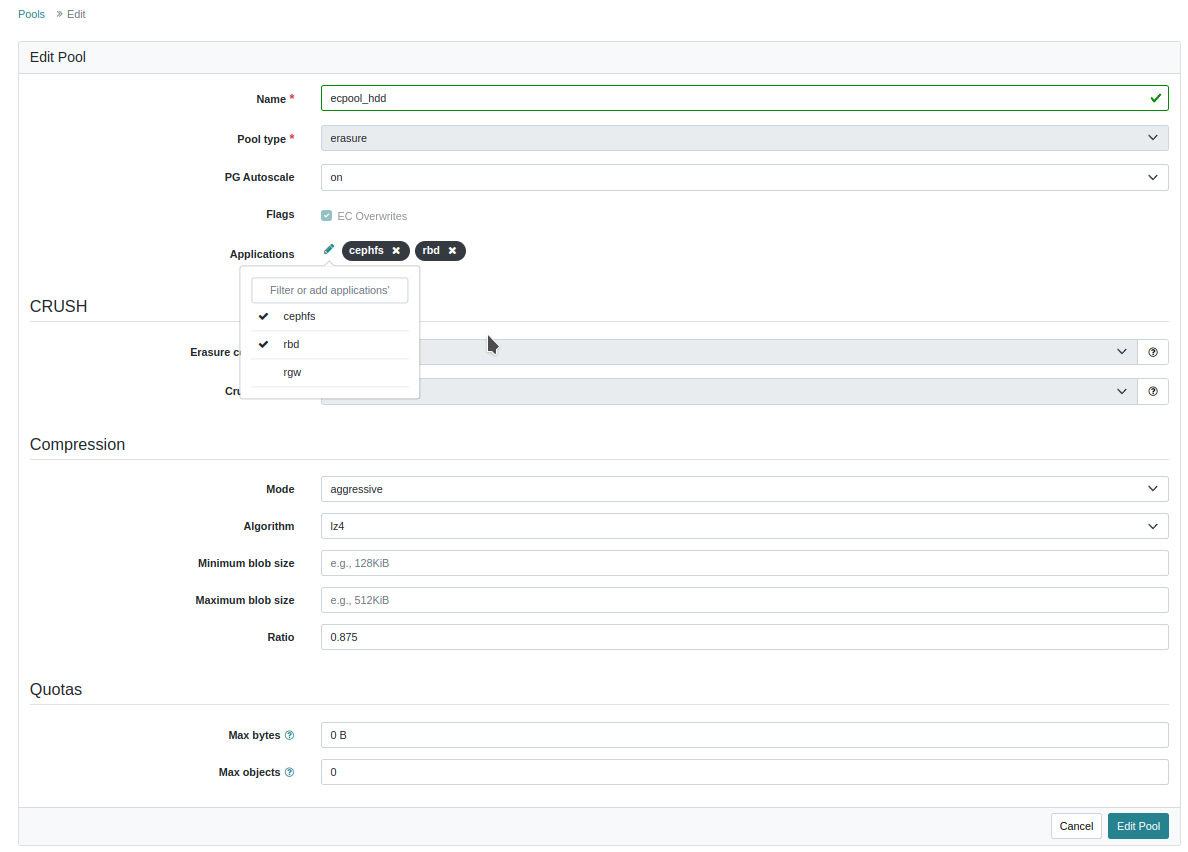
On Wed, Apr 19, 2023 at 5:57 PM Reto Gysi <rlgysi@gmail.com> wrote:
Hi,
Am Mi., 19. Apr. 2023 um 11:02 Uhr schrieb Ilya Dryomov <idryomov@gmail.com>:
On Wed, Apr 19, 2023 at 10:29 AM Reto Gysi <rlgysi@gmail.com> wrote:
yes, I used the same ecpool_hdd also for cephfs file systems. The new pool ecpool_test I've created for a test, I've also created it with application profile 'cephfs', but there aren't any cephfs filesystem attached to it.
This is not and has never been supported.
Do you mean 1) using the same erasure coded pool for both rbd and cephfs, or 2) multiple cephfs filesystem using the same erasure coded pool via ceph.dir.layout.pool="ecpool_hdd"?
(1), using the same EC pool for both RBD and CephFS.
1)
2) rgysi cephfs filesystem rgysi - 5 clients ===== RANK STATE MDS ACTIVITY DNS INOS DIRS CAPS 0 active rgysi.debian.uhgqen Reqs: 0 /s 409k 408k 40.8k 16.5k POOL TYPE USED AVAIL cephfs.rgysi.meta metadata 1454M 2114G cephfs.rgysi.data data 4898G 17.6T ecpool_hdd data 29.3T 29.6T
root@zephir:~# getfattr -n ceph.dir.layout /home/rgysi/am/ecpool/ getfattr: Removing leading '/' from absolute path names # file: home/rgysi/am/ecpool/ ceph.dir.layout="stripe_unit=4194304 stripe_count=1 object_size=4194304 pool=ecpool_hdd"
root@zephir:~#
backups cephfs filesystem backups - 2 clients ======= RANK STATE MDS ACTIVITY DNS INOS DIRS CAPS 0 active backups.debian.runngh Reqs: 0 /s 253k 253k 21.3k 899 POOL TYPE USED AVAIL cephfs.backups.meta metadata 1364M 2114G cephfs.backups.data data 16.7T 16.4T ecpool_hdd data 29.3T 29.6T
root@zephir:~# getfattr -n ceph.dir.layout /mnt/backups/windows/windows-drives/ getfattr: Removing leading '/' from absolute path names # file: mnt/backups/windows/windows-drives/ ceph.dir.layout="stripe_unit=4194304 stripe_count=1 object_size=4194304 pool=ecpool_hdd"
root@zephir:~#
So I guess I should use a different ec datapool for rbd and for each of the cephfs filesystems in the future, correct?
Definitely a different EC pool for RBD (i.e. don't mix with CephFS). Not sure about the _each_ of the filesystems bit -- Venky or Patrick can comment on whether sharing an EC pool between filesystems is OK. Thanks, Ilya
Hi Ilya, Ok, I've migrated the ceph-dev image to a separate ecpool for rbd and now the backup works fine again. root@zephir:~# umount /opt/ceph-dev root@zephir:~# rbd unmap ceph-dev root@zephir:~# rbd migration prepare --data-pool rbd_ecpool ceph-dev root@zephir:~# rbd migration execute ceph-dev Image migration: 100% complete...done. root@zephir:~# rbd migration commit ceph-dev Commit image migration: 100% complete...done. root@zephir:~# rbd map ceph-dev /dev/rbd1 root@zephir:~# mount /opt/ceph-dev/ root@zephir:~# ls -l /opt/ceph-dev/ < files are there> root@zephir:~# rbd snap create ceph-dev@backup Creating snap: 100% complete...done. root@zephir:~# rbd snap ls ceph-dev SNAPID NAME SIZE PROTECTED TIMESTAMP 4 ceph-dev_2023-03-05T02:00:09.030+01:00 10 GiB Wed Apr 19 18:41:39 2023 5 ceph-dev_2023-03-06T02:00:03.832+01:00 10 GiB Wed Apr 19 18:41:40 2023 6 ceph-dev_2023-04-05T03:22:01.315+02:00 10 GiB Wed Apr 19 18:41:41 2023 7 ceph-dev_2023-04-05T03:35:56.748+02:00 10 GiB Wed Apr 19 18:41:45 2023 8 ceph-dev_2023-04-05T03:37:23.778+02:00 10 GiB Wed Apr 19 18:41:46 2023 9 ceph-dev_2023-04-06T02:00:06.159+02:00 10 GiB Wed Apr 19 18:41:47 2023 10 ceph-dev_2023-04-07T02:00:05.913+02:00 10 GiB Wed Apr 19 18:41:50 2023 11 ceph-dev_2023-04-08T02:00:06.534+02:00 10 GiB Wed Apr 19 18:41:51 2023 12 ceph-dev_2023-04-09T02:00:06.430+02:00 10 GiB Wed Apr 19 18:41:52 2023 13 ceph-dev_2023-04-11T02:00:09.750+02:00 10 GiB Wed Apr 19 18:41:53 2023 14 ceph-dev_2023-04-12T02:00:09.528+02:00 10 GiB Wed Apr 19 18:41:54 2023 15 backup 10 GiB Wed Apr 19 18:50:04 2023 root@zephir:~# root@zephir:~# rbd info ceph-dev rbd image 'ceph-dev': size 10 GiB in 2560 objects order 22 (4 MiB objects) snapshot_count: 12 id: 26027367d55572 data_pool: rbd_ecpool block_name_prefix: rbd_data.7.26027367d55572 format: 2 features: layering, exclusive-lock, object-map, fast-diff, deep-flatten, data-pool op_features: flags: create_timestamp: Wed Apr 19 18:41:38 2023 access_timestamp: Wed Apr 19 18:41:38 2023 modify_timestamp: Wed Apr 19 18:41:38 2023 root@zephir:~# Thank you very much. So I will wait and see if Venky or Shankar give feedback if the 2 cephfs file systems should use different ec pools Thanks & Cheers Reto Am Mi., 19. Apr. 2023 um 18:04 Uhr schrieb Ilya Dryomov <idryomov@gmail.com
:
On Wed, Apr 19, 2023 at 5:57 PM Reto Gysi <rlgysi@gmail.com> wrote:
Hi,
Am Mi., 19. Apr. 2023 um 11:02 Uhr schrieb Ilya Dryomov <
On Wed, Apr 19, 2023 at 10:29 AM Reto Gysi <rlgysi@gmail.com> wrote:
yes, I used the same ecpool_hdd also for cephfs file systems. The new
idryomov@gmail.com>: pool ecpool_test I've created for a test, I've also created it with application profile 'cephfs', but there aren't any cephfs filesystem attached to it.
This is not and has never been supported.
Do you mean 1) using the same erasure coded pool for both rbd and cephfs, or 2) multiple cephfs filesystem using the same erasure coded pool via ceph.dir.layout.pool="ecpool_hdd"?
(1), using the same EC pool for both RBD and CephFS.
1)
2) rgysi cephfs filesystem rgysi - 5 clients ===== RANK STATE MDS ACTIVITY DNS INOS DIRS
0 active rgysi.debian.uhgqen Reqs: 0 /s 409k 408k 40.8k 16.5k POOL TYPE USED AVAIL cephfs.rgysi.meta metadata 1454M 2114G cephfs.rgysi.data data 4898G 17.6T ecpool_hdd data 29.3T 29.6T
root@zephir:~# getfattr -n ceph.dir.layout /home/rgysi/am/ecpool/ getfattr: Removing leading '/' from absolute path names # file: home/rgysi/am/ecpool/ ceph.dir.layout="stripe_unit=4194304 stripe_count=1 object_size=4194304
CAPS pool=ecpool_hdd"
root@zephir:~#
backups cephfs filesystem backups - 2 clients ======= RANK STATE MDS ACTIVITY DNS INOS DIRS
0 active backups.debian.runngh Reqs: 0 /s 253k 253k 21.3k 899 POOL TYPE USED AVAIL cephfs.backups.meta metadata 1364M 2114G cephfs.backups.data data 16.7T 16.4T ecpool_hdd data 29.3T 29.6T
root@zephir:~# getfattr -n ceph.dir.layout /mnt/backups/windows/windows-drives/ getfattr: Removing leading '/' from absolute path names # file: mnt/backups/windows/windows-drives/ ceph.dir.layout="stripe_unit=4194304 stripe_count=1 object_size=4194304
CAPS pool=ecpool_hdd"
root@zephir:~#
So I guess I should use a different ec datapool for rbd and for each of
the cephfs filesystems in the future, correct?
Definitely a different EC pool for RBD (i.e. don't mix with CephFS). Not sure about the _each_ of the filesystems bit -- Venky or Patrick can comment on whether sharing an EC pool between filesystems is OK.
Thanks,
Ilya
Hi Reto, On Wed, Apr 19, 2023 at 9:34 PM Ilya Dryomov <idryomov@gmail.com> wrote:
On Wed, Apr 19, 2023 at 5:57 PM Reto Gysi <rlgysi@gmail.com> wrote:
Hi,
Am Mi., 19. Apr. 2023 um 11:02 Uhr schrieb Ilya Dryomov <idryomov@gmail.com>:
On Wed, Apr 19, 2023 at 10:29 AM Reto Gysi <rlgysi@gmail.com> wrote:
yes, I used the same ecpool_hdd also for cephfs file systems. The new pool ecpool_test I've created for a test, I've also created it with application profile 'cephfs', but there aren't any cephfs filesystem attached to it.
This is not and has never been supported.
Do you mean 1) using the same erasure coded pool for both rbd and cephfs, or 2) multiple cephfs filesystem using the same erasure coded pool via ceph.dir.layout.pool="ecpool_hdd"?
(1), using the same EC pool for both RBD and CephFS.
1)
2) rgysi cephfs filesystem rgysi - 5 clients ===== RANK STATE MDS ACTIVITY DNS INOS DIRS CAPS 0 active rgysi.debian.uhgqen Reqs: 0 /s 409k 408k 40.8k 16.5k POOL TYPE USED AVAIL cephfs.rgysi.meta metadata 1454M 2114G cephfs.rgysi.data data 4898G 17.6T ecpool_hdd data 29.3T 29.6T
root@zephir:~# getfattr -n ceph.dir.layout /home/rgysi/am/ecpool/ getfattr: Removing leading '/' from absolute path names # file: home/rgysi/am/ecpool/ ceph.dir.layout="stripe_unit=4194304 stripe_count=1 object_size=4194304 pool=ecpool_hdd"
root@zephir:~#
backups cephfs filesystem backups - 2 clients ======= RANK STATE MDS ACTIVITY DNS INOS DIRS CAPS 0 active backups.debian.runngh Reqs: 0 /s 253k 253k 21.3k 899 POOL TYPE USED AVAIL cephfs.backups.meta metadata 1364M 2114G cephfs.backups.data data 16.7T 16.4T ecpool_hdd data 29.3T 29.6T
root@zephir:~# getfattr -n ceph.dir.layout /mnt/backups/windows/windows-drives/ getfattr: Removing leading '/' from absolute path names # file: mnt/backups/windows/windows-drives/ ceph.dir.layout="stripe_unit=4194304 stripe_count=1 object_size=4194304 pool=ecpool_hdd"
root@zephir:~#
So I guess I should use a different ec datapool for rbd and for each of the cephfs filesystems in the future, correct?
Definitely a different EC pool for RBD (i.e. don't mix with CephFS). Not sure about the _each_ of the filesystems bit -- Venky or Patrick can comment on whether sharing an EC pool between filesystems is OK.
That's true for CephFS too -- different pools for each ceph file system is recommended. You can use the `--allow-dangerous-metadata-overlay` option when creating a ceph file system to reuse metadata and data pools if those are already in use, however, it's only to be used during emergency situations.
Thanks,
Ilya
-- Cheers, Venky
Ok, thanks Venky! Am Do., 20. Apr. 2023 um 06:12 Uhr schrieb Venky Shankar < vshankar@redhat.com>:
Hi Reto,
On Wed, Apr 19, 2023 at 9:34 PM Ilya Dryomov <idryomov@gmail.com> wrote:
On Wed, Apr 19, 2023 at 5:57 PM Reto Gysi <rlgysi@gmail.com> wrote:
Hi,
Am Mi., 19. Apr. 2023 um 11:02 Uhr schrieb Ilya Dryomov <
idryomov@gmail.com>:
On Wed, Apr 19, 2023 at 10:29 AM Reto Gysi <rlgysi@gmail.com> wrote:
yes, I used the same ecpool_hdd also for cephfs file systems. The
new pool ecpool_test I've created for a test, I've also created it with application profile 'cephfs', but there aren't any cephfs filesystem attached to it.
This is not and has never been supported.
Do you mean 1) using the same erasure coded pool for both rbd and cephfs, or 2) multiple cephfs filesystem using the same erasure coded pool via ceph.dir.layout.pool="ecpool_hdd"?
(1), using the same EC pool for both RBD and CephFS.
1)
2) rgysi cephfs filesystem rgysi - 5 clients ===== RANK STATE MDS ACTIVITY DNS INOS DIRS
CAPS
0 active rgysi.debian.uhgqen Reqs: 0 /s 409k 408k 40.8k 16.5k POOL TYPE USED AVAIL cephfs.rgysi.meta metadata 1454M 2114G cephfs.rgysi.data data 4898G 17.6T ecpool_hdd data 29.3T 29.6T
root@zephir:~# getfattr -n ceph.dir.layout /home/rgysi/am/ecpool/ getfattr: Removing leading '/' from absolute path names # file: home/rgysi/am/ecpool/ ceph.dir.layout="stripe_unit=4194304 stripe_count=1 object_size=4194304 pool=ecpool_hdd"
root@zephir:~#
backups cephfs filesystem backups - 2 clients ======= RANK STATE MDS ACTIVITY DNS INOS DIRS CAPS 0 active backups.debian.runngh Reqs: 0 /s 253k 253k 21.3k 899 POOL TYPE USED AVAIL cephfs.backups.meta metadata 1364M 2114G cephfs.backups.data data 16.7T 16.4T ecpool_hdd data 29.3T 29.6T
root@zephir:~# getfattr -n ceph.dir.layout /mnt/backups/windows/windows-drives/ getfattr: Removing leading '/' from absolute path names # file: mnt/backups/windows/windows-drives/ ceph.dir.layout="stripe_unit=4194304 stripe_count=1 object_size=4194304 pool=ecpool_hdd"
root@zephir:~#
So I guess I should use a different ec datapool for rbd and for each of the cephfs filesystems in the future, correct?
Definitely a different EC pool for RBD (i.e. don't mix with CephFS). Not sure about the _each_ of the filesystems bit -- Venky or Patrick can comment on whether sharing an EC pool between filesystems is OK.
That's true for CephFS too -- different pools for each ceph file system is recommended.
You can use the `--allow-dangerous-metadata-overlay` option when creating a ceph file system to reuse metadata and data pools if those are already in use, however, it's only to be used during emergency situations.
Thanks,
Ilya
-- Cheers, Venky
You don't seem to specify a pool name to the snap create command, does your rbd_default_pool match the desired pool? And also does rbd_default_data_pool match what you expect (if those values are even set)? I've never used custom values for those configs but if you don't specify a pool name the default name "rbd" is expected by ceph. At least that's how I know it. Zitat von Reto Gysi <rlgysi@gmail.com>:
Hi Ilya
Sure.
root@zephir:~# rbd snap create ceph-dev@backup --id admin --debug-ms 1 --debug-rbd 20 >/home/rgysi/log.txt 2>&1 root@zephir:~#
Am Di., 18. Apr. 2023 um 16:19 Uhr schrieb Ilya Dryomov <idryomov@gmail.com
:
On Tue, Apr 18, 2023 at 3:21 PM Reto Gysi <rlgysi@gmail.com> wrote:
Hi,
Yes both snap create commands were executed as user admin: client.admin caps: [mds] allow * caps: [mgr] allow * caps: [mon] allow * caps: [osd] allow *
deep scrubbing+repair of ecpool_hdd is still ongoing, but so far the problem still exists
Hi Reto,
Deep scrubbing is unlikely to help with a "Operation not supported" error.
I really doubt that the output that you attached in one of the previous emails is all that is logged. Even in the successful case, there is not a single RBD-related debug log. I would suggest repeating the test with an explicit redirection and attaching the file itself.
Thanks,
Ilya
Hi Eugen Yes, I used the default setting of rbd_default_pool='rbd'. I don't have anything set for default_data_pool. root@zephir:~# ceph config show-with-defaults mon.zephir | grep -E "default(_data)*_pool" osd_default_data_pool_replay_window 45 default rbd_default_data_pool default rbd_default_pool rbd default root@zephir:~# If I don't specify a data-pool during 'ceph create <image>' it will create the image with pool 'rbd' and without a separate data pool. pool 'rbd' is a replica 3 pool. adding '-p rbd' to the snap create command doesn't change/fix the error: root@zephir:~# rbd -p rbd snap create ceph-dev@backup --id admin --debug-ms 1 --debug-rbd 20 2023-04-18T19:25:23.002+0200 7f1a036ff4c0 1 Processor -- start 2023-04-18T19:25:23.002+0200 7f1a036ff4c0 1 -- start start 2023-04-18T19:25:23.002+0200 7f1a036ff4c0 1 --2- >> [v2: 192.168.1.10:3300/0,v1:192.168.1.10:6789/0] conn(0x56151b58f2b0 0x56151b58f680 unknown :-1 s=NONE pgs=0 cs=0 l=0 rev1=0 crypto rx=0 tx=0 comp rx=0 tx=0).connect 2023-04-18T19:25:23.002+0200 7f1a036ff4c0 1 --2- >> [v2: 192.168.1.1:3300/0,v1:192.168.1.1:6789/0] conn(0x56151b58fc50 0x56151b598320 unknown :-1 s=NONE pgs=0 cs=0 l=0 rev1=0 crypto rx=0 tx=0 comp rx=0 tx=0).connect 2023-04-18T19:25:23.002+0200 7f1a036ff4c0 1 --2- >> [v2: 192.168.43.208:3300/0,v1:192.168.43.208:6789/0] conn(0x56151b598860 0x56151b59ac40 unknown :-1 s=NONE pgs=0 cs=0 l=0 rev1=0 crypto rx=0 tx=0 comp rx=0 tx=0).connect 2023-04-18T19:25:23.002+0200 7f1a036ff4c0 1 -- --> [v2: 192.168.1.1:3300/0,v1:192.168.1.1:6789/0] -- mon_getmap magic: 0 v1 -- 0x56151b47cb70 con 0x56151b58fc50 2023-04-18T19:25:23.002+0200 7f1a036ff4c0 1 -- --> [v2: 192.168.1.10:3300/0,v1:192.168.1.10:6789/0] -- mon_getmap magic: 0 v1 -- 0x56151b4761b0 con 0x56151b58f2b0 2023-04-18T19:25:23.002+0200 7f1a036ff4c0 1 -- --> [v2: 192.168.43.208:3300/0,v1:192.168.43.208:6789/0] -- mon_getmap magic: 0 v1 -- 0x56151b412680 con 0x56151b598860 2023-04-18T19:25:23.002+0200 7f19f8d43700 1 --2- >> [v2: 192.168.1.1:3300/0,v1:192.168.1.1:6789/0] conn(0x56151b58fc50 0x56151b598320 unknown :-1 s=BANNER_CONNECTING pgs=0 cs=0 l=0 rev1=0 crypto rx=0 tx=0 comp rx=0 tx=0)._handle_peer_banner_payload supporte d=3 required=0 2023-04-18T19:25:23.002+0200 7f1a01544700 1 --2- >> [v2: 192.168.1.10:3300/0,v1:192.168.1.10:6789/0] conn(0x56151b58f2b0 0x56151b58f680 unknown :-1 s=BANNER_CONNECTING pgs=0 cs=0 l=0 rev1=0 crypto rx=0 tx=0 comp rx=0 tx=0)._handle_peer_banner_payload suppor ted=3 required=0 2023-04-18T19:25:23.002+0200 7f19f8d43700 1 --2- >> [v2: 192.168.1.1:3300/0,v1:192.168.1.1:6789/0] conn(0x56151b58fc50 0x56151b598320 unknown :-1 s=HELLO_CONNECTING pgs=0 cs=0 l=0 rev1=1 crypto rx=0 tx=0 comp rx=0 tx=0).handle_hello peer v2:192.168.1.1:3300 /0 says I am v2:192.168.1.1:35346/0 (socket says 192.168.1.1:35346) 2023-04-18T19:25:23.002+0200 7f19f8d43700 1 -- 192.168.1.1:0/2631157109 learned_addr learned my addr 192.168.1.1:0/2631157109 (peer_addr_for_me v2: 192.168.1.1:0/0) 2023-04-18T19:25:23.002+0200 7f1a01544700 1 -- 192.168.1.1:0/2631157109 >> [v2:192.168.43.208:3300/0,v1:192.168.43.208:6789/0] conn(0x56151b598860 msgr2=0x56151b59ac40 unknown :-1 s=STATE_CONNECTING_RE l=0).mark_down 2023-04-18T19:25:23.002+0200 7f1a01544700 1 --2- 192.168.1.1:0/2631157109
[v2:192.168.43.208:3300/0,v1:192.168.43.208:6789/0] conn(0x56151b598860 0x56151b59ac40 unknown :-1 s=START_CONNECT pgs=0 cs=0 l=0 rev1=0 crypto rx=0 tx=0 comp rx=0 tx=0).stop 2023-04-18T19:25:23.002+0200 7f1a01544700 1 -- 192.168.1.1:0/2631157109 >> [v2:192.168.1.1:3300/0,v1:192.168.1.1:6789/0] conn(0x56151b58fc50 msgr2=0x56151b598320 unknown :-1 s=STATE_CONNECTION_ESTABLISHED l=0).mark_down 2023-04-18T19:25:23.002+0200 7f1a01544700 1 --2- 192.168.1.1:0/2631157109 [v2:192.168.1.1:3300/0,v1:192.168.1.1:6789/0] conn(0x56151b58fc50 0x56151b598320 unknown :-1 s=AUTH_CONNECTING pgs=0 cs=0 l=0 rev1=1 crypto rx=0 tx=0 comp rx=0 tx=0).stop 2023-04-18T19:25:23.002+0200 7f1a01544700 1 -- 192.168.1.1:0/2631157109 --> [v2:192.168.1.10:3300/0,v1:192.168.1.10:6789/0] -- mon_subscribe({config=0+,monmap=0+}) v3 -- 0x56151b41d7f0 con 0x56151b58f2b0 2023-04-18T19:25:23.002+0200 7f19f8d43700 1 --2- 192.168.1.1:0/2631157109 [v2:192.168.1.1:3300/0,v1:192.168.1.1:6789/0] conn(0x56151b58fc50 0x56151b598320 unknown :-1 s=CLOSED pgs=0 cs=0 l=0 rev1=1 crypto rx=0 tx=0 comp rx=0 tx=0).handle_auth_done state changed! 2023-04-18T19:25:23.002+0200 7f1a01544700 1 --2- 192.168.1.1:0/2631157109 [v2:192.168.1.10:3300/0,v1:192.168.1.10:6789/0] conn(0x56151b58f2b0 0x56151b58f680 secure :-1 s=READY pgs=214 cs=0 l=1 rev1=1 crypto rx=0x7f19f400a5d0 tx=0x7f19f4005d40 comp rx=0 t x=0).ready entity=mon.1 client_cookie=a9059b943a3e6f58 server_cookie=0 in_seq=0 out_seq=0 2023-04-18T19:25:23.002+0200 7f1a00d43700 1 -- 192.168.1.1:0/2631157109 <== mon.1 v2:192.168.1.10:3300/0 1 ==== mon_map magic: 0 v1 ==== 467+0+0 (secure 0 0 0) 0x7f19f400f590 con 0x56151b58f2b0 2023-04-18T19:25:23.002+0200 7f1a00d43700 1 -- 192.168.1.1:0/2631157109 <== mon.1 v2:192.168.1.10:3300/0 2 ==== config(40 keys) v1 ==== 1486+0+0 (secure 0 0 0) 0x7f19f400fd30 con 0x56151b58f2b0 2023-04-18T19:25:23.002+0200 7f1a00d43700 1 -- 192.168.1.1:0/2631157109 <== mon.1 v2:192.168.1.10:3300/0 3 ==== mon_map magic: 0 v1 ==== 467+0+0 (secure 0 0 0) 0x7f19f400e880 con 0x56151b58f2b0 Creating snap: 10% complete...failed. rbd: failed to create snapshot: (95) Operation not supported root@zephir:~#
BTW: I'm running Debian 11, with Kernel 6.1.12 if that matters root@zephir:~# uname -a Linux zephir 6.1.12 #5 SMP PREEMPT_DYNAMIC Mon Mar 27 16:36:27 CEST 2023 x86_64 GNU/Linux root@zephir:~# cat /etc/debian_version 11.6 root@zephir:~# Am Di., 18. Apr. 2023 um 19:01 Uhr schrieb Eugen Block <eblock@nde.ag>:
You don't seem to specify a pool name to the snap create command, does your rbd_default_pool match the desired pool? And also does rbd_default_data_pool match what you expect (if those values are even set)? I've never used custom values for those configs but if you don't specify a pool name the default name "rbd" is expected by ceph. At least that's how I know it.
Zitat von Reto Gysi <rlgysi@gmail.com>:
Hi Ilya
Sure.
root@zephir:~# rbd snap create ceph-dev@backup --id admin --debug-ms 1 --debug-rbd 20 >/home/rgysi/log.txt 2>&1 root@zephir:~#
Am Di., 18. Apr. 2023 um 16:19 Uhr schrieb Ilya Dryomov < idryomov@gmail.com
:
On Tue, Apr 18, 2023 at 3:21 PM Reto Gysi <rlgysi@gmail.com> wrote:
Hi,
Yes both snap create commands were executed as user admin: client.admin caps: [mds] allow * caps: [mgr] allow * caps: [mon] allow * caps: [osd] allow *
deep scrubbing+repair of ecpool_hdd is still ongoing, but so far the problem still exists
Hi Reto,
Deep scrubbing is unlikely to help with a "Operation not supported" error.
I really doubt that the output that you attached in one of the previous emails is all that is logged. Even in the successful case, there is not a single RBD-related debug log. I would suggest repeating the test with an explicit redirection and attaching the file itself.
Thanks,
Ilya
participants (5)
-
Chris Palmer
-
Eugen Block
-
Ilya Dryomov
-
Reto Gysi
-
Venky Shankar