tuning for backup target cluster
Hi Everyone, I'm putting together a HDD cluster with an ECC pool dedicated to the backup environment. Traffic via s3. Version 18.2, 7 OSD nodes, 12 * 12TB HDD + 1NVME each, 4+2 ECC pool. Wondering if there is some general guidance for startup setup/tuning in regards to s3 object size. Files are read from fast storage (SSD/NVME) and written to s3. Files sizes are 10MB-1TB, so it's not standard s3. traffic. Backup for big files took hours to complete. My first shot would be to increase default bluestore_min_alloc_size_hdd, to reduce the number of stored objects, but I'm not sure if it's a good direccion? Any other parameters worth checking to support such a traffic pattern? Thanks! -- Łukasz
Hi Everyone,
I'm putting together a HDD cluster with an ECC pool dedicated to the backup environment. Traffic via s3. Version 18.2, 7 OSD nodes, 12 * 12TB HDD + 1NVME each,
QLC, man. QLC. That said, I hope you're going to use that single NVMe SSD for at least the index pool. Is this a chassis with universal slots, or is that NVMe device maybe M.2 or rear-cage?
Wondering if there is some general guidance for startup setup/tuning in regards to s3 object size.
Small objects are the devil of any object storage system.
Files are read from fast storage (SSD/NVME) and written to s3. Files sizes are 10MB-1TB, so it's not standard s3. traffic.
Nothing nonstandard about that, though your 1TB objects presumably are going to be MPU. Having the .buckets.non-ec pool on HDD with objects that large might be really slow to assemble them, you might need to increase timeouts but I'm speculating.
Backup for big files took hours to complete.
Spinners gotta spin. They're a false economy.
My first shot would be to increase default bluestore_min_alloc_size_hdd, to reduce the number of stored objects, but I'm not sure if it's a good direccion?
With that workload you *could* increase that to like 64KB, but I don't think it'd gain you much.
Any other parameters worth checking to support such a traffic pattern?
`ceph df` `ceph osd dump | grep pool` So we can see what's going on HDD and what's on NVMe.
Thanks!
-- Łukasz _______________________________________________ ceph-users mailing list -- ceph-users@ceph.io To unsubscribe send an email to ceph-users-leave@ceph.io
So a few questions I have around this. What is the network you have for this cluster? Changing the bluestone_min_alloc_size would be the last thing I would even consider. In fact I wouldn’t be changing it as you are in untested territory. The challenge with making these sort of things perform is to generate lots of parallel streams so what ever is doing the uploading needs to be doing parallel multipart uploads. There is no mention of the uploading code that is being used. So with 7 Nodes each with 12 Disks and doing large files like this I would be expecting to see 50-70MB/s per useable HDD. By useable I mean if you are doing Replicas then you would divide the number of disks by the replica number or in your case with EC I would be diving the number of disks by the EC size and multiplying by the data part. So divide by 6 and multiply by 4. So allowing for EC overhead you in theory could get beyond 2.8GBytes/s That is the theoretical disk limit I would be looking to exceed. So now you have the question of do you have enough streams running in parallel? Have you tried a benchmarking tool such as minio warp to see what it can achieve. You haven’t mentioned the number of PG’s you have for each of the pools in question. You need to ensure that every pool that is being used has more PG’s that the number of disks. If that’s not the case then individual disks could be slowing things down. You also have the metadata pools used by RGW that ideally need to be on NVME. Because you are using EC then there is the buckets.non-ec pool which is used to manage the OMAPS for the multipart uploads this is usually down at 8 PG’s and that will be limiting things as well. Darren Soothill Want a meeting with me: https://calendar.app.google/MUdgrLEa7jSba3du9 Looking for help with your Ceph cluster? Contact us at https://croit.io/ croit GmbH, Freseniusstr. 31h, 81247 Munich CEO: Martin Verges - VAT-ID: DE310638492 Com. register: Amtsgericht Munich HRB 231263 Web: https://croit.io/ | YouTube: https://goo.gl/PGE1Bx
On 25 May 2024, at 14:56, Anthony D'Atri <aad@dreamsnake.net> wrote:
Hi Everyone,
I'm putting together a HDD cluster with an ECC pool dedicated to the backup environment. Traffic via s3. Version 18.2, 7 OSD nodes, 12 * 12TB HDD + 1NVME each,
QLC, man. QLC. That said, I hope you're going to use that single NVMe SSD for at least the index pool. Is this a chassis with universal slots, or is that NVMe device maybe M.2 or rear-cage?
Wondering if there is some general guidance for startup setup/tuning in regards to s3 object size.
Small objects are the devil of any object storage system.
Files are read from fast storage (SSD/NVME) and written to s3. Files sizes are 10MB-1TB, so it's not standard s3. traffic.
Nothing nonstandard about that, though your 1TB objects presumably are going to be MPU. Having the .buckets.non-ec pool on HDD with objects that large might be really slow to assemble them, you might need to increase timeouts but I'm speculating.
Backup for big files took hours to complete.
Spinners gotta spin. They're a false economy.
My first shot would be to increase default bluestore_min_alloc_size_hdd, to reduce the number of stored objects, but I'm not sure if it's a good direccion?
With that workload you *could* increase that to like 64KB, but I don't think it'd gain you much.
Any other parameters worth checking to support such a traffic pattern?
`ceph df` `ceph osd dump | grep pool`
So we can see what's going on HDD and what's on NVMe.
Thanks!
-- Łukasz _______________________________________________ ceph-users mailing list -- ceph-users@ceph.io To unsubscribe send an email to ceph-users-leave@ceph.io
_______________________________________________ ceph-users mailing list -- ceph-users@ceph.io To unsubscribe send an email to ceph-users-leave@ceph.io
Anthony, Darren Thanks for response. Answering your questions: What is the network you have for this cluster? 25GB/s
Is this a chassis with universal slots, or is that NVMe device maybe M.2 or rear-cage?
12 * HDD via LSI jbod + 1 PCI NVME. Now it's 1.6TB, for the production plan is to use 3.2TB. `ceph df`
`ceph osd dump | grep pool` So we can see what's going on HDD and what's on NVMe.
--- RAW STORAGE --- CLASS SIZE AVAIL USED RAW USED %RAW USED hdd 703 TiB 587 TiB 116 TiB 116 TiB 16.51 TOTAL 703 TiB 587 TiB 116 TiB 116 TiB 16.51 --- POOLS --- POOL ID PGS STORED OBJECTS USED %USED MAX AVAIL default.rgw.meta 52 64 6.0 KiB 13 131 KiB 0 177 TiB .mgr 54 32 28 MiB 8 83 MiB 0 177 TiB .rgw.root 55 64 2.0 KiB 4 48 KiB 0 177 TiB default.rgw.control 56 64 0 B 8 0 B 0 177 TiB default.rgw.buckets.index 59 32 34 MiB 33 102 MiB 0 177 TiB default.rgw.log 63 32 3.6 KiB 209 408 KiB 0 177 TiB default.rgw.buckets.non-ec 65 32 44 MiB 40 133 MiB 0 177 TiB 4_2_EC 67 1024 71 TiB 18.61M 106 TiB 16.61 355 TiB # ceph osd dump | grep pool pool 52 'default.rgw.meta' replicated size 3 min_size 2 crush_rule 6 object_hash rjenkins pg_num 64 pgp_num 64 autoscale_mode off last_change 18206 lfor 0/0/13123 flags hashpspool stripe_width 0 application rgw read_balance_score 5.27 pool 54 '.mgr' replicated size 3 min_size 2 crush_rule 6 object_hash rjenkins pg_num 32 pgp_num 32 autoscale_mode off last_change 18206 lfor 0/0/13186 flags hashpspool stripe_width 0 pg_num_max 32 pg_num_min 1 application mgr read_balance_score 5.25 pool 55 '.rgw.root' replicated size 3 min_size 2 crush_rule 6 object_hash rjenkins pg_num 64 pgp_num 64 autoscale_mode off last_change 18206 lfor 0/0/13191 flags hashpspool stripe_width 0 application rgw read_balance_score 3.92 pool 56 'default.rgw.control' replicated size 3 min_size 2 crush_rule 6 object_hash rjenkins pg_num 64 pgp_num 64 autoscale_mode off last_change 18206 lfor 0/0/13200 flags hashpspool stripe_width 0 application rgw read_balance_score 6.55 pool 59 'default.rgw.buckets.index' replicated size 3 min_size 2 crush_rule 6 object_hash rjenkins pg_num 32 pgp_num 32 autoscale_mode on last_change 18206 lfor 0/0/13594 flags hashpspool stripe_width 0 pg_autoscale_bias 4 application rgw read_balance_score 5.27 pool 63 'default.rgw.log' replicated size 3 min_size 2 crush_rule 6 object_hash rjenkins pg_num 32 pgp_num 32 autoscale_mode on last_change 18397 lfor 0/0/18386 flags hashpspool stripe_width 0 application rgw read_balance_score 10.56 pool 65 'default.rgw.buckets.non-ec' replicated size 3 min_size 2 crush_rule 6 object_hash rjenkins pg_num 32 pgp_num 32 autoscale_mode on last_change 18923 lfor 0/0/18921 flags hashpspool stripe_width 0 application rgw read_balance_score 7.89 pool 67 '4_2_EC' erasure profile 4_2 size 6 min_size 5 crush_rule 13 object_hash rjenkins pg_num 1024 pgp_num 1024 autoscale_mode off last_change 23570 flags hashpspool stripe_width 16384 application rgw You also have the metadata pools used by RGW that ideally need to be on
NVME. Because you are using EC then there is the buckets.non-ec pool which is used to manage the OMAPS for the multipart uploads this is usually down at 8 PG’s and that will be limiting things as well.
This part is very interesting. Some time ago I asked a similar question here <https://lists.ceph.io/hyperkitty/list/ceph-users@ceph.io/thread/YPHI5MF2CBQ2C7KYOJFG32A7N5HF2BXS/#7I6UDHWUK23JCKZSK25VXTRQYEDRFCPY>. Conclusion was that the index is covered by a bluestore. Should we consider removing a few HDDs and replacing them with SSD to non-ec pool? So now you have the question of do you have enough streams running in
parallel? Have you tried a benchmarking tool such as minio warp to see what it can achieve.
I think so, warp shows 1.6GiB/s for 20GB objects in 50 streams - acceptable. Changing the bluestone_min_alloc_size would be the last thing I would even
consider. In fact I wouldn’t be changing it as you are in untested territory.
ACK! :) Thanks! On Mon, 27 May 2024 at 09:27, Darren Soothill <darren.soothill@croit.io> wrote:
So a few questions I have around this.
What is the network you have for this cluster?
Changing the bluestone_min_alloc_size would be the last thing I would even consider. In fact I wouldn’t be changing it as you are in untested territory.
The challenge with making these sort of things perform is to generate lots of parallel streams so what ever is doing the uploading needs to be doing parallel multipart uploads. There is no mention of the uploading code that is being used.
So with 7 Nodes each with 12 Disks and doing large files like this I would be expecting to see 50-70MB/s per useable HDD. By useable I mean if you are doing Replicas then you would divide the number of disks by the replica number or in your case with EC I would be diving the number of disks by the EC size and multiplying by the data part. So divide by 6 and multiply by 4.
So allowing for EC overhead you in theory could get beyond 2.8GBytes/s That is the theoretical disk limit I would be looking to exceed.
So now you have the question of do you have enough streams running in parallel? Have you tried a benchmarking tool such as minio warp to see what it can achieve.
You haven’t mentioned the number of PG’s you have for each of the pools in question. You need to ensure that every pool that is being used has more PG’s that the number of disks. If that’s not the case then individual disks could be slowing things down.
You also have the metadata pools used by RGW that ideally need to be on NVME.
Because you are using EC then there is the buckets.non-ec pool which is used to manage the OMAPS for the multipart uploads this is usually down at 8 PG’s and that will be limiting things as well.
Darren Soothill
Want a meeting with me: https://calendar.app.google/MUdgrLEa7jSba3du9
Looking for help with your Ceph cluster? Contact us at https://croit.io/
croit GmbH, Freseniusstr. 31h, 81247 Munich CEO: Martin Verges - VAT-ID: DE310638492 Com. register: Amtsgericht Munich HRB 231263 Web: https://croit.io/ | YouTube: https://goo.gl/PGE1Bx
On 25 May 2024, at 14:56, Anthony D'Atri <aad@dreamsnake.net> wrote:
Hi Everyone,
I'm putting together a HDD cluster with an ECC pool dedicated to the backup environment. Traffic via s3. Version 18.2, 7 OSD nodes, 12 * 12TB HDD + 1NVME each,
QLC, man. QLC. That said, I hope you're going to use that single NVMe SSD for at least the index pool. Is this a chassis with universal slots, or is that NVMe device maybe M.2 or rear-cage?
Wondering if there is some general guidance for startup setup/tuning in regards to s3 object size.
Small objects are the devil of any object storage system.
Files are read from fast storage (SSD/NVME) and written to s3. Files sizes are 10MB-1TB, so it's not standard s3. traffic.
Nothing nonstandard about that, though your 1TB objects presumably are going to be MPU. Having the .buckets.non-ec pool on HDD with objects that large might be really slow to assemble them, you might need to increase timeouts but I'm speculating.
Backup for big files took hours to complete.
Spinners gotta spin. They're a false economy.
My first shot would be to increase default bluestore_min_alloc_size_hdd, to reduce the number of stored objects, but I'm not sure if it's a good direccion?
With that workload you *could* increase that to like 64KB, but I don't think it'd gain you much.
Any other parameters worth checking to support such a traffic pattern?
`ceph df` `ceph osd dump | grep pool`
So we can see what's going on HDD and what's on NVMe.
Thanks!
-- Łukasz _______________________________________________ ceph-users mailing list -- ceph-users@ceph.io To unsubscribe send an email to ceph-users-leave@ceph.io
_______________________________________________ ceph-users mailing list -- ceph-users@ceph.io To unsubscribe send an email to ceph-users-leave@ceph.io
-- Łukasz Borek lukasz@borek.org.pl
Is this a chassis with universal slots, or is that NVMe device maybe M.2 or rear-cage?
12 * HDD via LSI jbod + 1 PCI NVME.
All NVMe devices are PCI ;).
Now it's 1.6TB, for the production plan is to use 3.2TB.
`ceph df`
`ceph osd dump | grep pool` So we can see what's going on HDD and what's on NVMe.
--- RAW STORAGE --- CLASS SIZE AVAIL USED RAW USED %RAW USED hdd 703 TiB 587 TiB 116 TiB 116 TiB 16.51 TOTAL 703 TiB 587 TiB 116 TiB 116 TiB 16.51
--- POOLS --- POOL ID PGS STORED OBJECTS USED %USED MAX AVAIL default.rgw.meta 52 64 6.0 KiB 13 131 KiB 0 177 TiB .mgr 54 32 28 MiB 8 83 MiB 0 177 TiB .rgw.root 55 64 2.0 KiB 4 48 KiB 0 177 TiB default.rgw.control 56 64 0 B 8 0 B 0 177 TiB default.rgw.buckets.index 59 32 34 MiB 33 102 MiB 0 177 TiB default.rgw.log 63 32 3.6 KiB 209 408 KiB 0 177 TiB default.rgw.buckets.non-ec 65 32 44 MiB 40 133 MiB 0 177 TiB 4_2_EC 67 1024 71 TiB 18.61M 106 TiB 16.61 355 TiB
So *everything* is on the HDDs? I suggest disabling the pg autoscaler and adjusting your pg_num values. If I calculate correctly `ceph osd df` should show + / - 82 on each OSD. I would target double that number. As a start maybe raise buckets.index and buckets.non-ec to 256.
You also have the metadata pools used by RGW that ideally need to be on
NVME. Because you are using EC then there is the buckets.non-ec pool which is used to manage the OMAPS for the multipart uploads this is usually down at 8 PG’s and that will be limiting things as well.
This part is very interesting. Some time ago I asked a similar question here <https://lists.ceph.io/hyperkitty/list/ceph-users@ceph.io/thread/YPHI5MF2CBQ2C7KYOJFG32A7N5HF2BXS/#7I6UDHWUK23JCKZSK25VXTRQYEDRFCPY>. Conclusion was that the index is covered by a bluestore.
hmmm. Since you don’t have any pools on that single NVMe drive I gather that you’re using it for WAL+DB, and you’ll have ~132GB sliced per OSD? Interesting idea. You’ll want to watch the RocksDB usage on those OSDs to ensure you aren’t spilling onto the slow device.
Should we consider removing a few HDDs and replacing them with SSD to non-ec pool?
So now you have the question of do you have enough streams running in
parallel? Have you tried a benchmarking tool such as minio warp to see what it can achieve.
I think so, warp shows 1.6GiB/s for 20GB objects in 50 streams - acceptable.
Changing the bluestone_min_alloc_size would be the last thing I would even
consider. In fact I wouldn’t be changing it as you are in untested territory.
ACK! :)
It used to be 64KB. Back around Octopus / Pacific it changed to 4KB for both rotational and non-rotational devices, in part due to the space amp that RGW users with small objects experienced: https://docs.google.com/spreadsheets/d/1rpGfScgG-GLoIGMJWDixEkqs-On9w8nAUToPQjN8bDI/edit#gid=358760253 Bluestore Space Amplification Cheat Sheet docs.google.com In your case I don’t think it would hurt to rebuild all of your OSDs with a value of 64KB, but I don’t think with modern code it would buy you much.
Thanks!
On Mon, 27 May 2024 at 09:27, Darren Soothill <darren.soothill@croit.io> wrote:
So a few questions I have around this.
What is the network you have for this cluster?
Changing the bluestone_min_alloc_size would be the last thing I would even consider. In fact I wouldn’t be changing it as you are in untested territory.
The challenge with making these sort of things perform is to generate lots of parallel streams so what ever is doing the uploading needs to be doing parallel multipart uploads. There is no mention of the uploading code that is being used.
So with 7 Nodes each with 12 Disks and doing large files like this I would be expecting to see 50-70MB/s per useable HDD. By useable I mean if you are doing Replicas then you would divide the number of disks by the replica number or in your case with EC I would be diving the number of disks by the EC size and multiplying by the data part. So divide by 6 and multiply by 4.
So allowing for EC overhead you in theory could get beyond 2.8GBytes/s That is the theoretical disk limit I would be looking to exceed.
So now you have the question of do you have enough streams running in parallel? Have you tried a benchmarking tool such as minio warp to see what it can achieve.
You haven’t mentioned the number of PG’s you have for each of the pools in question. You need to ensure that every pool that is being used has more PG’s that the number of disks. If that’s not the case then individual disks could be slowing things down.
You also have the metadata pools used by RGW that ideally need to be on NVME.
Because you are using EC then there is the buckets.non-ec pool which is used to manage the OMAPS for the multipart uploads this is usually down at 8 PG’s and that will be limiting things as well.
Darren Soothill
Want a meeting with me: https://calendar.app.google/MUdgrLEa7jSba3du9
Looking for help with your Ceph cluster? Contact us at https://croit.io/
croit GmbH, Freseniusstr. 31h, 81247 Munich CEO: Martin Verges - VAT-ID: DE310638492 Com. register: Amtsgericht Munich HRB 231263 Web: https://croit.io/ | YouTube: https://goo.gl/PGE1Bx
On 25 May 2024, at 14:56, Anthony D'Atri <aad@dreamsnake.net> wrote:
Hi Everyone,
I'm putting together a HDD cluster with an ECC pool dedicated to the backup environment. Traffic via s3. Version 18.2, 7 OSD nodes, 12 * 12TB HDD + 1NVME each,
QLC, man. QLC. That said, I hope you're going to use that single NVMe SSD for at least the index pool. Is this a chassis with universal slots, or is that NVMe device maybe M.2 or rear-cage?
Wondering if there is some general guidance for startup setup/tuning in regards to s3 object size.
Small objects are the devil of any object storage system.
Files are read from fast storage (SSD/NVME) and written to s3. Files sizes are 10MB-1TB, so it's not standard s3. traffic.
Nothing nonstandard about that, though your 1TB objects presumably are going to be MPU. Having the .buckets.non-ec pool on HDD with objects that large might be really slow to assemble them, you might need to increase timeouts but I'm speculating.
Backup for big files took hours to complete.
Spinners gotta spin. They're a false economy.
My first shot would be to increase default bluestore_min_alloc_size_hdd, to reduce the number of stored objects, but I'm not sure if it's a good direccion?
With that workload you *could* increase that to like 64KB, but I don't think it'd gain you much.
Any other parameters worth checking to support such a traffic pattern?
`ceph df` `ceph osd dump | grep pool`
So we can see what's going on HDD and what's on NVMe.
Thanks!
-- Łukasz _______________________________________________ ceph-users mailing list -- ceph-users@ceph.io To unsubscribe send an email to ceph-users-leave@ceph.io
_______________________________________________ ceph-users mailing list -- ceph-users@ceph.io To unsubscribe send an email to ceph-users-leave@ceph.io
-- Łukasz Borek lukasz@borek.org.pl _______________________________________________ ceph-users mailing list -- ceph-users@ceph.io To unsubscribe send an email to ceph-users-leave@ceph.io
I have certainly seen cases where the OMAPS have not stayed within the RocksDB/WAL NVME space and have been going down to disk. This was on a large cluster with a lot of objects but the disks that where being used for the non-ec pool where seeing a lot more actual disk activity than the other disks in the system. Moving the non-ec pool onto NVME helped with a lot of operations that needed to be done to cleanup a lot of orphaned objects. Yes this was a large cluster with a lot of ingress data admitedly. Darren Soothill Want a meeting with me: https://calendar.app.google/MUdgrLEa7jSba3du9 Looking for help with your Ceph cluster? Contact us at https://croit.io/ croit GmbH, Freseniusstr. 31h, 81247 Munich CEO: Martin Verges - VAT-ID: DE310638492 Com. register: Amtsgericht Munich HRB 231263 Web: https://croit.io/ | YouTube: https://goo.gl/PGE1Bx
On 29 May 2024, at 21:24, Anthony D'Atri <aad@dreamsnake.net> wrote:
You also have the metadata pools used by RGW that ideally need to be on NVME.
The OP seems to intend shared NVMe for WAL+DB, so that the omaps are on NVMe that way.
_______________________________________________ ceph-users mailing list -- ceph-users@ceph.io To unsubscribe send an email to ceph-users-leave@ceph.io
The OP's number suggest IIRC like 120GB-ish for WAL+DB, though depending on workload spillover could of course still be a thing.
I have certainly seen cases where the OMAPS have not stayed within the RocksDB/WAL NVME space and have been going down to disk.
This was on a large cluster with a lot of objects but the disks that where being used for the non-ec pool where seeing a lot more actual disk activity than the other disks in the system.
Moving the non-ec pool onto NVME helped with a lot of operations that needed to be done to cleanup a lot of orphaned objects.
Yes this was a large cluster with a lot of ingress data admitedly.
Darren Soothill
Want a meeting with me: https://calendar.app.google/MUdgrLEa7jSba3du9
Looking for help with your Ceph cluster? Contact us at https://croit.io/
croit GmbH, Freseniusstr. 31h, 81247 Munich CEO: Martin Verges - VAT-ID: DE310638492 Com. register: Amtsgericht Munich HRB 231263 Web: https://croit.io/ | YouTube: https://goo.gl/PGE1Bx
On 29 May 2024, at 21:24, Anthony D'Atri <aad@dreamsnake.net> wrote:
You also have the metadata pools used by RGW that ideally need to be on NVME.
The OP seems to intend shared NVMe for WAL+DB, so that the omaps are on NVMe that way.
_______________________________________________ ceph-users mailing list -- ceph-users@ceph.io To unsubscribe send an email to ceph-users-leave@ceph.io
_______________________________________________ ceph-users mailing list -- ceph-users@ceph.io To unsubscribe send an email to ceph-users-leave@ceph.io
I have certainly seen cases where the OMAPS have not stayed within the RocksDB/WAL NVME space and have been going down to disk.
How to monitor OMAPS size and if it does not get out of NVME? The OP's number suggest IIRC like 120GB-ish for WAL+DB, though depending on
workload spillover could of course still be a thing.
Correct. But for production deployment the plan is to use 3.2TB for 10 HDDs. In case of performance problems we will move non-ec pool to SSD (by replacing few HDD by SSDs) Using cephadm, is it possible to cut part of the NVME drive for OSD and leave rest space for RocksDB/WALL? Now my deployment is as simple as : # ceph orch ls osd osd.dashboard-admin-1710711254620 --export service_type: osd service_id: dashboard-admin-1710711254620 service_name: osd.dashboard-admin-1710711254620 placement: host_pattern: cephbackup-osd3 spec: data_devices: rotational: true db_devices: rotational: false filter_logic: AND objectstore: bluestore Thanks On Mon, 3 Jun 2024 at 17:28, Anthony D'Atri <aad@dreamsnake.net> wrote:
The OP's number suggest IIRC like 120GB-ish for WAL+DB, though depending on workload spillover could of course still be a thing.
I have certainly seen cases where the OMAPS have not stayed within the
RocksDB/WAL NVME space and have been going down to disk.
This was on a large cluster with a lot of objects but the disks that
where being used for the non-ec pool where seeing a lot more actual disk activity than the other disks in the system.
Moving the non-ec pool onto NVME helped with a lot of operations that
needed to be done to cleanup a lot of orphaned objects.
Yes this was a large cluster with a lot of ingress data admitedly.
Darren Soothill
Want a meeting with me: https://calendar.app.google/MUdgrLEa7jSba3du9
Looking for help with your Ceph cluster? Contact us at https://croit.io/
croit GmbH, Freseniusstr. 31h, 81247 Munich CEO: Martin Verges - VAT-ID: DE310638492 Com. register: Amtsgericht Munich HRB 231263 Web: https://croit.io/ | YouTube: https://goo.gl/PGE1Bx
On 29 May 2024, at 21:24, Anthony D'Atri <aad@dreamsnake.net> wrote:
You also have the metadata pools used by RGW that ideally need to be
on NVME.
The OP seems to intend shared NVMe for WAL+DB, so that the omaps are on
NVMe that way.
_______________________________________________ ceph-users mailing list -- ceph-users@ceph.io To unsubscribe send an email to ceph-users-leave@ceph.io
_______________________________________________ ceph-users mailing list -- ceph-users@ceph.io To unsubscribe send an email to ceph-users-leave@ceph.io
ceph-users mailing list -- ceph-users@ceph.io To unsubscribe send an email to ceph-users-leave@ceph.io
-- Łukasz Borek lukasz@borek.org.pl
On 6/4/24 12:47, Lukasz Borek wrote:
Using cephadm, is it possible to cut part of the NVME drive for OSD and leave rest space for RocksDB/WALL?
Not out of the box. You could check if your devices support NVMe namespaces and create more than one namespace on the device. The kernel then sees multiple block devices and for the orchestrator they are completely separate. Regards -- Robert Sander Heinlein Consulting GmbH Schwedter Str. 8/9b, 10119 Berlin https://www.heinlein-support.de Tel: 030 / 405051-43 Fax: 030 / 405051-19 Amtsgericht Berlin-Charlottenburg - HRB 220009 B Geschäftsführer: Peer Heinlein - Sitz: Berlin
Or partition, or use LVM. I've wondered for years what the practical differences are between using a namespace and a conventional partition.
On Jun 4, 2024, at 07:59, Robert Sander <r.sander@heinlein-support.de> wrote:
On 6/4/24 12:47, Lukasz Borek wrote:
Using cephadm, is it possible to cut part of the NVME drive for OSD and leave rest space for RocksDB/WALL?
Not out of the box.
You could check if your devices support NVMe namespaces and create more than one namespace on the device. The kernel then sees multiple block devices and for the orchestrator they are completely separate.
Regards -- Robert Sander Heinlein Consulting GmbH Schwedter Str. 8/9b, 10119 Berlin
https://www.heinlein-support.de
Tel: 030 / 405051-43 Fax: 030 / 405051-19
Amtsgericht Berlin-Charlottenburg - HRB 220009 B Geschäftsführer: Peer Heinlein - Sitz: Berlin _______________________________________________ ceph-users mailing list -- ceph-users@ceph.io To unsubscribe send an email to ceph-users-leave@ceph.io
Hi, On 6/4/24 16:15, Anthony D'Atri wrote:
I've wondered for years what the practical differences are between using a namespace and a conventional partition.
Namespaces show up as separate block devices in the kernel. The orchestrator will not touch any devices that contain a partition table or logical volume signatures. Regards -- Robert Sander Heinlein Consulting GmbH Schwedter Str. 8/9b, 10119 Berlin https://www.heinlein-support.de Tel: 030 / 405051-43 Fax: 030 / 405051-19 Amtsgericht Berlin-Charlottenburg - HRB 220009 B Geschäftsführer: Peer Heinlein - Sitz: Berlin
You could check if your devices support NVMe namespaces and create more than one namespace on the device.
Wow, tricky. Will give it a try. Thanks! ____ Łukasz Borek lukasz@borek.org.pl On Tue, 4 Jun 2024 at 16:26, Robert Sander <r.sander@heinlein-support.de> wrote:
Hi,
On 6/4/24 16:15, Anthony D'Atri wrote:
I've wondered for years what the practical differences are between using a namespace and a conventional partition.
Namespaces show up as separate block devices in the kernel.
The orchestrator will not touch any devices that contain a partition table or logical volume signatures.
Regards -- Robert Sander Heinlein Consulting GmbH Schwedter Str. 8/9b, 10119 Berlin
https://www.heinlein-support.de
Tel: 030 / 405051-43 Fax: 030 / 405051-19
Amtsgericht Berlin-Charlottenburg - HRB 220009 B Geschäftsführer: Peer Heinlein - Sitz: Berlin _______________________________________________ ceph-users mailing list -- ceph-users@ceph.io To unsubscribe send an email to ceph-users-leave@ceph.io
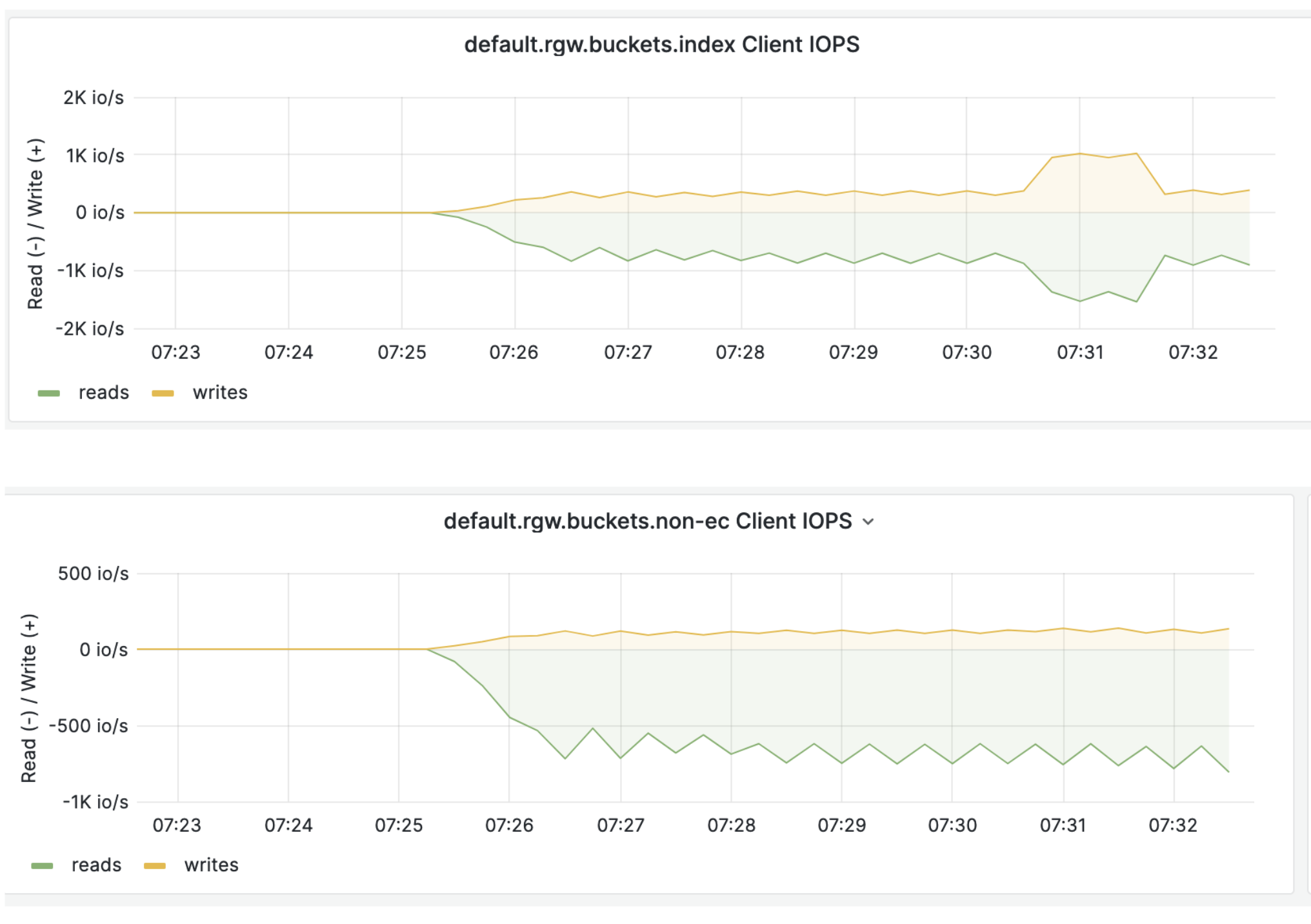
To summarize this thread. I split NVME device to support both DB+WALL and OSD : nvme delete-ns /dev/nvme0 -n 1 nvme create-ns /dev/nvme0 --nsze=209715200 --ncap=209715200 --flbas=0 -dps=0 nvme create-ns /dev/nvme0 --nsze=2915912368 --ncap=2915912368 --flbas=0 -dps=0 nvme attach-ns /dev/nvme0 --namespace-id=1 -controllers=0x41 nvme attach-ns /dev/nvme0 --namespace-id=2 -controllers=0x41 echo 1 > /sys/class/nvme/nvme0/rescan_controller All system and utils pools are redirected to replicated pools based on NVME OSDs. s3 write performance benchmark result increased from 1.7GB/s to 2.04 GB.s and there is traffic on index and non-ec : [image: image.png] NVME device during benchmark: Device r/s rMB/s rrqm/s %rrqm r_await rareq-sz w/s wMB/s wrqm/s %wrqm w_await wareq-sz d/s dMB/s drqm/s %drqm d_await dareq-sz f/s f_await aqu-sz %util nvme0c0n1(db+wall) 0.00 0.00 0.00 0.00 0.00 0.00 1822.00 9.00 483.00 20.95 0.03 5.06 0.00 0.00 0.00 0.00 0.00 0.00 0.00 0.00 0.05 96.00 nvme0c0n2 (osd) 0.00 0.00 0.00 0.00 0.00 0.00 214.00 1.04 51.00 19.25 0.03 4.95 0.00 0.00 0.00 0.00 0.00 0.00 0.00 0.00 0.01 34.00 Thanks! On Tue, 4 Jun 2024 at 21:01, Lukasz Borek <lukasz@borek.org.pl> wrote:
You could check if your devices support NVMe namespaces and create more
than one namespace on the device.
Wow, tricky. Will give it a try.
Thanks!
____ Łukasz Borek lukasz@borek.org.pl
On Tue, 4 Jun 2024 at 16:26, Robert Sander <r.sander@heinlein-support.de> wrote:
Hi,
On 6/4/24 16:15, Anthony D'Atri wrote:
I've wondered for years what the practical differences are between using a namespace and a conventional partition.
Namespaces show up as separate block devices in the kernel.
The orchestrator will not touch any devices that contain a partition table or logical volume signatures.
Regards -- Robert Sander Heinlein Consulting GmbH Schwedter Str. 8/9b, 10119 Berlin
https://www.heinlein-support.de
Tel: 030 / 405051-43 Fax: 030 / 405051-19
Amtsgericht Berlin-Charlottenburg - HRB 220009 B Geschäftsführer: Peer Heinlein - Sitz: Berlin _______________________________________________ ceph-users mailing list -- ceph-users@ceph.io To unsubscribe send an email to ceph-users-leave@ceph.io
-- Łukasz Borek lukasz@borek.org.pl
participants (4)
-
Anthony D'Atri
-
Darren Soothill
-
Lukasz Borek
-
Robert Sander